
 ">WeChat
Yes.Labyrinth algorithm wrap-upI summarised the four algorithms that created the maze, and in this article I focused on how the maze game works and its visualization. Using GUI at python3, tkinter made a poor version of the maze game, as illustrated by the map below.
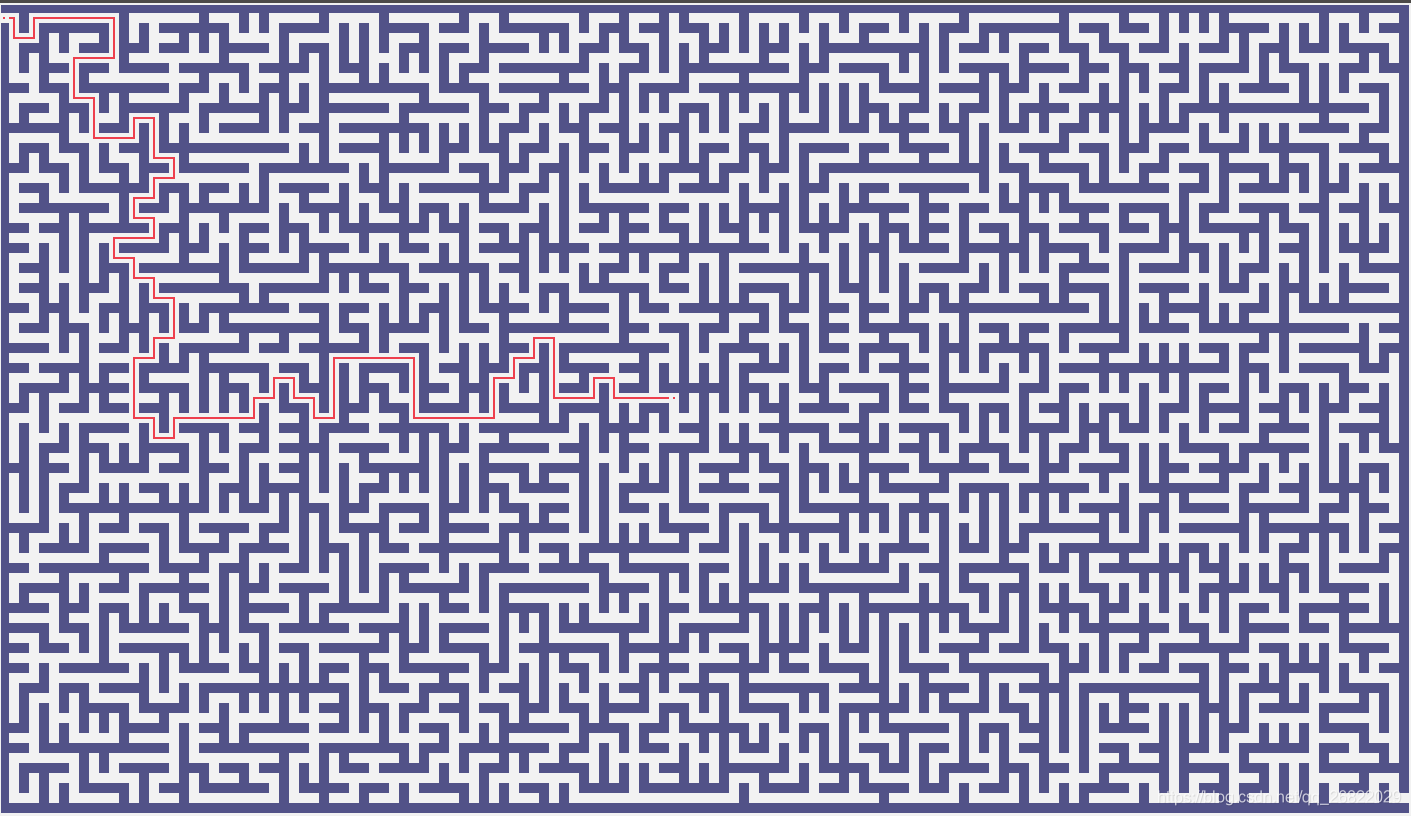
In order to reduce the difficulty of a game, you can click on a blank spot in the chart to create a path from the beginning to where you click. The maze’s difficulties are determined mainly by the following parameters:
- Long and wide: The bigger the size, the harder the map is to generate
- Labyrinth Generating Algorithm: Map Difficulty: Kruskal Algorithm > Random Depth Prefer > prim algorithm > Recursive partition algorithms.
Version 1.0.7 has been developed and the functions achieved are:
Current version code inMaze-game-v1.0.7.
- Game background music
- Game difficulty is increasing
- Add status bar to display status information
- Cheating (see tips) increases penalty scores (20 points for current cheating)
- Save Read Maps
- Menu Bar to set up map generation algorithms, map sizes, etc.
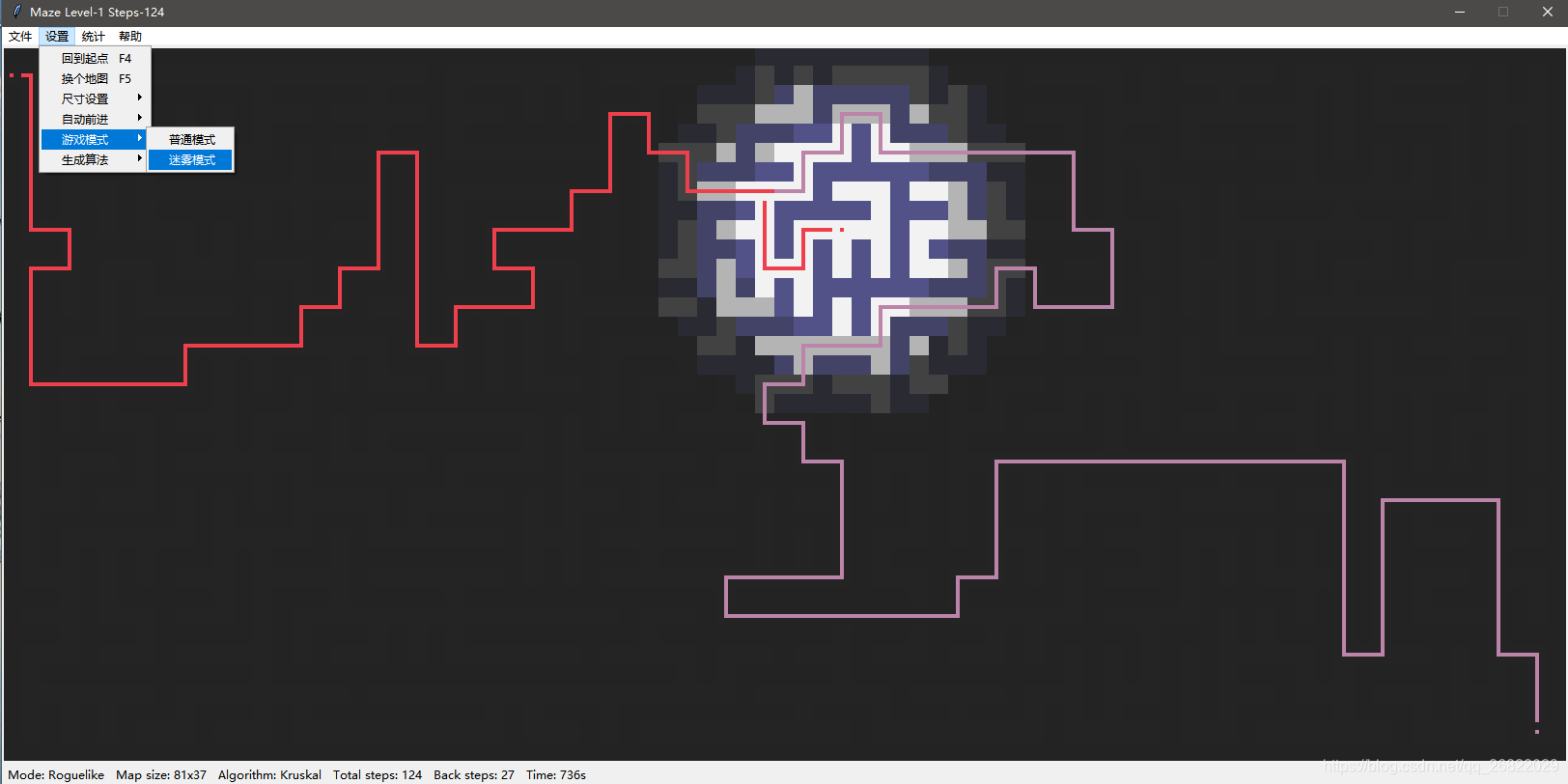
- Add Mist Mode
- Increase the survival model, referenceRoguelike Vision AlgorithmsIt’s funful.
- Show levels and current number of moves
- Randomly generate game maps
- Auto-retrogression when pressing the arrow key (stop by turnoff)
- Number of times to move from starting point to any position assistive path display (left mouse click to show the route)
- Pass at the end and press any key to enter the next level (currently no difficulty setting, same difficulty)
Showed bug list:
-
Up and down keys are still available when you reach the finish line and will not enter the next level
Solved: modify the logic of entering the next level -
The drawings are slow. I don’t know if it’s my coded trash or the tkinter library itself.[狗头]
Solved: just refreshing and calling Canvas.delete (“all”) to remove all the pre-drawes before painting a new page. -
The map created after customs clearance is slower. It’ll take a year to press the key.[狗头]
Resolved: Idem
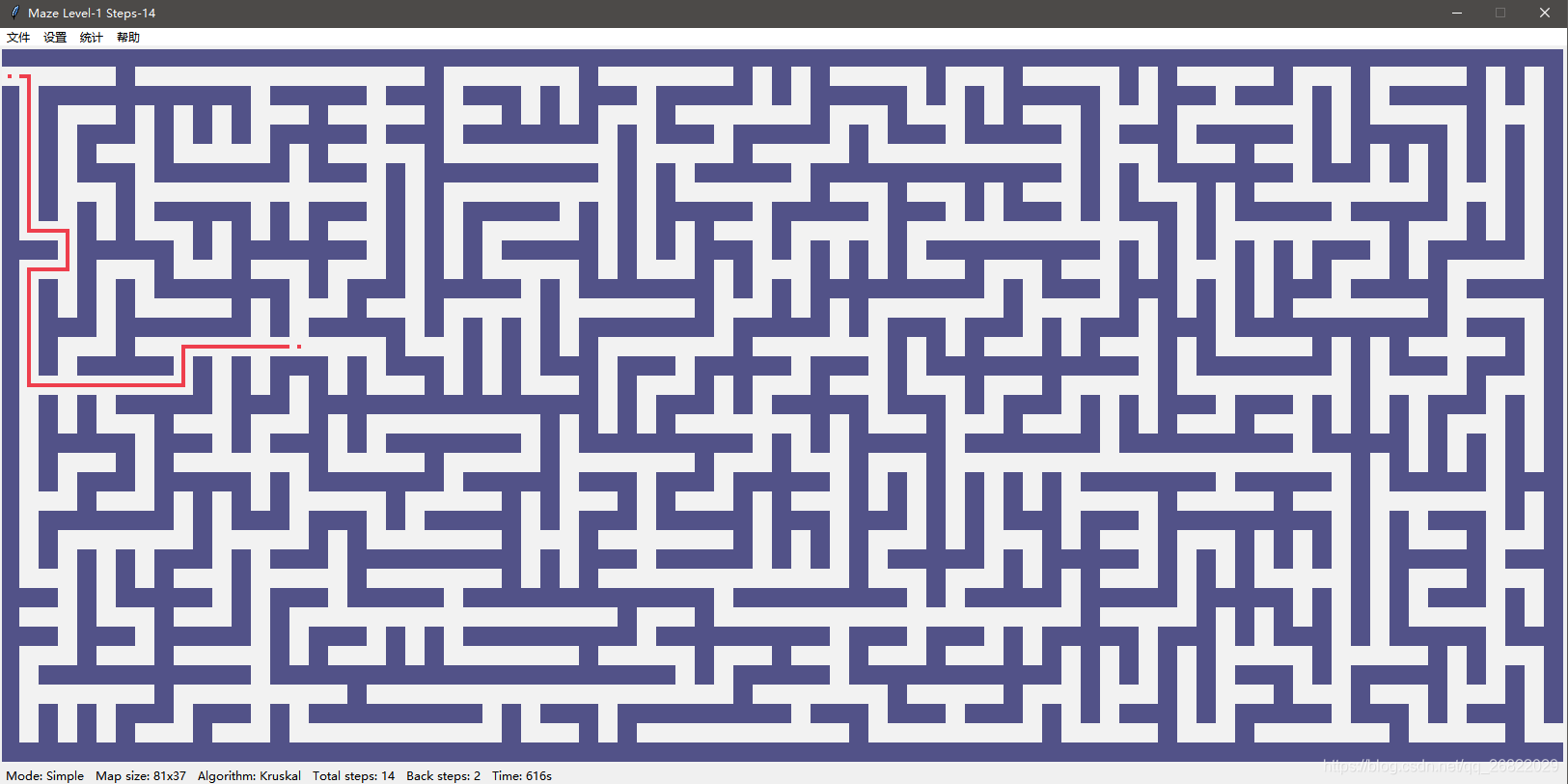
Recent version of the screenshot
1 Simple Mode
2 Mist Mode
Detailed description and explanatory follow-up. The list of source codes in version 1.0.3 is now available below, which will be uploaded directly to facilitate code managementGithub, has been updated to V1.0.7, latest version of the codeMaze-game-v1.0.7.
- Labyrinth type Maze:
├ print_matrix
├ generate_matrix_dfs
├ generate_matrix_prim
├ generate_matrix_kruskal
├ generate_matrix_split
├ find_path_dfs
└ find_path_bfs (TODO) - And check the cluster. UnionSet:
├ find
└ union - Visibility: _ Draw_cell _ Draw_Path _ Draw_maze _ Check_reach _eventhandler _paint _reset _date_maze
The source of maze algorithms mazeGenerator.py:
import numpy as np
import time
import random
import copy

class UnionSet(object):
	"""
	并查集实现,构造函数中的matrix是一个numpy类型
	"""
	def __init__(self, arr):
		self.parent = {pos: pos for pos in arr}
		self.count = len(arr)

	def find(self, root):
		if root == self.parent[root]:
			return root
		return self.find(self.parent[root])

	def union(self, root1, root2):
		self.parent[self.find(root1)] = self.find(root2)


class Maze(object):
	"""
	迷宫生成类
	"""
	def __init__(self, width = 11, height = 11):
		assert width >= 5 and height >= 5, "Length of width or height must be larger than 5."

		self.width = (width // 2) * 2 + 1
		self.height = (height // 2) * 2 + 1
		self.start = [1, 0]
		self.destination = [self.height - 2, self.width - 1]
		self.matrix = None
		self.path = []

	def print_matrix(self):
		matrix = copy.deepcopy(self.matrix)
		for p in self.path:
			matrix[p[0]][p[1]] = 1
		for i in range(self.height):
			for j in range(self.width):
				if matrix[i][j] == -1:
					print('□', end = '')
				elif matrix[i][j] == 0:
					print('  ', end = '')
				elif matrix[i][j] == 1:
					print('■', end = '')
			print('')

	def generate_matrix_dfs(self):
		# 地图初始化,并将出口和入口处的值设置为0
		self.matrix = -np.ones((self.height, self.width))
		self.matrix[self.start[0], self.start[1]] = 0
		self.matrix[self.destination[0], self.destination[1]] = 0

		visit_flag = [[0 for i in range(self.width)] for j in range(self.height)]

		def check(row, col, row_, col_):
			temp_sum = 0
			for d in [[0, 1], [0, -1], [1, 0], [-1, 0]]:
				temp_sum += self.matrix[row_ + d[0]][col_ + d[1]]
			return temp_sum <= -3

		def dfs(row, col):
			visit_flag[row][col] = 1
			self.matrix[row][col] = 0
			if row == self.start[0] and col == self.start[1] + 1:
				return

			directions = [[0, 2], [0, -2], [2, 0], [-2, 0]]
			random.shuffle(directions)
			for d in directions:
				row_, col_ = row + d[0], col + d[1]
				if row_ > 0 and row_ < self.height - 1 and col_ > 0 and col_ < self.width - 1 and visit_flag[row_][col_] == 0 and check(row, col, row_, col_):
					if row == row_:
						visit_flag[row][min(col, col_) + 1] = 1
						self.matrix[row][min(col, col_) + 1] = 0
					else:
						visit_flag[min(row, row_) + 1][col] = 1
						self.matrix[min(row, row_) + 1][col] = 0
					dfs(row_, col_)

		dfs(self.destination[0], self.destination[1] - 1)
		self.matrix[self.start[0], self.start[1] + 1] = 0

	# 虽然说是prim算法,但是我感觉更像随机广度优先算法
	def generate_matrix_prim(self):
		# 地图初始化,并将出口和入口处的值设置为0
		self.matrix = -np.ones((self.height, self.width))

		def check(row, col):
			temp_sum = 0
			for d in [[0, 1], [0, -1], [1, 0], [-1, 0]]:
				temp_sum += self.matrix[row + d[0]][col + d[1]]
			return temp_sum < -3

		queue = []
		row, col = (np.random.randint(1, self.height - 1) // 2) * 2 + 1, (np.random.randint(1, self.width - 1) // 2) * 2 + 1
		queue.append((row, col, -1, -1))
		while len(queue) != 0:
			row, col, r_, c_ = queue.pop(np.random.randint(0, len(queue)))
			if check(row, col):
				self.matrix[row, col] = 0
				if r_ != -1 and row == r_:
					self.matrix[row][min(col, c_) + 1] = 0
				elif r_ != -1 and col == c_:
					self.matrix[min(row, r_) + 1][col] = 0
				for d in [[0, 2], [0, -2], [2, 0], [-2, 0]]:
					row_, col_ = row + d[0], col + d[1]
					if row_ > 0 and row_ < self.height - 1 and col_ > 0 and col_ < self.width - 1 and self.matrix[row_][col_] == -1:
						queue.append((row_, col_, row, col))

		self.matrix[self.start[0], self.start[1]] = 0
		self.matrix[self.destination[0], self.destination[1]] = 0

	# 递归切分算法,还有问题,现在不可用
	def generate_matrix_split(self):
		# 地图初始化,并将出口和入口处的值设置为0
		self.matrix = -np.zeros((self.height, self.width))
		self.matrix[0, :] = -1
		self.matrix[self.height - 1, :] = -1
		self.matrix[:, 0] = -1
		self.matrix[:, self.width - 1] = -1

		# 随机生成位于(start, end)之间的偶数
		def get_random(start, end):
			rand = np.random.randint(start, end)
			if rand & 0x1 ==  0:
				return rand
			return get_random(start, end)

		# split函数的四个参数分别是左上角的行数、列数,右下角的行数、列数,墙壁只能在偶数行,偶数列
		def split(lr, lc, rr, rc):
			if rr - lr < 2 or rc - lc < 2:
				return

			# 生成墙壁,墙壁只能是偶数点
			cur_row, cur_col = get_random(lr, rr), get_random(lc, rc)
			for i in range(lc, rc + 1):
				self.matrix[cur_row][i] = -1
			for i in range(lr, rr + 1):
				self.matrix[i][cur_col] = -1

			# 挖穿三面墙得到连通图,挖孔的点只能是偶数点
			wall_list = [
				("left", cur_row, [lc + 1, cur_col - 1]),
				("right", cur_row, [cur_col + 1, rc - 1]),
				("top", cur_col, [lr + 1, cur_row - 1]),
				("down", cur_col, [cur_row +  1, rr - 1])
			]
			random.shuffle(wall_list)
			for wall in wall_list[:-1]:
				if wall[2][1] - wall[2][0] < 1:
					continue
				if wall[0] in ["left", "right"]:
					self.matrix[wall[1], get_random(wall[2][0], wall[2][1] + 1) + 1] = 0
				else:
					self.matrix[get_random(wall[2][0], wall[2][1] + 1), wall[1] + 1] = 0

			# self.print_matrix()
			# time.sleep(1)
			# 递归
			split(lr + 2, lc + 2, cur_row - 2, cur_col - 2)
			split(lr + 2, cur_col + 2, cur_row - 2, rc - 2)
			split(cur_row + 2, lc + 2, rr - 2, cur_col - 2)
			split(cur_row + 2, cur_col + 2, rr - 2, rc - 2)

			self.matrix[self.start[0], self.start[1]] = 0
			self.matrix[self.destination[0], self.destination[1]] = 0

		split(0, 0, self.height - 1, self.width - 1)

	# 最小生成树算法-kruskal(选边法)思想生成迷宫地图,这种实现方法最复杂。
	def generate_matrix_kruskal(self):
		# 地图初始化,并将出口和入口处的值设置为0
		self.matrix = -np.ones((self.height, self.width))

		def check(row, col):
			ans, counter = [], 0
			for d in [[0, 1], [0, -1], [1, 0], [-1, 0]]:
				row_, col_ = row + d[0], col + d[1]
				if row_ > 0 and row_ < self.height - 1 and col_ > 0 and col_ < self.width - 1 and self.matrix[row_, col_] == -1:
					ans.append([d[0] * 2, d[1] * 2])
					counter += 1
			if counter <= 1:
				return []
			return ans

		nodes = set()
		row = 1
		while row < self.height:
			col = 1
			while col < self.width:
				self.matrix[row, col] = 0
				nodes.add((row, col))
				col += 2
			row += 2

		unionset = UnionSet(nodes)
		while unionset.count > 1:
			row, col = nodes.pop()
			directions = check(row, col)
			if len(directions):
				random.shuffle(directions)
				for d in directions:
					row_, col_ = row + d[0], col + d[1]
					if unionset.find((row, col)) == unionset.find((row_, col_)):
						continue
					nodes.add((row, col))
					unionset.count -= 1
					unionset.union((row, col), (row_, col_))

					if row == row_:
						self.matrix[row][min(col, col_) + 1] = 0
					else:
						self.matrix[min(row, row_) + 1][col] = 0
					break

		self.matrix[self.start[0], self.start[1]] = 0
		self.matrix[self.destination[0], self.destination[1]] = 0

	# 迷宫寻路算法dfs
	def find_path_dfs(self, destination):
		visited = [[0 for i in range(self.width)] for j in range(self.height)]

		def dfs(path):
			visited[path[-1][0]][path[-1][1]] = 1
			if path[-1][0] == destination[0] and path[-1][1] == destination[1]:
				self.path = path[:]
				return
			for d in [[0, 1], [0, -1], [1, 0], [-1, 0]]:
				row_, col_ = path[-1][0] + d[0], path[-1][1] + d[1]
				if row_ > 0 and row_ < self.height - 1 and col_ > 0 and col_ < self.width and visited[row_][col_] == 0 and self.matrix[row_][col_] == 0:
					dfs(path + [[row_, col_]])

		dfs([[self.start[0], self.start[1]]])

if __name__ == '__main__':
	maze = Maze(51, 51)
	maze.generate_matrix_kruskal()
	maze.print_matrix()
	maze.find_path_dfs(maze.destination)
	print("answer", maze.path)
	maze.print_matrix()
- 1
The maze visualizes the source code. maze.py:
import tkinter as tk
from mazeGenerator import Maze
import time
import copy
import numpy as np
import math
import threading

def draw_cell(canvas, row, col, color="#F2F2F2"):
    x0, y0 = col * cell_width, row * cell_width
    x1, y1 = x0 + cell_width, y0 + cell_width
    canvas.create_rectangle(x0, y0, x1, y1, fill = color, outline =color, width = 0)

def draw_path(canvas, matrix, row, col, color, line_color):
    # 列
    if row + 1 < rows and matrix[row - 1][col] >= 1 and matrix[row + 1][col] >= 1:
        x0, y0 = col * cell_width + 2 * cell_width / 5, row * cell_width
        x1, y1 = x0 + cell_width / 5, y0 + cell_width
    # 行
    elif col + 1 < cols and matrix[row][col - 1] >= 1 and matrix[row][col + 1] >= 1:
        x0, y0 = col * cell_width, row * cell_width + 2 * cell_width / 5
        x1, y1 = x0 + cell_width, y0 + cell_width / 5
    # 左上角
    elif col + 1 < cols and row + 1 < rows and matrix[row][col + 1] >= 1 and matrix[row + 1][col] >= 1:
        x0, y0 = col * cell_width + 2 * cell_width / 5, row * cell_width + 2 * cell_width / 5
        x1, y1 = x0 + 3 * cell_width / 5, y0 + cell_width / 5
        canvas.create_rectangle(x0, y0, x1, y1, fill = color, outline = line_color, width = 0)
        x0, y0 = col * cell_width + 2 * cell_width / 5, row * cell_width + 2 * cell_width / 5
        x1, y1 = x0 + cell_width / 5, y0 + 3 * cell_width / 5
    # 右上角
    elif row + 1 < rows and matrix[row][col - 1] >= 1 and matrix[row + 1][col] >= 1:
        x0, y0 = col * cell_width, row * cell_width + 2 * cell_width / 5
        x1, y1 = x0 + 3 * cell_width / 5, y0 + cell_width / 5
        canvas.create_rectangle(x0, y0, x1, y1, fill = color, outline = line_color, width = 0)
        x0, y0 = col * cell_width + 2 * cell_width / 5, row * cell_width + 2 * cell_width / 5
        x1, y1 = x0 + cell_width / 5, y0 + 3 * cell_width / 5
    # 左下角
    elif col + 1 < cols and matrix[row - 1][col] >= 1 and matrix[row][col + 1] >= 1:
        x0, y0 = col * cell_width + 2 * cell_width / 5, row * cell_width
        x1, y1 = x0 + cell_width / 5, y0 + 3 * cell_width / 5
        canvas.create_rectangle(x0, y0, x1, y1, fill = color, outline = line_color, width = 0)
        x0, y0 = col * cell_width + 2 * cell_width / 5, row * cell_width + 2 * cell_width / 5
        x1, y1 = x0 + 3 * cell_width / 5, y0 + cell_width / 5
    # 右下角
    elif matrix[row - 1][col] >= 1 and matrix[row][col - 1] >= 1:
        x0, y0 = col * cell_width, row * cell_width + 2 * cell_width / 5
        x1, y1 = x0 + 3 * cell_width / 5, y0 + cell_width / 5
        canvas.create_rectangle(x0, y0, x1, y1, fill = color, outline = line_color, width = 0)
        x0, y0 = col * cell_width + 2 * cell_width / 5, row * cell_width
        x1, y1 = x0 + cell_width / 5, y0 + 3 * cell_width / 5
    else:
        x0, y0 = col * cell_width + 2 * cell_width / 5, row * cell_width + 2 * cell_width / 5
        x1, y1 = x0 + cell_width / 5, y0 + cell_width / 5
    canvas.create_rectangle(x0, y0, x1, y1, fill = color, outline = line_color, width = 0)

def draw_maze(canvas, matrix, path, moves):
    """
    根据matrix中每个位置的值绘图:
    -1: 墙壁
    0: 空白
    1: 参考路径
    2: 移动过的位置
    """
    for r in range(rows):
        for c in range(cols):
            if matrix[r][c] == 0:
                draw_cell(canvas, r, c)
            elif matrix[r][c] == -1:
                draw_cell(canvas, r, c, '#525288')
            elif matrix[r][c] == 1:
                draw_cell(canvas, r, c)
                draw_path(canvas, matrix, r, c, '#bc84a8', '#bc84a8')
            elif matrix[r][c] == 2:
                draw_cell(canvas, r, c)
                draw_path(canvas, matrix, r, c, '#ee3f4d', '#ee3f4d')
    for p in path:
        matrix[p[0]][p[1]] = 1
    for move in moves:
        matrix[move[0]][move[1]] = 2

def update_maze(canvas, matrix, path, moves):
    canvas.delete("all")
    matrix = copy.copy(matrix)
    for p in path:
        matrix[p[0]][p[1]] = 1
    for move in moves:
        matrix[move[0]][move[1]] = 2

    row, col = movement_list[-1]
    colors = ['#525288', '#F2F2F2', '#525288', '#F2F2F2', '#525288', '#F2F2F2', '#525288', '#F2F2F2']
    if level > 2:
        colors = ['#232323', '#252525', '#2a2a32', '#424242', '#434368', '#b4b4b4', '#525288', '#F2F2F2']

    for r in range(rows):
        for c in range(cols):
            distance = (row - r) * (row - r) + (col - c) * (col - c)
            if distance >= 100:
                color = colors[0:2]
            elif distance >= 60:
                color = colors[2:4]
            elif distance >= 30:
                color = colors[4:6]
            else:
                color = colors[6:8]

            if matrix[r][c] == 0:
                draw_cell(canvas, r, c, color[1])
            elif matrix[r][c] == -1:
                draw_cell(canvas, r, c, color[0])
            elif matrix[r][c] == 1:
                draw_cell(canvas, r, c, color[1])
                draw_path(canvas, matrix, r, c, '#bc84a8', '#bc84a8')
            elif matrix[r][c] == 2:
                draw_cell(canvas, r, c, color[1])
                draw_path(canvas, matrix, r, c, '#ee3f4d', '#ee3f4d')

def check_reach():
    global next_maze_flag
    if movement_list[-1] == maze.destination:
        print("Congratulations! You reach the goal! The step used: {}".format(click_counter))
        x0, y0 = width / 2 - 200, 30
        x1, y1 = x0 + 400, y0 + 40
        canvas.create_rectangle(x0, y0, x1, y1, fill = '#F2F2F2', outline ='#525288', width = 3)
        canvas.create_text(width / 2, y0 + 20, text = "Congratulations! You reach the goal! Steps used: {}".format(click_counter), fill = "#525288")
        next_maze_flag = True


def _eventHandler(event):
    global movement_list
    global click_counter
    global next_maze_flag
    global level

    if not next_maze_flag and event.keysym  in ['Left', 'Right', 'Up', 'Down']:
        click_counter += 1
        windows.title("Maze Level-{} Steps-{}".format(level, click_counter))
        cur_pos = movement_list[-1]
        ops = {'Left': [0, -1], 'Right': [0, 1], 'Up': [-1, 0], 'Down': [1, 0]}
        r_, c_ = cur_pos[0] + ops[event.keysym][0], cur_pos[1] + ops[event.keysym][1]
        if len(movement_list) > 1 and [r_, c_] == movement_list[-2]:
            movement_list.pop()
            while True:
                cur_pos = movement_list[-1]
                counter = 0
                for d in [[0, 1], [0, -1], [1, 0], [-1, 0]]:
                    r_, c_ = cur_pos[0] + d[0], cur_pos[1] + d[1]
                    if c_ >= 0 and maze.matrix[r_][c_] == 0:
                        counter += 1
                if counter != 2:
                    break
                movement_list.pop()
        elif r_ < maze.height and c_ < maze.width and maze.matrix[r_][c_] == 0:
            while True:
                movement_list.append([r_, c_])
                temp_list = []
                for d in [[0, 1], [0, -1], [1, 0], [-1, 0]]:
                    r__, c__ = r_ + d[0], c_ + d[1]
                    if c__ < maze.width and maze.matrix[r__][c__] == 0 and [r__, c__] != cur_pos:
                        temp_list.append([r__, c__])
                if len(temp_list) != 1:
                    break
                cur_pos = [r_, c_]
                r_, c_ = temp_list[0]
        update_maze(canvas, maze.matrix, maze.path, movement_list)
        check_reach()
    elif next_maze_flag:
        next_maze_flag = False
        movement_list = [maze.start]
        click_counter = 0
        maze.generate_matrix_kruskal()
        maze.path = []
        draw_maze(canvas, maze.matrix, maze.path, movement_list)
        level += 1


def _paint(event):
    x, y = math.floor((event.y - 1) / cell_width), math.floor((event.x - 1) / cell_width)
    if maze.matrix[x][y] == 0:
        maze.find_path_dfs([x, y])
        update_maze(canvas, maze.matrix, maze.path, movement_list)

def _reset(event):
    maze.path = []
    update_maze(canvas, maze.matrix, maze.path, movement_list)

if __name__ == '__main__':
    # 基础参数
    cell_width = 20
    rows = 37
    cols = 51
    height = cell_width * rows
    width = cell_width * cols
    level = 1
    click_counter = 0
    next_maze_flag = False

    windows = tk.Tk()
    windows.title("Maze")
    canvas = tk.Canvas(windows, background="#F2F2F2", width = width, height = height)
    canvas.pack()

    maze = Maze(cols, rows)
    movement_list = [maze.start]
    maze.generate_matrix_kruskal()
    draw_maze(canvas, maze.matrix, maze.path, movement_list)

    canvas.bind("<Button-1>", _paint)
    canvas.bind("<Button-3>", _reset)
    canvas.bind_all("<KeyPress>", _eventHandler)
    windows.mainloop()
Save the above two codes to mazeGenerator.py and maze.py, respectively, ensuring that both py files run maze.py under one folder. (Preliminary end)
未经允许不得转载:萌萌Apprentissage » Python achieves a maze game example source code


 Python batches to extract mainstream search engine pictures
 Python's word crawling across 100 degrees.
 PythonTaiichi Taipei Artificial Intelligence Tensoflow Graphic Processing
 Selenium with Tor Browser using Python
 I'm gonna get you a new one, shell.cloud.google on the line.
 run crontab with python selenium tor browser display in linux
 Lineux Environment Use python to call the ter browser random browser web page

