
 ">WeChat
Oui.Compilation de l’algorithme du labyrintheJ’ai résumé les quatre algorithmes qui ont créé le labyrinthe, et dans cet article je me suis concentré sur le fonctionnement du jeu de labyrinthe et sa visualisation.
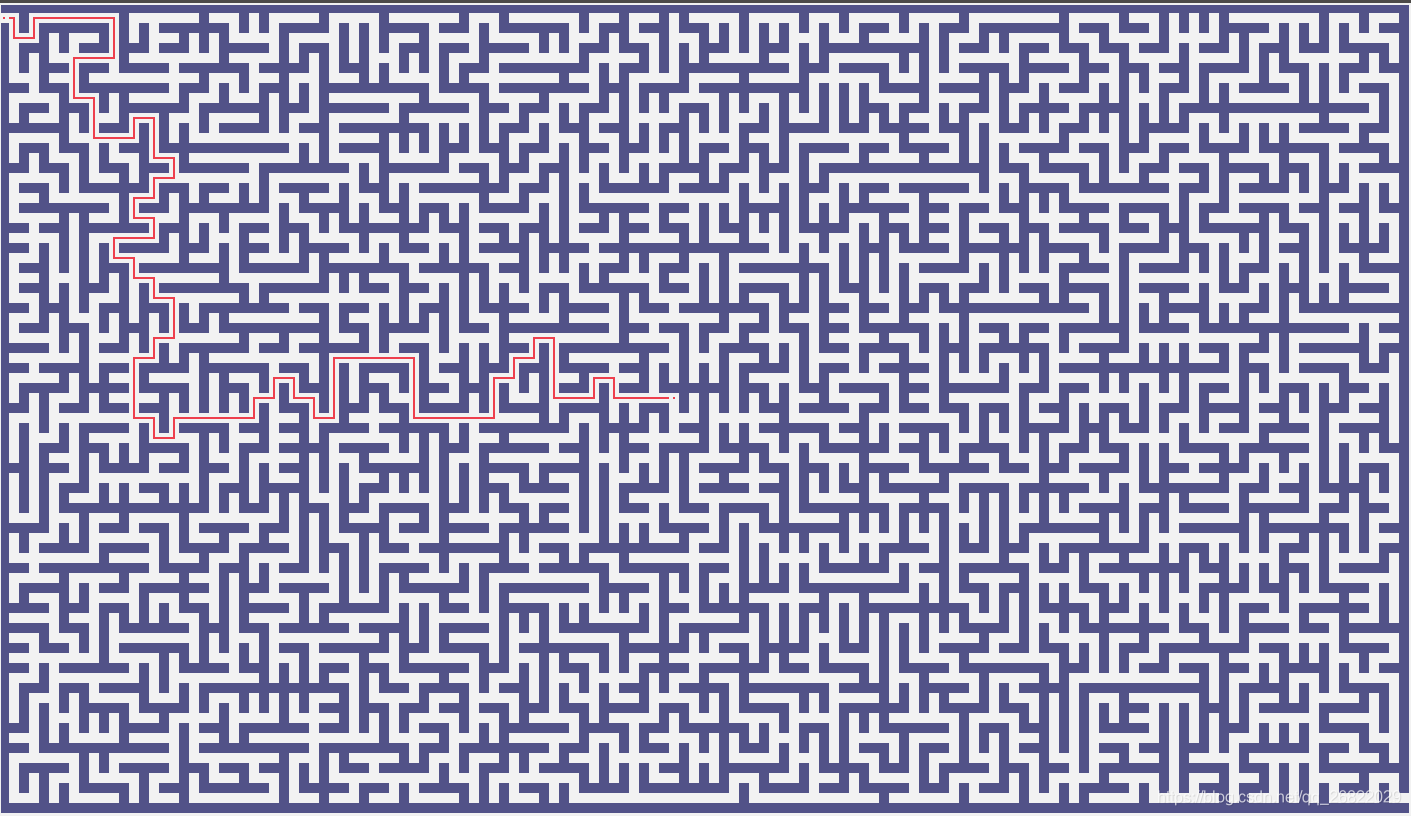
Afin de réduire la difficulté d’un jeu, vous pouvez cliquer sur un point vide dans le graphique pour créer un chemin du début à l’endroit où vous cliquez. Les difficultés du labyrinthe sont principalement déterminées par les paramètres suivants:
- Long et large : Plus la taille est grande, plus la carte est difficile à générer
- Labyrinth Générer l’algorithme: Carte Difficulté: Kruskal Algorithm > Préférez la profondeur aléatoire > algorithme prim > Algorithmes de partition récursive.
La version 1.0.7 a été élaborée et les fonctions obtenues sont les suivantes :
Code de version actuel dansMaze-game-v1.0.7.
- Musique de fond du jeu
- La difficulté du jeu augmente
- Ajouter une barre d’état pour afficher les informations d’état
- La tricherie (voir les conseils) augmente les scores de pénalité (20 points pour la tricherie actuelle)
- Enregistrer les cartes de lecture
- Barre de menu pour configurer les algorithmes de génération de cartes, les tailles de cartes, etc.
- Ajouter le mode Mist
- Augmenter le modèle de survie, référenceAlgorithmes de vision semblables à des roguesC’est amusant.
- Afficher les niveaux et le nombre actuel de mouvements
- Générer aléatoirement des cartes de jeu
- Auto-rétrogression en appuyant sur la touche flèche (arrêt par extinction)
- Nombre de fois où vous pouvez passer du point de départ à n’importe quelle position assistante (cliquez sur la souris pour afficher l’itinéraire)
- Passez à la fin et appuyez sur n’importe quelle clé pour entrer au niveau suivant (actuellement pas de difficulté, même difficulté)
Liste de bogues affichée :
-
Les clés de haut et de bas sont toujours disponibles lorsque vous atteignez la ligne d’arrivée et n’entreront pas au niveau suivant
Résolue : modifier la logique d’entrée au niveau suivant -
Les dessins sont lents, je ne sais pas si c’est ma poubelle codée ou la bibliothèque TKinter elle-même.[狗头]
Résolue : simplement rafraîchissante et appelant Canvas.delete (=all) pour enlever toutes les pré-drawes avant de peindre une nouvelle page. -
La carte créée après le dédouanement est plus lente. Il faudra un an pour appuyer sur la clé.[狗头]
Résolue : idem
Version récente de la capture d’écran
1 Mode simple
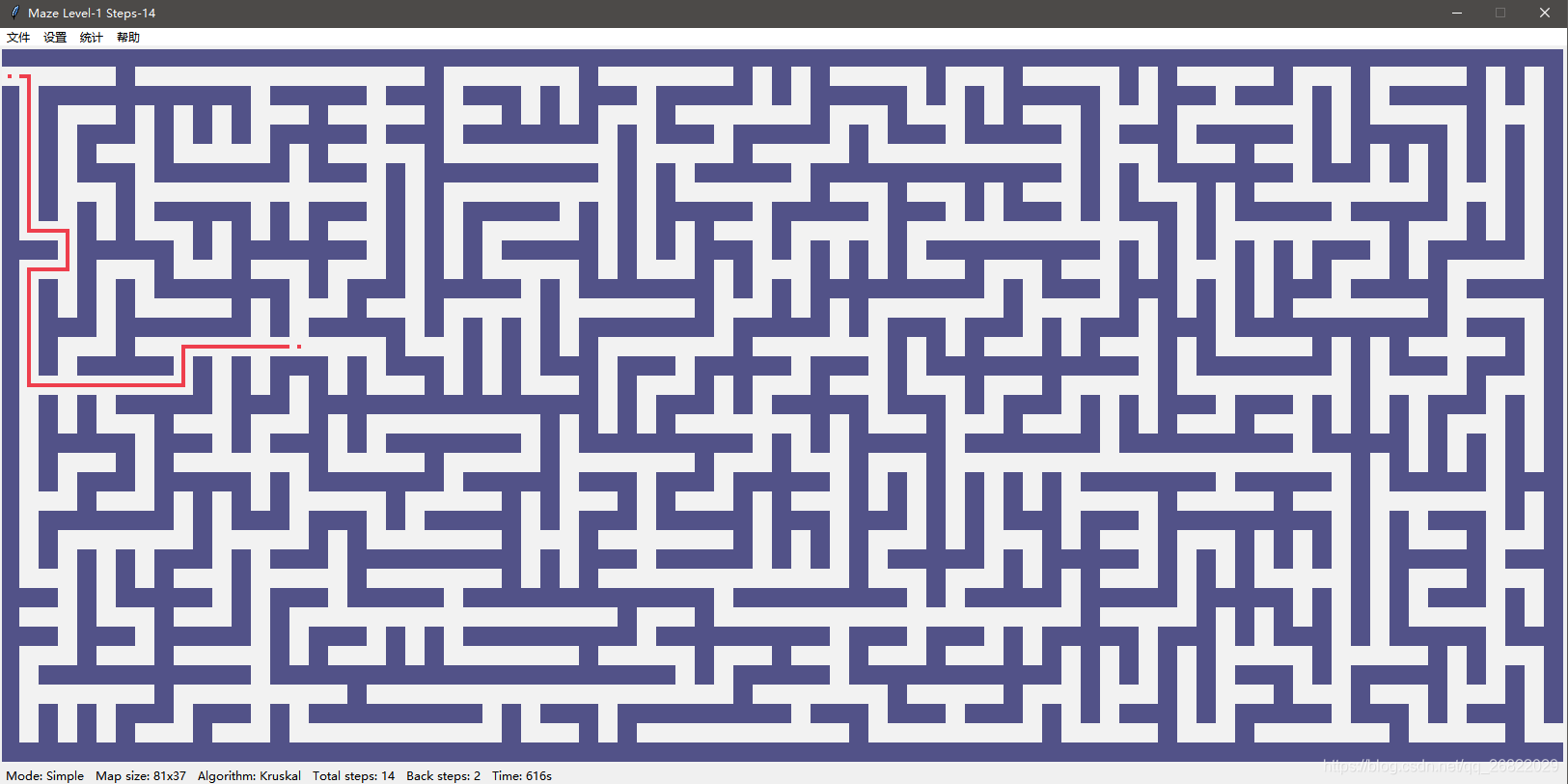
2 Mode de brouillard
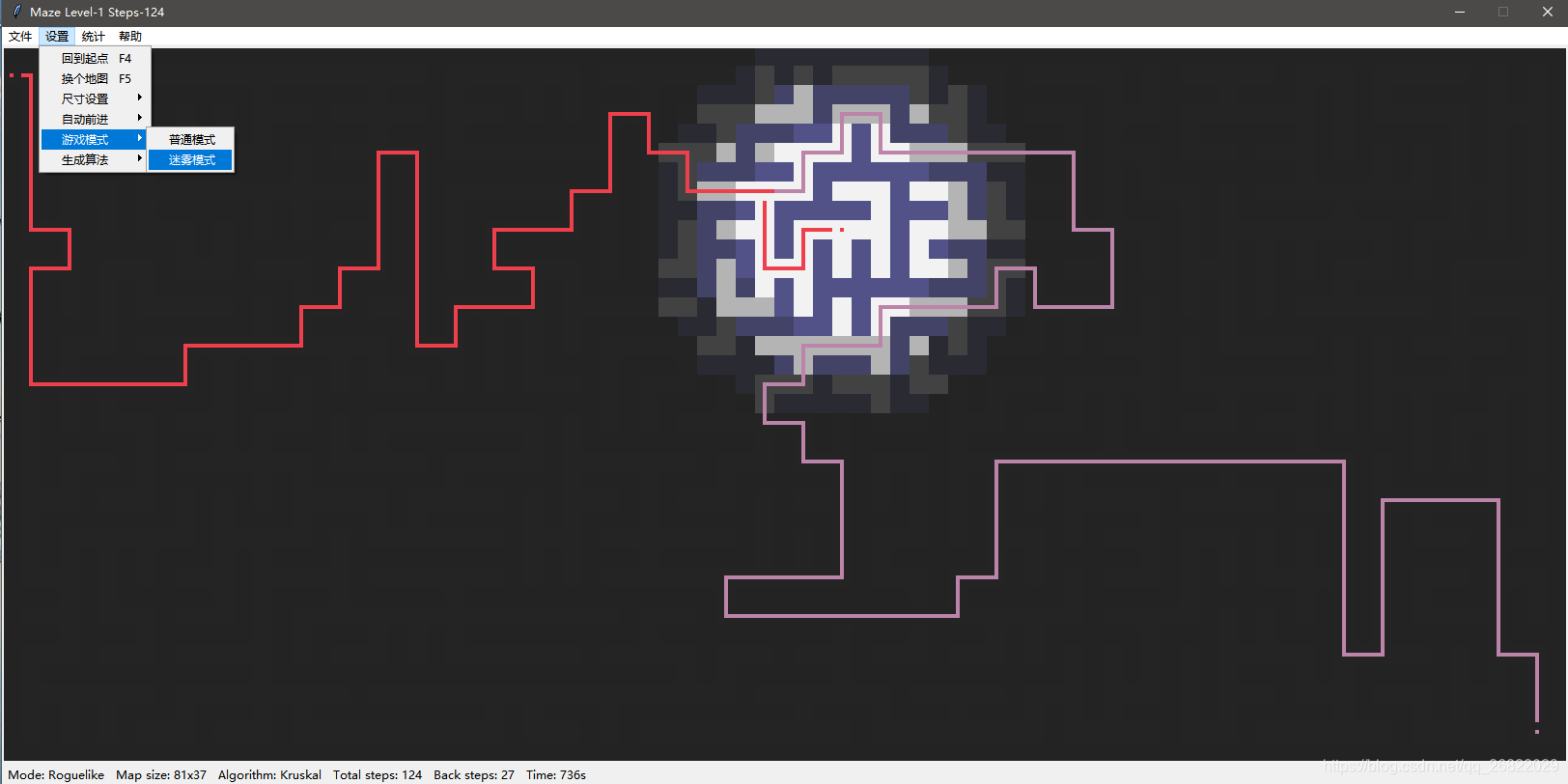
Description détaillée et suivi explicatif. La liste des codes sources de la version 1.0.3 est maintenant disponible ci-dessous, qui sera téléchargée directement pour faciliter la gestion du codeGithub, a été mis à jour à V1.0.7, dernière version du codeMaze-game-v1.0.7.
- Type de labyrinthe Maze: print_matrix we generate_matrix_dfs we generate_matrix_prim we generate_matrix_kruskal we generate_matrix_split we find_path_dfs (TODO)
- Et vérifie le groupe. UnionSet: trouver un syndicat
- Visibilité : _ Draw_cell _ Draw_Path _ Draw_maze _ Check_reach _eventhandler _ paint _reset _date_maze
La source des algorithmes de labyrinthe lazeGenerator.py:
import numpy as np
import time
import random
import copy

class UnionSet(object):
	"""
	并查集实现,构造函数中的matrix是一个numpy类型
	"""
	def __init__(self, arr):
		self.parent = {pos: pos for pos in arr}
		self.count = len(arr)

	def find(self, root):
		if root == self.parent[root]:
			return root
		return self.find(self.parent[root])

	def union(self, root1, root2):
		self.parent[self.find(root1)] = self.find(root2)


class Maze(object):
	"""
	迷宫生成类
	"""
	def __init__(self, width = 11, height = 11):
		assert width >= 5 and height >= 5, "Length of width or height must be larger than 5."

		self.width = (width // 2) * 2 + 1
		self.height = (height // 2) * 2 + 1
		self.start = [1, 0]
		self.destination = [self.height - 2, self.width - 1]
		self.matrix = None
		self.path = []

	def print_matrix(self):
		matrix = copy.deepcopy(self.matrix)
		for p in self.path:
			matrix[p[0]][p[1]] = 1
		for i in range(self.height):
			for j in range(self.width):
				if matrix[i][j] == -1:
					print('□', end = '')
				elif matrix[i][j] == 0:
					print('  ', end = '')
				elif matrix[i][j] == 1:
					print('■', end = '')
			print('')

	def generate_matrix_dfs(self):
		# 地图初始化,并将出口和入口处的值设置为0
		self.matrix = -np.ones((self.height, self.width))
		self.matrix[self.start[0], self.start[1]] = 0
		self.matrix[self.destination[0], self.destination[1]] = 0

		visit_flag = [[0 for i in range(self.width)] for j in range(self.height)]

		def check(row, col, row_, col_):
			temp_sum = 0
			for d in [[0, 1], [0, -1], [1, 0], [-1, 0]]:
				temp_sum += self.matrix[row_ + d[0]][col_ + d[1]]
			return temp_sum <= -3

		def dfs(row, col):
			visit_flag[row][col] = 1
			self.matrix[row][col] = 0
			if row == self.start[0] and col == self.start[1] + 1:
				return

			directions = [[0, 2], [0, -2], [2, 0], [-2, 0]]
			random.shuffle(directions)
			for d in directions:
				row_, col_ = row + d[0], col + d[1]
				if row_ > 0 and row_ < self.height - 1 and col_ > 0 and col_ < self.width - 1 and visit_flag[row_][col_] == 0 and check(row, col, row_, col_):
					if row == row_:
						visit_flag[row][min(col, col_) + 1] = 1
						self.matrix[row][min(col, col_) + 1] = 0
					else:
						visit_flag[min(row, row_) + 1][col] = 1
						self.matrix[min(row, row_) + 1][col] = 0
					dfs(row_, col_)

		dfs(self.destination[0], self.destination[1] - 1)
		self.matrix[self.start[0], self.start[1] + 1] = 0

	# 虽然说是prim算法,但是我感觉更像随机广度优先算法
	def generate_matrix_prim(self):
		# 地图初始化,并将出口和入口处的值设置为0
		self.matrix = -np.ones((self.height, self.width))

		def check(row, col):
			temp_sum = 0
			for d in [[0, 1], [0, -1], [1, 0], [-1, 0]]:
				temp_sum += self.matrix[row + d[0]][col + d[1]]
			return temp_sum < -3

		queue = []
		row, col = (np.random.randint(1, self.height - 1) // 2) * 2 + 1, (np.random.randint(1, self.width - 1) // 2) * 2 + 1
		queue.append((row, col, -1, -1))
		while len(queue) != 0:
			row, col, r_, c_ = queue.pop(np.random.randint(0, len(queue)))
			if check(row, col):
				self.matrix[row, col] = 0
				if r_ != -1 and row == r_:
					self.matrix[row][min(col, c_) + 1] = 0
				elif r_ != -1 and col == c_:
					self.matrix[min(row, r_) + 1][col] = 0
				for d in [[0, 2], [0, -2], [2, 0], [-2, 0]]:
					row_, col_ = row + d[0], col + d[1]
					if row_ > 0 and row_ < self.height - 1 and col_ > 0 and col_ < self.width - 1 and self.matrix[row_][col_] == -1:
						queue.append((row_, col_, row, col))

		self.matrix[self.start[0], self.start[1]] = 0
		self.matrix[self.destination[0], self.destination[1]] = 0

	# 递归切分算法,还有问题,现在不可用
	def generate_matrix_split(self):
		# 地图初始化,并将出口和入口处的值设置为0
		self.matrix = -np.zeros((self.height, self.width))
		self.matrix[0, :] = -1
		self.matrix[self.height - 1, :] = -1
		self.matrix[:, 0] = -1
		self.matrix[:, self.width - 1] = -1

		# 随机生成位于(start, end)之间的偶数
		def get_random(start, end):
			rand = np.random.randint(start, end)
			if rand & 0x1 ==  0:
				return rand
			return get_random(start, end)

		# split函数的四个参数分别是左上角的行数、列数,右下角的行数、列数,墙壁只能在偶数行,偶数列
		def split(lr, lc, rr, rc):
			if rr - lr < 2 or rc - lc < 2:
				return

			# 生成墙壁,墙壁只能是偶数点
			cur_row, cur_col = get_random(lr, rr), get_random(lc, rc)
			for i in range(lc, rc + 1):
				self.matrix[cur_row][i] = -1
			for i in range(lr, rr + 1):
				self.matrix[i][cur_col] = -1

			# 挖穿三面墙得到连通图,挖孔的点只能是偶数点
			wall_list = [
				("left", cur_row, [lc + 1, cur_col - 1]),
				("right", cur_row, [cur_col + 1, rc - 1]),
				("top", cur_col, [lr + 1, cur_row - 1]),
				("down", cur_col, [cur_row +  1, rr - 1])
			]
			random.shuffle(wall_list)
			for wall in wall_list[:-1]:
				if wall[2][1] - wall[2][0] < 1:
					continue
				if wall[0] in ["left", "right"]:
					self.matrix[wall[1], get_random(wall[2][0], wall[2][1] + 1) + 1] = 0
				else:
					self.matrix[get_random(wall[2][0], wall[2][1] + 1), wall[1] + 1] = 0

			# self.print_matrix()
			# time.sleep(1)
			# 递归
			split(lr + 2, lc + 2, cur_row - 2, cur_col - 2)
			split(lr + 2, cur_col + 2, cur_row - 2, rc - 2)
			split(cur_row + 2, lc + 2, rr - 2, cur_col - 2)
			split(cur_row + 2, cur_col + 2, rr - 2, rc - 2)

			self.matrix[self.start[0], self.start[1]] = 0
			self.matrix[self.destination[0], self.destination[1]] = 0

		split(0, 0, self.height - 1, self.width - 1)

	# 最小生成树算法-kruskal(选边法)思想生成迷宫地图,这种实现方法最复杂。
	def generate_matrix_kruskal(self):
		# 地图初始化,并将出口和入口处的值设置为0
		self.matrix = -np.ones((self.height, self.width))

		def check(row, col):
			ans, counter = [], 0
			for d in [[0, 1], [0, -1], [1, 0], [-1, 0]]:
				row_, col_ = row + d[0], col + d[1]
				if row_ > 0 and row_ < self.height - 1 and col_ > 0 and col_ < self.width - 1 and self.matrix[row_, col_] == -1:
					ans.append([d[0] * 2, d[1] * 2])
					counter += 1
			if counter <= 1:
				return []
			return ans

		nodes = set()
		row = 1
		while row < self.height:
			col = 1
			while col < self.width:
				self.matrix[row, col] = 0
				nodes.add((row, col))
				col += 2
			row += 2

		unionset = UnionSet(nodes)
		while unionset.count > 1:
			row, col = nodes.pop()
			directions = check(row, col)
			if len(directions):
				random.shuffle(directions)
				for d in directions:
					row_, col_ = row + d[0], col + d[1]
					if unionset.find((row, col)) == unionset.find((row_, col_)):
						continue
					nodes.add((row, col))
					unionset.count -= 1
					unionset.union((row, col), (row_, col_))

					if row == row_:
						self.matrix[row][min(col, col_) + 1] = 0
					else:
						self.matrix[min(row, row_) + 1][col] = 0
					break

		self.matrix[self.start[0], self.start[1]] = 0
		self.matrix[self.destination[0], self.destination[1]] = 0

	# 迷宫寻路算法dfs
	def find_path_dfs(self, destination):
		visited = [[0 for i in range(self.width)] for j in range(self.height)]

		def dfs(path):
			visited[path[-1][0]][path[-1][1]] = 1
			if path[-1][0] == destination[0] and path[-1][1] == destination[1]:
				self.path = path[:]
				return
			for d in [[0, 1], [0, -1], [1, 0], [-1, 0]]:
				row_, col_ = path[-1][0] + d[0], path[-1][1] + d[1]
				if row_ > 0 and row_ < self.height - 1 and col_ > 0 and col_ < self.width and visited[row_][col_] == 0 and self.matrix[row_][col_] == 0:
					dfs(path + [[row_, col_]])

		dfs([[self.start[0], self.start[1]]])

if __name__ == '__main__':
	maze = Maze(51, 51)
	maze.generate_matrix_kruskal()
	maze.print_matrix()
	maze.find_path_dfs(maze.destination)
	print("answer", maze.path)
	maze.print_matrix()
- 1
Le labyrinthe visualise le code source. Labyrinthe.:
import tkinter as tk
from mazeGenerator import Maze
import time
import copy
import numpy as np
import math
import threading

def draw_cell(canvas, row, col, color="#F2F2F2"):
    x0, y0 = col * cell_width, row * cell_width
    x1, y1 = x0 + cell_width, y0 + cell_width
    canvas.create_rectangle(x0, y0, x1, y1, fill = color, outline =color, width = 0)

def draw_path(canvas, matrix, row, col, color, line_color):
    # 列
    if row + 1 < rows and matrix[row - 1][col] >= 1 and matrix[row + 1][col] >= 1:
        x0, y0 = col * cell_width + 2 * cell_width / 5, row * cell_width
        x1, y1 = x0 + cell_width / 5, y0 + cell_width
    # 行
    elif col + 1 < cols and matrix[row][col - 1] >= 1 and matrix[row][col + 1] >= 1:
        x0, y0 = col * cell_width, row * cell_width + 2 * cell_width / 5
        x1, y1 = x0 + cell_width, y0 + cell_width / 5
    # 左上角
    elif col + 1 < cols and row + 1 < rows and matrix[row][col + 1] >= 1 and matrix[row + 1][col] >= 1:
        x0, y0 = col * cell_width + 2 * cell_width / 5, row * cell_width + 2 * cell_width / 5
        x1, y1 = x0 + 3 * cell_width / 5, y0 + cell_width / 5
        canvas.create_rectangle(x0, y0, x1, y1, fill = color, outline = line_color, width = 0)
        x0, y0 = col * cell_width + 2 * cell_width / 5, row * cell_width + 2 * cell_width / 5
        x1, y1 = x0 + cell_width / 5, y0 + 3 * cell_width / 5
    # 右上角
    elif row + 1 < rows and matrix[row][col - 1] >= 1 and matrix[row + 1][col] >= 1:
        x0, y0 = col * cell_width, row * cell_width + 2 * cell_width / 5
        x1, y1 = x0 + 3 * cell_width / 5, y0 + cell_width / 5
        canvas.create_rectangle(x0, y0, x1, y1, fill = color, outline = line_color, width = 0)
        x0, y0 = col * cell_width + 2 * cell_width / 5, row * cell_width + 2 * cell_width / 5
        x1, y1 = x0 + cell_width / 5, y0 + 3 * cell_width / 5
    # 左下角
    elif col + 1 < cols and matrix[row - 1][col] >= 1 and matrix[row][col + 1] >= 1:
        x0, y0 = col * cell_width + 2 * cell_width / 5, row * cell_width
        x1, y1 = x0 + cell_width / 5, y0 + 3 * cell_width / 5
        canvas.create_rectangle(x0, y0, x1, y1, fill = color, outline = line_color, width = 0)
        x0, y0 = col * cell_width + 2 * cell_width / 5, row * cell_width + 2 * cell_width / 5
        x1, y1 = x0 + 3 * cell_width / 5, y0 + cell_width / 5
    # 右下角
    elif matrix[row - 1][col] >= 1 and matrix[row][col - 1] >= 1:
        x0, y0 = col * cell_width, row * cell_width + 2 * cell_width / 5
        x1, y1 = x0 + 3 * cell_width / 5, y0 + cell_width / 5
        canvas.create_rectangle(x0, y0, x1, y1, fill = color, outline = line_color, width = 0)
        x0, y0 = col * cell_width + 2 * cell_width / 5, row * cell_width
        x1, y1 = x0 + cell_width / 5, y0 + 3 * cell_width / 5
    else:
        x0, y0 = col * cell_width + 2 * cell_width / 5, row * cell_width + 2 * cell_width / 5
        x1, y1 = x0 + cell_width / 5, y0 + cell_width / 5
    canvas.create_rectangle(x0, y0, x1, y1, fill = color, outline = line_color, width = 0)

def draw_maze(canvas, matrix, path, moves):
    """
    根据matrix中每个位置的值绘图:
    -1: 墙壁
    0: 空白
    1: 参考路径
    2: 移动过的位置
    """
    for r in range(rows):
        for c in range(cols):
            if matrix[r][c] == 0:
                draw_cell(canvas, r, c)
            elif matrix[r][c] == -1:
                draw_cell(canvas, r, c, '#525288')
            elif matrix[r][c] == 1:
                draw_cell(canvas, r, c)
                draw_path(canvas, matrix, r, c, '#bc84a8', '#bc84a8')
            elif matrix[r][c] == 2:
                draw_cell(canvas, r, c)
                draw_path(canvas, matrix, r, c, '#ee3f4d', '#ee3f4d')
    for p in path:
        matrix[p[0]][p[1]] = 1
    for move in moves:
        matrix[move[0]][move[1]] = 2

def update_maze(canvas, matrix, path, moves):
    canvas.delete("all")
    matrix = copy.copy(matrix)
    for p in path:
        matrix[p[0]][p[1]] = 1
    for move in moves:
        matrix[move[0]][move[1]] = 2

    row, col = movement_list[-1]
    colors = ['#525288', '#F2F2F2', '#525288', '#F2F2F2', '#525288', '#F2F2F2', '#525288', '#F2F2F2']
    if level > 2:
        colors = ['#232323', '#252525', '#2a2a32', '#424242', '#434368', '#b4b4b4', '#525288', '#F2F2F2']

    for r in range(rows):
        for c in range(cols):
            distance = (row - r) * (row - r) + (col - c) * (col - c)
            if distance >= 100:
                color = colors[0:2]
            elif distance >= 60:
                color = colors[2:4]
            elif distance >= 30:
                color = colors[4:6]
            else:
                color = colors[6:8]

            if matrix[r][c] == 0:
                draw_cell(canvas, r, c, color[1])
            elif matrix[r][c] == -1:
                draw_cell(canvas, r, c, color[0])
            elif matrix[r][c] == 1:
                draw_cell(canvas, r, c, color[1])
                draw_path(canvas, matrix, r, c, '#bc84a8', '#bc84a8')
            elif matrix[r][c] == 2:
                draw_cell(canvas, r, c, color[1])
                draw_path(canvas, matrix, r, c, '#ee3f4d', '#ee3f4d')

def check_reach():
    global next_maze_flag
    if movement_list[-1] == maze.destination:
        print("Congratulations! You reach the goal! The step used: {}".format(click_counter))
        x0, y0 = width / 2 - 200, 30
        x1, y1 = x0 + 400, y0 + 40
        canvas.create_rectangle(x0, y0, x1, y1, fill = '#F2F2F2', outline ='#525288', width = 3)
        canvas.create_text(width / 2, y0 + 20, text = "Congratulations! You reach the goal! Steps used: {}".format(click_counter), fill = "#525288")
        next_maze_flag = True


def _eventHandler(event):
    global movement_list
    global click_counter
    global next_maze_flag
    global level

    if not next_maze_flag and event.keysym  in ['Left', 'Right', 'Up', 'Down']:
        click_counter += 1
        windows.title("Maze Level-{} Steps-{}".format(level, click_counter))
        cur_pos = movement_list[-1]
        ops = {'Left': [0, -1], 'Right': [0, 1], 'Up': [-1, 0], 'Down': [1, 0]}
        r_, c_ = cur_pos[0] + ops[event.keysym][0], cur_pos[1] + ops[event.keysym][1]
        if len(movement_list) > 1 and [r_, c_] == movement_list[-2]:
            movement_list.pop()
            while True:
                cur_pos = movement_list[-1]
                counter = 0
                for d in [[0, 1], [0, -1], [1, 0], [-1, 0]]:
                    r_, c_ = cur_pos[0] + d[0], cur_pos[1] + d[1]
                    if c_ >= 0 and maze.matrix[r_][c_] == 0:
                        counter += 1
                if counter != 2:
                    break
                movement_list.pop()
        elif r_ < maze.height and c_ < maze.width and maze.matrix[r_][c_] == 0:
            while True:
                movement_list.append([r_, c_])
                temp_list = []
                for d in [[0, 1], [0, -1], [1, 0], [-1, 0]]:
                    r__, c__ = r_ + d[0], c_ + d[1]
                    if c__ < maze.width and maze.matrix[r__][c__] == 0 and [r__, c__] != cur_pos:
                        temp_list.append([r__, c__])
                if len(temp_list) != 1:
                    break
                cur_pos = [r_, c_]
                r_, c_ = temp_list[0]
        update_maze(canvas, maze.matrix, maze.path, movement_list)
        check_reach()
    elif next_maze_flag:
        next_maze_flag = False
        movement_list = [maze.start]
        click_counter = 0
        maze.generate_matrix_kruskal()
        maze.path = []
        draw_maze(canvas, maze.matrix, maze.path, movement_list)
        level += 1


def _paint(event):
    x, y = math.floor((event.y - 1) / cell_width), math.floor((event.x - 1) / cell_width)
    if maze.matrix[x][y] == 0:
        maze.find_path_dfs([x, y])
        update_maze(canvas, maze.matrix, maze.path, movement_list)

def _reset(event):
    maze.path = []
    update_maze(canvas, maze.matrix, maze.path, movement_list)

if __name__ == '__main__':
    # 基础参数
    cell_width = 20
    rows = 37
    cols = 51
    height = cell_width * rows
    width = cell_width * cols
    level = 1
    click_counter = 0
    next_maze_flag = False

    windows = tk.Tk()
    windows.title("Maze")
    canvas = tk.Canvas(windows, background="#F2F2F2", width = width, height = height)
    canvas.pack()

    maze = Maze(cols, rows)
    movement_list = [maze.start]
    maze.generate_matrix_kruskal()
    draw_maze(canvas, maze.matrix, maze.path, movement_list)

    canvas.bind("<Button-1>", _paint)
    canvas.bind("<Button-3>", _reset)
    canvas.bind_all("<KeyPress>", _eventHandler)
    windows.mainloop()
Enregistrez les deux codes ci-dessus pour lazeGenerator.py et laze.py, respectivement, en veillant à ce que les deux fichiers py lancent laze.py sous un dossier. (Fin préliminaire)
未经允许不得转载:萌萌Apprentissage » Python obtient un code source d'exemple de jeu labyrinthe


 Python lote pour extraire des images de moteurs de recherche
 Le mot de Python grimpant à 100 degrés.
 PythonTaiichi Taipei Intelligence artificielle Traitement graphique de Tensoflow
 Sélénium avec navigateur Tor en utilisant Python
 Je vais t'en chercher un nouveau, Shell.cloud.google en ligne.
 exécuter crontab avec python sélénium tor navigateur affichage dans linux
 Environnement Lineux Utilisez python pour appeler la page Web du navigateur ter aléatoire

