
 ">WeChat
environnement linux en utilisant le module python sérénium pour appeler la page web du navigateur ter aléatoirehttps://github.com/lvwuwei/tor-browser-selenium
首先在Linux桌面环境下安装tor浏览器
sudo apt install torbrowser-launcher
***安装好后记得点击菜单搜索tor然后点击运行会下载初始化tor浏览器
(如果是root用户会弹出无法在root用户下运行tor请参考https://ul00.com/739.html)linux使用Navigateur Root Runtor
Il s’agit de la ligne 94-97! *** Une fois que défini, le chercheur de menus clique sur l’exécution, initialise les paramètres d’agent et utilise ensuite python3 Installation pip3tbsélénium CommandePip3 installe le tbselenium (pas de combinaison pip3 de référence avec l’utilisation de l’environnement python3)https://ul00.com/81.html)
Télécharger ensuite le disque de noyau de geckodriver wget https://github.com/mozilla/geckodriver/releases/download/v0.28.0/geckodriver-v0.28.0-linux64.tar.gz
T-xvf geckodriver-v0.17.0-linux64.tar.gz fait copier le dossier geckodriver dans saxo cp geckodriver/usr/local/bin/ Utiliser l’environnement du navigateur de test de commande installé sans geckodriver –version disponible en version geckodriver 0.28.0
Service ouvertt
然后新建tor.py 测试程序
from tbselenium.tbdriver import TorBrowserDriver
from os.path import dirname, join, realpath, getsize
out_img = join(dirname(realpath(__file__)), "screenshot.png")
with TorBrowserDriver("/root/.local/share/torbrowser/tbb/x86_64/tor-browser_en-US/") as driver:
driver.load_url('https://check.torproject.org', wait_for_page_body=True)
print("----"*300)
driver.get_screenshot_as_file(out_img)
print("----"*300)
print("Screenshot is saved as %s (%s bytes)" % (out_img, getsize(out_img)))
#未完成 加入关闭浏览器和点击xpath

未经允许不得转载:萌萌Apprentissage » Environnement Lineux Utilisez python pour appeler la page Web du navigateur ter aléatoire


 Python lote pour extraire des images de moteurs de recherche
 Le mot de Python grimpant à 100 degrés.
 PythonTaiichi Taipei Intelligence artificielle Traitement graphique de Tensoflow
 Sélénium avec navigateur Tor en utilisant Python
 Je vais t'en chercher un nouveau, Shell.cloud.google en ligne.
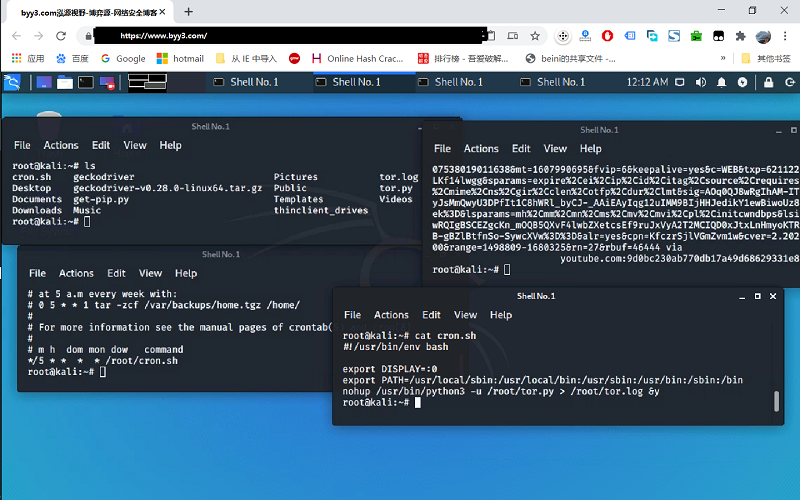 exécuter crontab avec python sélénium tor navigateur affichage dans linux

