
 ">WeChat
Summary
Since Win10 was upgraded to 1709, there has been a lack of access to local area network (LAN) sharing anonymously, and the sharing of this machine is not accessible anonymously by other machines.
Foreword
For many small and medium-sized enterprises, sharing without passwords is a very convenient and practical function, and safety is a secondary consideration for productivity enhancement. But Win10 rejects sharing of local area networks without passwords, with default settings not being used at all.
2. Setting up steps
2.1 Setting up document and printer sharing
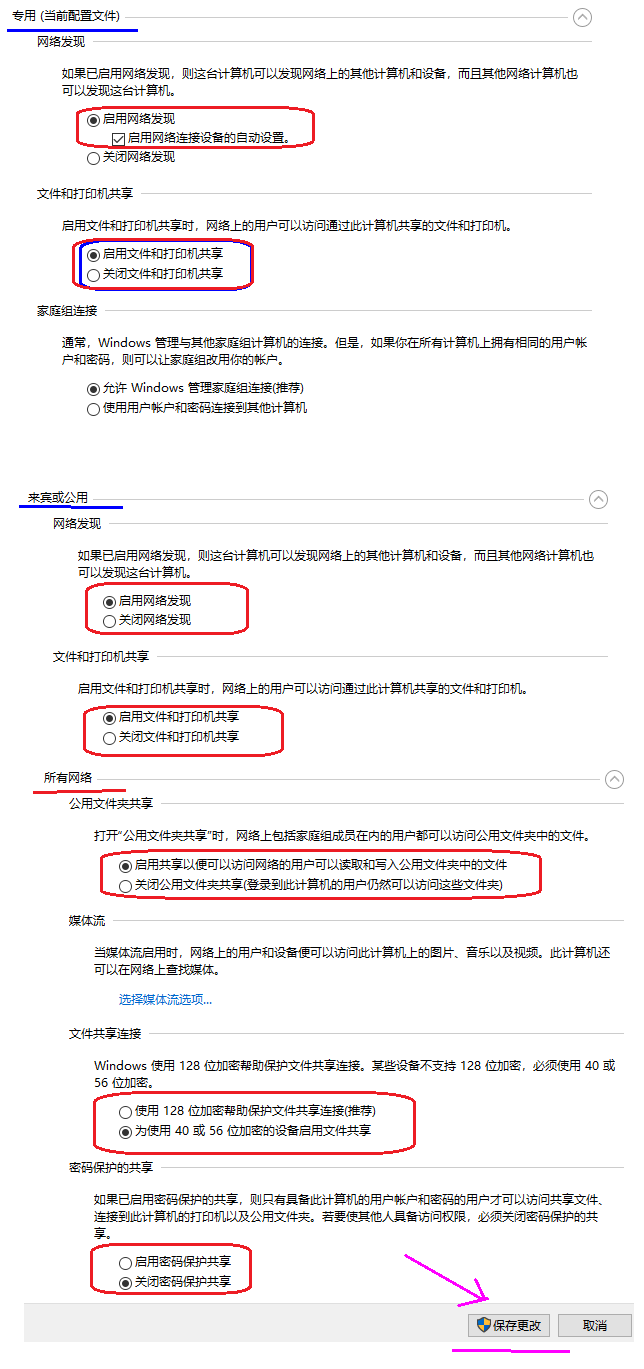
Open in turnControl panel \net and Internet ⁇ network and sharing centre \advanced share settings, and then “special”, “guests,” “all networks” set up separately. Note: “All networks” set up.Close password protection share”。

2.2 Commencement of corresponding services
Open in turnControl Panel \Managing Tool \ Services, find the “Function DiscoveryResource Public” service and set it to ‘Autostart’.


2.3 Unsafe visitors activated
Win10 has by default removed unsafe access to anonymous networks, and we need to open it.Registration Table SettingsSets in the group policy. 1) The registration table settings press the win+R key and call out the Run dialogue box, enter: regedit. The following keys were found in turn:AllowInsecureGuestAuth, (type DWORD) and set to ‘1”。
[HKEY_LOCAL_MACHINE\SYSTEM\CurrentControlSet\Services\LanmanWorkstation\Parameters]
“AllowInsecureGuestAuth”=dword:00000001


2) Group Policy Settings press the win+R key and call out the Run dialogue box, enter: gpedit.msc, open the group policy settings. In turn, expand the Computer Configuration-Managing Template-Net-Lanman workstation, setting the Enabled Unsafe Guest Login to enable it and click on [Applies]-[Saving] settings.


2.4 Enable SMB1.0.
Open in turnControl Panel \\Procedures\Performance and Functions, click on “Enable or close Windows”,


2.5 Restart Windows
Once the system is restarted, all shared users in LAN should be visible within the network neighbours and access to their shared resources.
3. Host sharing settings
Click right on the drive/director that you want to set a shared drive, attribute, sharing, advanced sharing, privileges, and add everyone’s user rights.


FAQ
1) If only one or two servers are unaccessible, they can be used directly. “Documentary management. “A certificate is sufficient for the function.All the above-mentioned settings (1,2, 3 steps) can be used.. The method is as follows: Open in turn.”Control Panel ⁇ User Accounts \Certificate Manager, click on the ” windows certificate ” , ” add the windows card” and enter the shared server username and password.


未经允许不得转载:萌萌Apprentissage » Win10 could not access local area network sharing problems and solve them

 learn NMAP


