
 ">WeChat
Introduction
Almost every penetration test project needs to follow a strict schedule, most of which is determined by client demand or development date. For permeators, there is a tool that can perform multiple tests on individual applications in a very short period of time, helping to identify as many gaps as possible during the scheduling period. Automation loophole scanners are tools for this task, and they are also used to detect alternative uses or ensure that penetration tests do not leave obvious things out.
5.1 Use Nikto scan
The tool that every tester must contain is Nikto, which may be the most widely used free scanner in the world. It’s like its website.https://cirt.net/Nikto2As stated above:
Nikto is the Web Server Scanner for Open Source (GPL), which performs a comprehensive scan of Web servers, containing more than 6700 potentially dangerous files or programs, checking out older versions of over 1250 servers and specific questions on more than 270 servers. It also checks server configurations such as multiple front page files, HTTP server options, and attempts to identify installed Web servers and software. The items and plugins are regularly updated and can be automatically updated.
In this secret book, we’ll use Nikto to search for loopholes on the Web server and analyze results.
Operational steps
- Nikto is a command line tool, so we open the terminal.
- We will scan the Peruggia loophole application and export results to HTML reports:
nikto -h http://192.168.56.102/peruggia/ -o result.html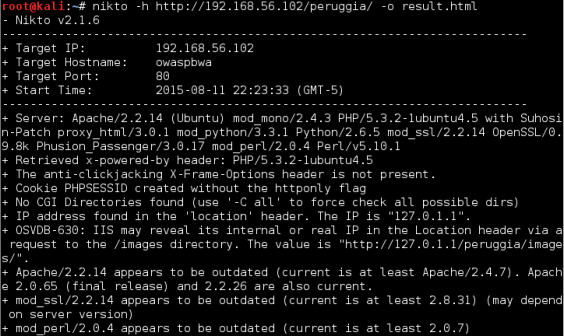

-hThe option to tell Nikto which host to scan,-oOption tells where to store the output. The file extension determines the accepted format. Here, we use.htmlto get the result report in HTML format. The output can also be in CSV, TXT or XML formats. - It takes some time to finish the scan. When it’s done, we can open it.
result.htmlDocuments: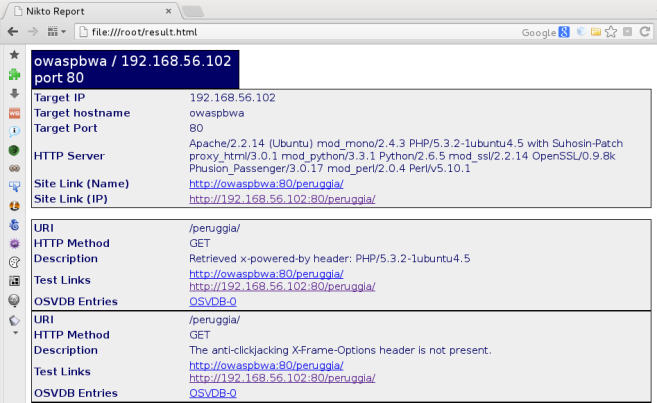
The rationale.
In this secret book, we use Nikto to scan applications and generate HTML reports. This tool has more options for performing specific scanning or generating particular output formats. Some of the most useful options are:
-H: This will show Nikto’s help.-config <file>: Use custom configuration files in scanning.-update: Update the plugin database.-Format <format>: This defines output formats that can be used for CSV, HTML, NBE (Nessus), SQL, TXT or XML. For example, CSV, XML and NBE are very useful when we intend to use them for input into other tools.-evasion <techique>: This uses some coding techniques to help avoid the use of firewalls and intrusion detection systems by Web.-list-plugins: View available test plugins.-Plugins <plugins>: Select which plugin to use in the scan (the default is all).-port <port number>: If the server uses a non-standard port (80,443), we may use Nikto with this option.
5.2 Discover loopholes using Wapiti
Wapiti is another terminal-based Web loophole scanner that sends GET and POST requests to target sites to find the following loopholes (see also below).<http://wapiti. sourceforge.net/>):
- File Leak
- Database injection
- XSS
- Command to execute detection
- CRLF Injection
- XXE (XML external entity) injection
- Use of potentially hazardous documents known
- But it’s been bypassed.
.htaccessWeak Configuration - Backup file providing sensitive information (source code leak)
And in this secret book, we use Wapiti to find out the gaps in our testing applications and generate scanning reports.
Operational steps
- We can open Wapiti from the terminal window, for example:
wapiti http://192.168.56.102/peruggia/ -o wapiti_result -f html -m "-blindsql"We will scan the vulnerable_vm Peruggia application, save output in HTML format and save it to
wapiti_resultDirectory, and skip SQL blinding test. - If we open the report directory, and
index.htmlDocuments, we’ll see something like this: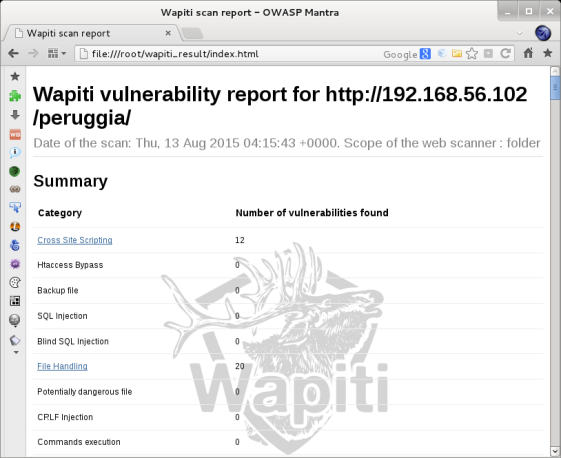 Here, we can see Wapiti found 12 XSS and 20 file processing holes.
- Now click.
Cross Site Scripting(Trill Script) - Select a loophole and click
HTTP Request. We select the second one, select and copy the requested URL section.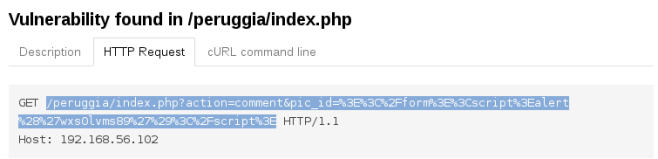
- Now, we’ll paste the URL to the browser like this:
http://192.168.56.102/ peruggia/index.php?action=comment&pic_id=%3E%3C%2Fform%3E%3Cscr ipt%3Ealert%28%27wxs0lvms89%27%29%3C%2Fscript%3E。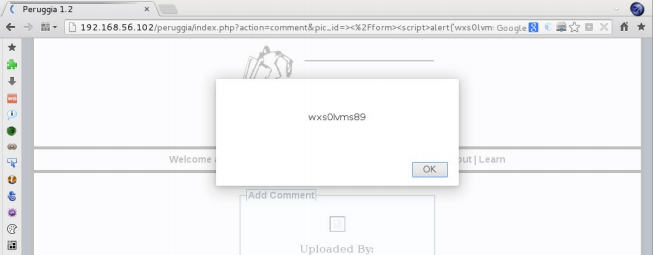 We did find an XSS loophole.
The rationale.
In this secret, we skip the SQL blinding test.-m "-blindsql") because this application has this loophole. It triggers a time-out error, making Wapiti shut down before the scan is finished because Wapiti enters it through input sleep()Commands are tested several times until the server exceeds the time-out threshold. Meanwhile, we have selected HTML format for the output.-o html),wapiti_resultAs a target directory for the report, we can also choose other formats such as JSON, OpenVAS, TXT or XML. Wapiti has some interesting options:
-x <URL>: Excludes a specific URL from the scan, which is useful for logout and password modification of URL.-i <file>: Resume a scan saved before the XML file. File name is optional, because Wapiti fromscanSynchronising folder-a <login%password>: Use a specific certificate for HTTP login.--auth-method <method>: Yes-aOptions to define the authorization, which canbasic,digest,kerberosorntlm。-s <URL>: Defines the URL that you want to scan.-p <proxy_url>: Use HTTP or HTTPS proxy.
5.3 Scan loopholes using OWASP ZAP
OWASP ZAP is a tool that we’ve used in this book for different tasks, and contains automated leak scanners among its many features. Its use and report generation are covered in the book.
Ready.
We need to climb the site before we can successfully perform a leak scan using OWASP ZAP:
- Open OWASP ZAP and configure browsers to use it as proxy.
- Visits
192.168.56.102/peruggia/。 - Follow the guidelines in chapter III, “Use of ZAP spiders”.
Operational steps
- Visiting OWASP ZAP
SitesPanel, and right.peruggiafolder. - Accessed in Menu
Attack | Active Scan。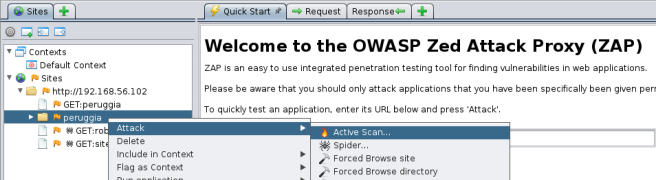
- New windows pop up. Here, we know what technology our applications and servers use, so, access.
TechnologyTab, and tick onlyMySQL、PostgreSQLandLinuxandApache。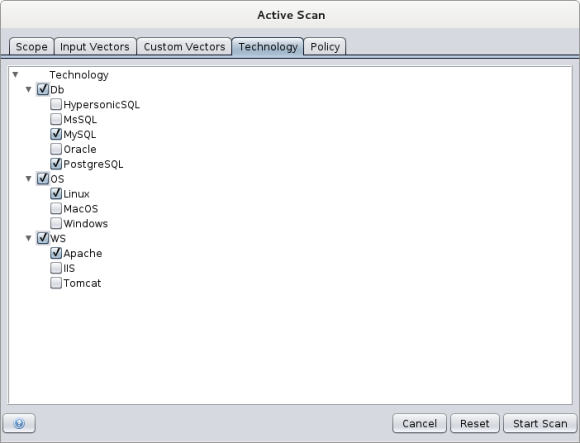 We can configure our scanners here.
Scope(where to start scanning, in what context, and otherwise)Input Vectors(options if you want to test the GT and POST requests, protocol headers, Cookie and other options)Custom Vectors(adding specific characters or words to the original request as attack vectors),Technology(What technology-specific tests are to be performed) andPolicy(Assign parameters for specific test options). - Click
Start Scan。 Active ScanThe tab will appear at the top of the panel, and all requests will be there. When the scan is finished, we can get inALertscheck the results on the tab.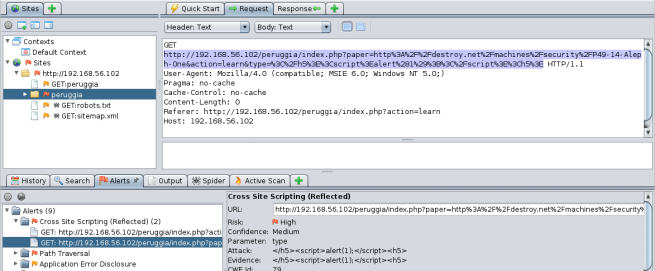
- If we choose a warning, we can look at the resulting request and the response from the server. This allows us to analyze the attack and determine whether it is a real loophole or an error in reporting. We can also use this information for fuzzy testing, replaying the request in browsers, or dig deeper into it to make use of it. To generate HTML reports, as was done with the previous tool, access to the main menu.
ReportSelect AfterGenerate HTML Report....。 - The new dialogue box asks for filenames and locations. For example, settings
zap_result. htmland open the file on completion: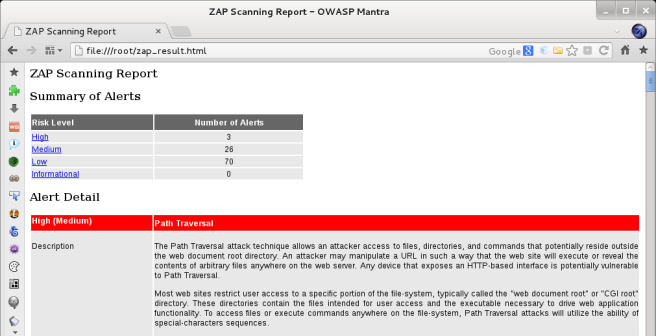
The rationale.
OWASP ZAP is capable of performing active and passive gap scans. Passive scanning is a non-invasion test conducted by the OWASP ZAP during our browsing, sending data and click link. Active testing involves using multiple attack strings for each form variable or request value to detect whether the server’s response carries something that we call “vulnerability.” OWASP ZAP uses various techniques to generate test strings which are very useful in terms of first target identification techniques to optimize our scanning and reduce the likelihood of detection or collapse of services.
More
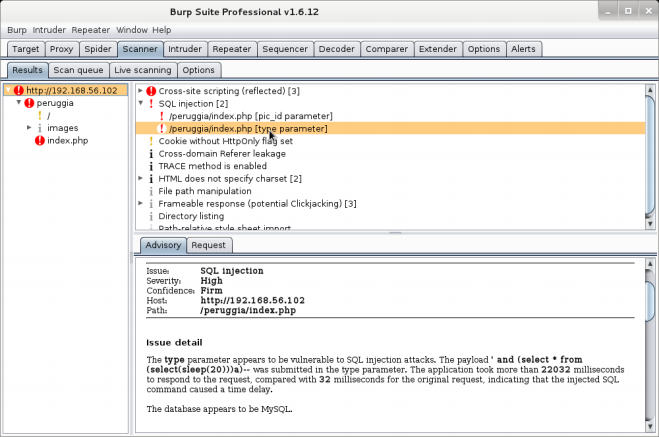
We’ve talked about Burp Suite. Kali only contains free versions, which do not have active and passive scanning features. It is highly recommended that you get a professional version license for Burp Suite because it has practical features and improvements on the free version, such as an active and passive loophole scan. Passive leak scans occur when we use Burp Suite as a browser agent and browse through web pages. Burp analyses all requests and responses while looking at patterns of known holes. In the active scan, Burp sends specific requests to servers and checks whether they respond to loopholes. These requests are specially constructed to trigger particular behaviour with flawed applications.
5.4 Use w3af scans
W3af supports the application of audit and attack frames. It is open-source, based on Python’s Web gap scanner. It has both GUI and command line interfaces with the same functionality. In this book we use w3af’s GUI configuration scan and reporting options to perform scanning.
Operational steps
- In order to start w3af, we can select it from the application menu bar and browse it through browsing.
Applications | 03 Web Application Analysis | w3af, or from the terminal:w3af_gui - Yes.
Profilesin part, we choosefull_audit。 - In the plugin section, access
crawland selectweb_spider(Projects selected). - We don’t want the scanner to test all servers, but we let it test applications. In the plugin section, select
only_forwardOptions and ClickSave。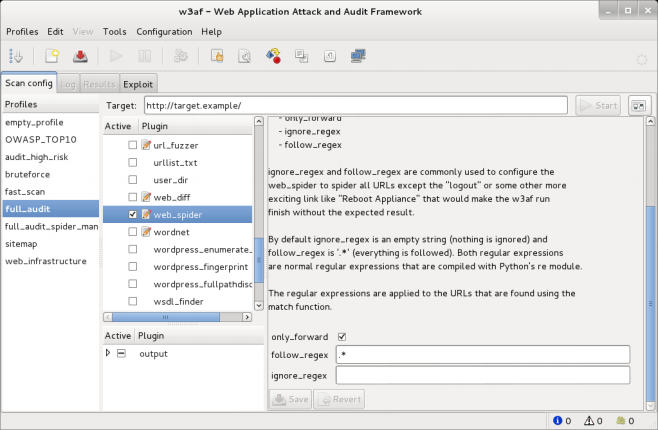
- Now, we’ll tell w3af to generate HTML reports at completion.
outputPlugin and Selectionhtml_file。 - To select the name of the file and where to save the report, modify
output_fileoption. Here we specify the root directory underw3af_report.html, clickSave。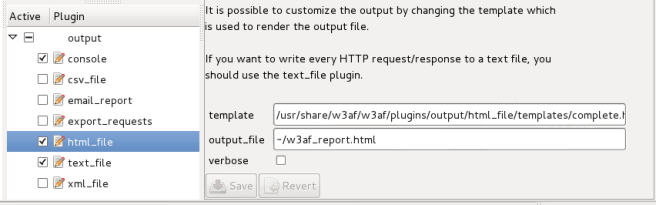
- Right now.
Targettext box, enter the URL that you want to test, here ishttp://192.168.56.102/WackoPicko/and clickStart。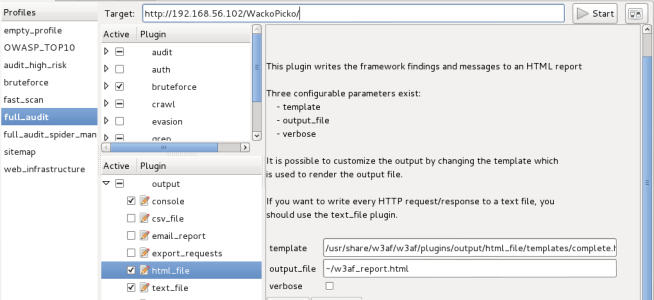
- The log tab will get the focus, and we can see the scanning process. We need to wait for it to be finished.
- Switch to after completion
ResultsTab, like this: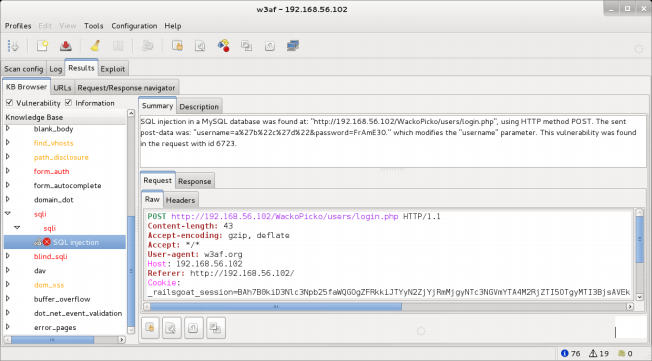
- Open in the browser to see detailed reports
w3af_report.htmlHTML file.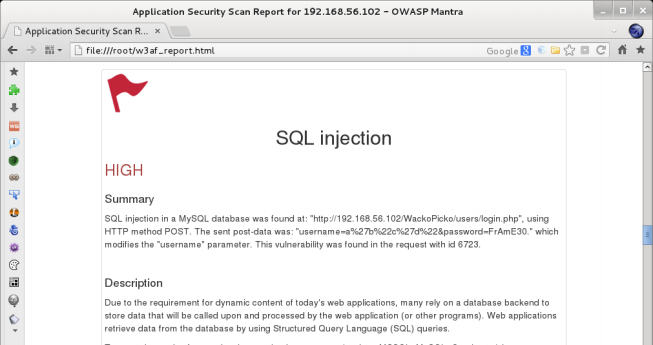
The rationale.
W3af uses configuration files to simplify the selection of plugins for scanning. For example, we can define a profile that contains only SQL injections, which test applications for SQL injections without doing anything else.full_auditConfigure plugins that perform reptile tests, extract lists of words that can be used as passwords, and test most relevant Web loopholes such as XSS, SQLi, file inclusion, directory history, etc.web_spiderPlugins come in front of crawling, so that we can focus on applications intended for testing and avoid scanning to other applications. We also modify output plugins to generate HTML reports rather than console outputs and text files. W3af also has tools such as intercept agents, fuzzy testers, text decodors, and request exporters that convert original requests into source codes in multiple languages.
More
W3af’s GUI is sometimes unstable. In case it collapses and cannot complete the scan, its command line interface can provide the same functionality. For example, in order to perform the same scan that we have just implemented, we need to do the following at the terminal:
w3af_console
profiles
use full_audit
back
plugins
output config html_file
set output_file /root/w3af_report.html
save
back
crawl config web_spider
set only_forward True
save
back
back
target
set target http://192.168.56.102/WackoPicko/
save
back
start
5.5 Use of Vega scanners
Vega is a web-bracker made by the Canadian company Subgraph, which is distributed as an open source tool. In addition to being a scanner, it can also be used as a intercept agent and scan when our browser’s target site is located. In this code, we will use Vega to find Web-backholes.
Operational steps
- Select it from the application menu, access
Applications | Kali Linux | Web Applications | Web Vulnerability Scanners | vega, or open it through the terminal:vega - Click the Start New Scan button.
- The new dialogue box will pop up.
Enter a base URI for scan, enterhttp://192.168.56.102/WackoPickoTo scan applications.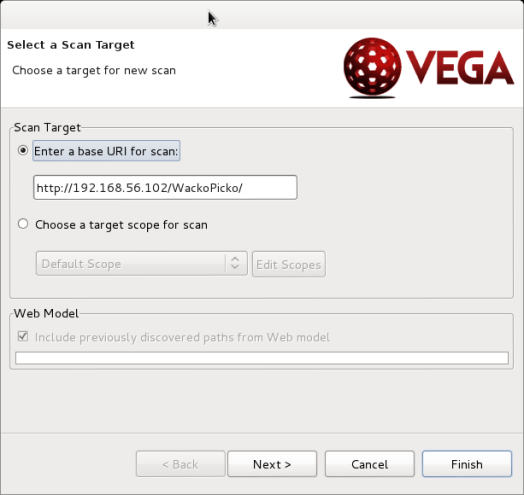
- Click
Next. Here we can choose to run that module on the application. Let’s keep our default.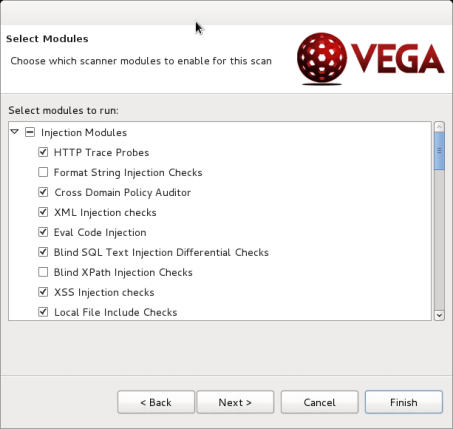
- Click
FinishLet’s start the scan.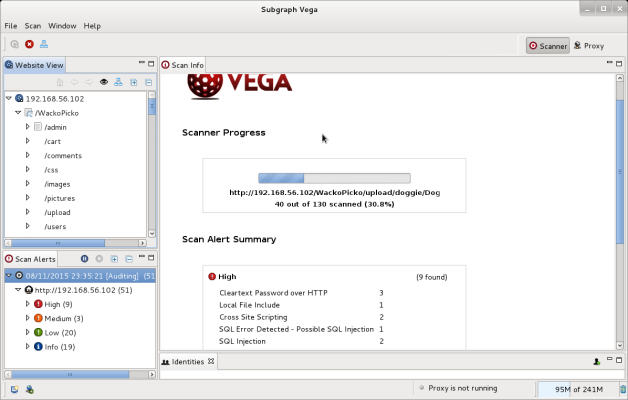
- When the scan is finished, we can access the left.
Scan AlertsTrees check the results. The leak details are shown on the right panel, like this: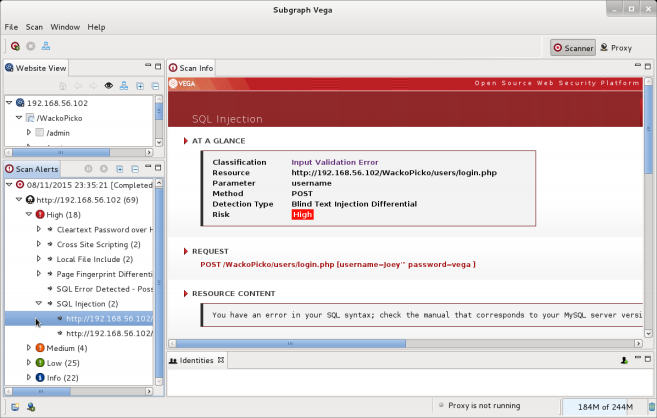
The rationale.
Vega works by first climbing the URL, identifying forms and other possible data entry that we have specified as a target, such as Cookie or header. Once they are found, Vega tries to make different inputs, identifying loopholes by analysing responses and matching them with known loophole patterns. In Vega, we can scan a set of sites within a single site or range. We can choose which test to perform by selecting the module used in the scan. Likewise, we can use identities (pre-stored user/cipher combinations) or chat cookies to authenticate the station and remove some parameters from the tests. As an important defect, it does not report generation or data export characteristics. So we need to look at all the leak descriptions and details in Vega GUI.
5.6 Wmap with Metasploit finds Web loopholes
Wmap is not a loophole scanner per se. He is a Metasploit module that uses all frames of Web bugs and server-related modules, and allows them to coordinate loading and execution on the target server. Its results are not exported as reports, but will be used as entries in the Metasploit database. In this secret book, we use Wmap to find holes in Vulnerable_vm and use the Metasploit command line tool to check results.
Ready.
Before we run the Metasploit console, we need to start a connected database server so that we can save the results that we generate:
service postgresql start
Operational steps
- Start the terminal and run Metasploit console:
msfconsole - Load Wmap module after loading complete:
load wmap - Now, we add a site to Wamp:
wmap_sites -a http://192.168.56.102/WackoPicko/ - If we’re going to look at the registered sites:
wmap_sites -l - Now we have this site as a scanning target:
wmap_targets -d 0 - If we plan to target the plugin, we can use:
wmap_targets -l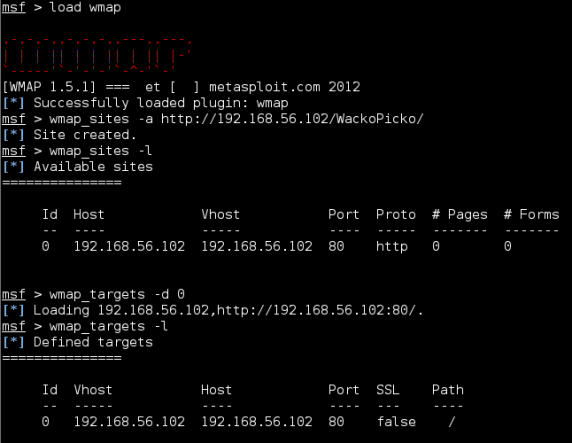
- Now, we’re running tests:
wmap_run -e
- We need to use Metasploit’s command to check the recorded bug:
vulns
wmap_vulns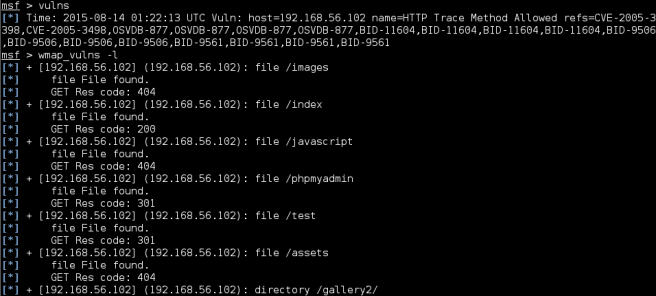
The rationale.
Wmap uses the Metasploit module to scan gaps in target applications and servers. It retrieves site information from Metasploit databases and modules and sends results into a database. One of the practical aspects of this integration is that if we perform penetration tests on multiple servers, and use Metasploit for testing, Wmap automatically gets IP addresses of all Web servers, and known URLs, and assembles them as sites so that when we intend to carry out Web assessments, we just have to select targets from the list of stations.wmap_run, we can choose which module to implement.-mOptions and regular expressions. For example, the following command line opens all modules except those containingdos, which means that no service testing has been denied:
wmap_run -m ^((?!dos).)*$
Another practical option is…-p. it allows us to select the path we intend to test through regular expressions, for example in the next command, we will check all words that containloginthe URL.
wmap_run -p ^.*(login).*$
Finally, if we are going to export our scan results, we can always use Metasploit’s database features. For example, the following commands are used in the MSF console to export the entire database to XML files.
db_export -f xml /root/database.xml未经允许不得转载:萌萌Apprentissage » nicktoWapiti OWASPZAP w3af vega ⁇ Wmap


 learn NMAP

